Technology

A Life in Sync

Submitted by Jonathan on 19 February 2012 - 12:08am

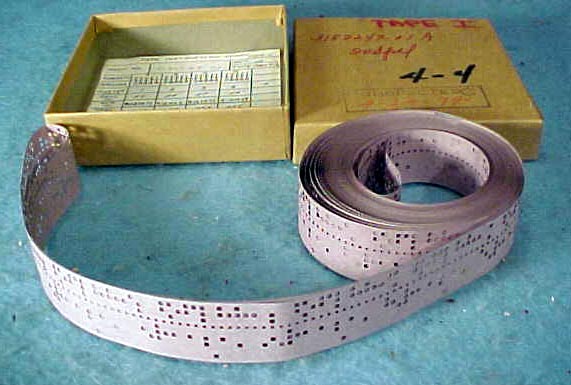
iCloud, Dropbox, IMAP are now the tools of choice for keeping my digital life in constant sync with all the devices I use from iPad, iPhone through to Macs at home and work. It's cross platform, so works on Windows and Linux computers too. Ever since the DVD, USB stick, CD, hard disk, floppy disk, tape and before that, punched tape systems, we've had a desire to carry data around with us. It served us well, but now, at long last we can negate the need to carry anything with us at all.

Dropbox has revolutionised where and how data is available to me whichever and wherever the device is located. Dropbox simply maintains a local folder on 

each computer that you use. As you add files and folders to the 'Dropbox' folder, Dropbox quietly works seamlessly to migrate that information to all theother devices.

What I love most is that Dropbox is transparent, seamless and autonomous in operation, and gone are the days of forgetting to click the 'sync' button which so often caused much heartache when you neglect to do something so simple.

Why not create yourself a Dropbox folder to keep your life in sync.

1. Create a Dropbox account

2. Install the Dropbox software on your iPad, iPhone, Mac, Windows, Linux systems and you're good to go.
 
An added bonus of Dropbox is the ability to share files between friends, family and colleagues. Even collaborating on single files works well. 


iCloud is even more transparent, and actually intends to only keep your own data synchronised between devices. It doesn't have the ability to maintain a folder of files yet it does ensure photos, music, books, apps, calendars, contacts, notes and mail are maintained across all your personal mobile and desktop devices. Again, an awesome technology which simply works seamlessly. I have no complaints it just works.
 
If you're not already using it, you should. Ensure you have upgraded to iOS5 and you're away.


Also, read more about Share-Gate SharePoint migration for all your education and business needs.

Google Docs and Gold Challenge

Submitted by Jonathan on 5 February 2012 - 10:28pm

This week, I've been busy using Google Docs to create an online spreadsheet that can be updated by our teaching staff at Kings Road Primary School as we begin our Gold Challenge, raising money for Kids Inspire.

What was particularly revealing is that not only does Google Docs allow multiple users to work with the spreadsheets, but it also allows this data to be published in other sites. I played around with using the Graphs function to create a thermometer come totaliser graph as an easy way for our pupils to follow the progress so far and it is this graph that I'm able to publish, keeping all the other sheets containing the names of pupils, private. Essential for any organisation where you don't wish to publish sensitive information.

I've written a news article about the Gold Challenge  and was able to insert a live view of the distance achieved so far. I'm really impressed by just how easy this is to achieve. This is a live view of the distance travelled by the staff and pupils in our school, so far.


Look! No wires. Learning about electricity without wires.

Submitted by Jonathan on 22 November 2011 - 10:52pm

Having attended the Design and Technology Show this weekend at Birmingham's NEC, I came away with an amazing product which I think revolutionises our understanding of electricity and electrical circuits whilst unleashing our creative minds to make some cool things.

It's black and comes in a small jar.

The product is a glue-like paint which just like paint, can be used on any surface you can think of. It dries like glue and is adhesive, which means it can be used to hold things together. However, it also has conductive properties, which makes the product really exciting when combined with electrical components.

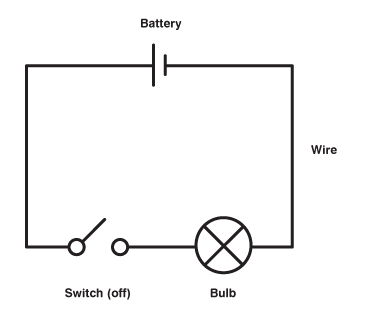
As a teacher, teaching electrical circuits to young children often leads to many misconceptions. Whenever we see a circuit presented in a book, very often it's shown as either circular or rectangular. That's difficult to translate into a bulb, battery and a bunch of wires that take on a life of their own.

Over at the Bare Conductive stand I was captivated by Bibi Nelson who demonstrated painting two parallel lines on some paper. She attached an LED light to one end of the parallel lines and placed a 9V battery which straddled across the two lines at the other end. The LED lit as electrical energy transferred through the paint to the LED. Brilliant. 

Of course the conductive paint can be used to make any shapes you like and so the concept of a standard rectangular or circular circuit is replaced by an understanding that circuits simply need to be complete and join up.

Not only can the paint be applied to paper, but it can be painted on walls, concrete, glass, fabric and even skin! (though you'll need a pot of Bare Skin instead!) There are numerous ways of connecting the painted surface to buzzers and batteries, perhaps using paper clips, adhesive copper strips, crocodile clips and even snaps for fabric projects.

Bare Paint is very versatile and there are some really cool projects that you can have a go at making on the Bare Conductive website. Take a look for yourselves and see if there's something you think pupils would be equally amazed by.


Untie your shoelaces and let's get learning

Submitted by Jonathan on 13 September 2011 - 8:47pm

Today pupils at Kings Road Primary School had the opportunity to take part in a brief online video conference with Educational professionals in Silkeborg, Denmark. It was a little bit impromptu and so the pupils didn't have any preparation time, which I've often found is the best moment for real learning to take place. After initial introductions, Kings Road pupils were simply asked to name one thing that is fab about their school.

Top on their list was the use of new technologies in learning and how it is used to support learning in the classroom. They pointed to numerous examples which was not only insightful but reflective on the impact iPads had made on them.

Next, they mentioned the Strand Organisation, now in its second year. This is 'stage not age' organisation and the pupils are very confident to speak about the benefits this brings. They are particularly appreciative that learning is more focused to their needs and are challenged appropriately without feeling like they are being kept waiting for others to catch up or left feeling vulnerable that they simply aren't able to keep up.

Something else that was mentioned, was the Library. Often considered as a resource that new technologies will soon replace. We have strong counter arguments against that, one of which is that the children really believe in the library and the need to use both fiction and non-fiction books effectively.

As the conference came to an end, Stephen Heppell, who chaired the conference offered something new that the pupils in Denmark have been doing for a while. 'Shoeless learning'

Effectively this simply means children taking off their shoes as they enter the classroom or learning space. Why? Well, we didn't get time to discuss that with Stephen or the Educational professionals, so the pupils immediately set off to find out for themselves. Following a link to 'Shoeless learning' and some further googling for more information, it was clear they were curious to see if it could help them too. The scientists in the group spoke of controlled experiments which they could try on different learners within the class. Does shoeless learning have more of an impact on boys than girls was one question they posed.

Remember the pupils weren't in class at this point, it was their break time, and yet here they are in this 'in-between' learning moment questioning, researching, reflecting, debating and developing a clear set of arguments with which to challenge their class teachers in an attempt to convince them to at least give it a trial. Without provocation, they presented some of the opposing reasons for not 'going shoeless' one of which is health and safety and not treading on a staple or drawing pin etc. These all need mitigating of course, and the risks managed - but of course the pupils totally appreciate that and can immediately find alternative solutions. It's what's termed a 'no brainer' ! This important work continued at lunchtime too, there was no stopping them and yet it all started with a simple question.

Who wouldn't want their school's to be full of learners learning about learning? Today, the pupils honed their skills in...

  • questioning
  • researching
  • reflecting
  • debating
  • convincing

It does lead me to wonder just how much of the curriculum we teach in schools is already scaffolded and pre-prepared. I bit like pre-cast concrete I suppose, heavy, difficult to move, built in set sizes to fit a specific design. However, we haven't argued much against it, because learning does take place but I very much doubt that this is anywhere near as much as something self-directed by pupils with the wisdom and facilitation by the teacher. In the past three to four months, our curriculum has undergone a significant review with a real emphasis on developing Key Skills around a pupil-centric curriculum. Today was proof that this has an enormous potential as pupils really begin to fly as collaborative learners.

I felt proud and privileged to watch learning unfold in a very seductive and engaging way.


Places to study more about learning theories

Learning Theories
Educational Psychology

Apple iPad Case

Submitted by Jonathan on 17 March 2011 - 8:56pm

At last I've ventured into getting the proper Apple iPad Case. It has many advantages, one being that it fits snuggly to the actual form of the iPad making it appear super sleek and thin.
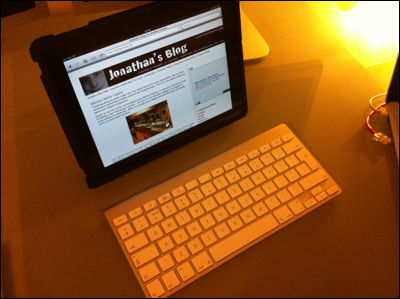

I love the rubbery texture which makes the case very grippy.

I love the simplicity of the design too, making it possible to stand the iPad in a range of different orientations.

The best arrangement is set up with the screen standing on edge and a bluetooth keyboard connected making it a very portable and capable computer.


Using the iPad with the on screen keyboard is also very usable when orientated flat with a 15 degree incline. I love the way that the onscreen keyboard doesn't appear if a bluetooth keyboard is paired and active. Very intelligent thinking which is what makes Apple the great brand that it is.


This case for the iPad and also several iPad 2 cases can be found easily on the web.

Categories 

Technology, iPad, case, bluetooth

Synology DiskStation Audio Station

Submitted by Jonathan on 14 February 2011 - 12:53am

I've had the DiskStation running for a week now and I keep finding a whole set of new features. The device is a fully fledged media server offering a streaming service for a variety of media types, photos, audio, video and even security cameras.

I'm interested in how this device can be used in the school environment to share both learning resources and the digital creativity work that the pupils produce. The latter is such a big issue for me because so much work is created by pupils, yet there are few opportunities where this work can be shared, nevermind even accessed by a wider audience. I think the Synology DiskStation is about to change all that.

Audio Station

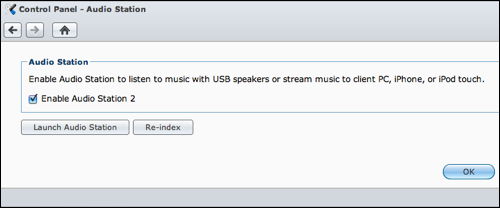
Starting the Audio Station service is easy. Simply find the application in the Control Panel and check the box.

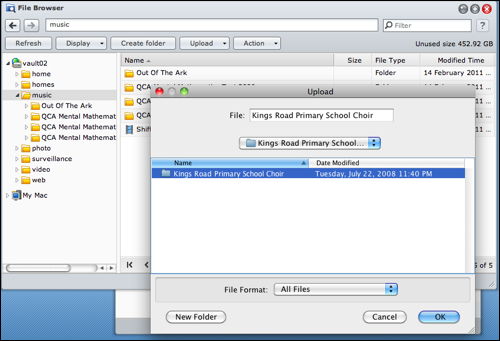
Files to be shared are uploaded using the File Browser window. You can establish your own file system should you wish, or simply point your upload to a folder containing the media you wish to upload and the whole process is managed efficiently and effortlessly.

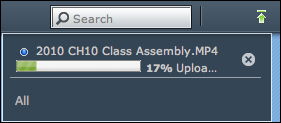
A progress bar shows what items are in the queue and also upload progress.

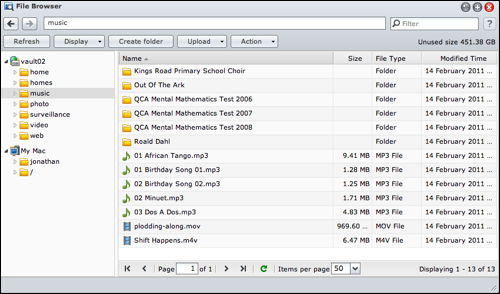
Once uploaded, you can view the collection of folders and files through the File Browser window.

However, this is only the storage of this media. What about being able to play this media across the Ethernet or Wireless network?

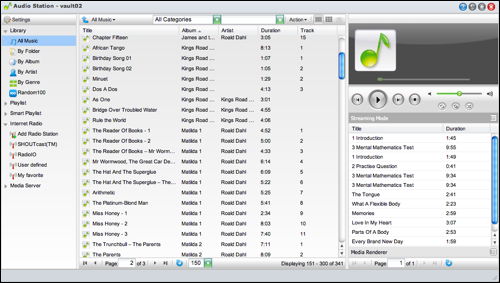
The DiskStation software allows the media to be streamed to device in several ways. Using the web interface, the media can be played through the Audio Station software which is essentially presented with a similar interface to iTunes. A neat solution for cross-platform compatibility since the display will appear identical on a Mac or Windows PC. Furthermore, in a school setting, this requires less training in order to use the software.


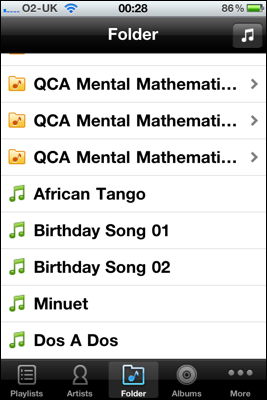
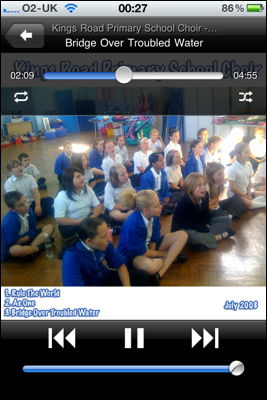
What I REALLY like about the DiskStation however, is the way in which multiple devices can access this same playlist. Here is the view on my iPhone 4....


This is staggeringly good. It makes me reflect on how we can simply do away with CDs being used here and there, skipping and jumping because the scratches from heavy and continued usage. Plugging a computer, an iPhone, iPod or an iPad into a sound system would just work. All of this works across the WIFI network.

The DS audio app is the player for the iPhone/iPad/iPod and is a free download from the iTunes Store.

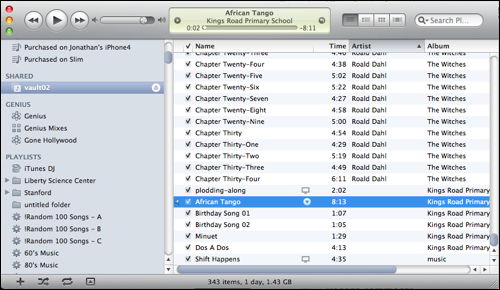
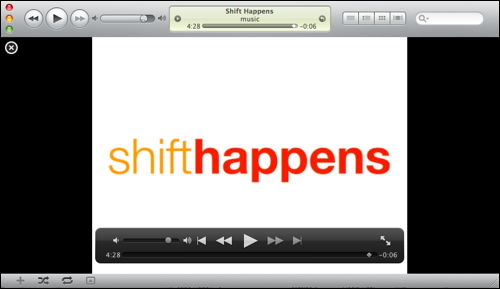
...and finally. What better way of accessing shared music from a central source, than to make it available to the iTunes Streaming Service?

Here is my iTunes application on my Mac listing the contents of the iTunes library...

...and below, accessing and playing the "Shift Happens" film. 


This DiskStation is staggeringly good and so effortless to implement, administer, control and access.

Already, I am uploading videos that pupils have made, films that pupils are watching for the From Screen to Page writing programme and audio that might be used around the school and across the curriculum.

Learning really can be this exciting.

I can't wait to begin exploring yet another feature, which will probably wait until the next blog update!

Synology's DiskStation NAS has arrived.

Submitted by Jonathan on 2 February 2011 - 12:51am

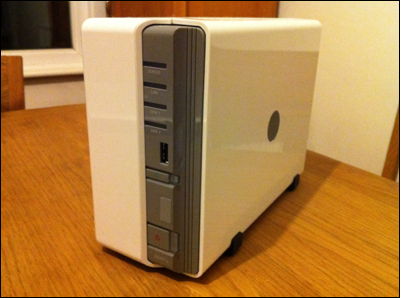
Synology's new DiskStation DS211 arrived last week. I've been interested in NAS (Network Attached Storage) for some years, and have found a few units which live up to what I consider are the demands of being a useable NAS.

Here is my quick starter for 10:

  1. Fast. Reading and writing data has to be snappy. Since the NAS is likely to be a large central store of a variety of data, audio, video, software installers, backups, fast read/write speeds are essential. Particularly with video when multiple users are watching two different films whilst a TV programme is being recorded.
  2. Access from multiple platforms. Essential in a setup involving multiple operating systems. On my computer alone, it triple boots into Mac (much preferred) Windows (urggh!) and Linux (Mmmm)
  3. Be expandable. My demand for storage space increases exponentially. Simply buying a NAS drive only for it to be full within a year isn't cost effective. A NAS really ought to have two drive bays for expansion.
  4. Quiet and energy efficient. This is one of few devices that is left on 24/7, and for obvious reasons needs to use as little energy as possible when idle.

In addition to the above, this enclosure received a good review in a recent MacUser article and I was interested in the customisable applications that extend the capabilities of the NAS. There are some neat tools that enable the iPhone to connect to the drive and access the media that is stored. More on this in a future blog article.

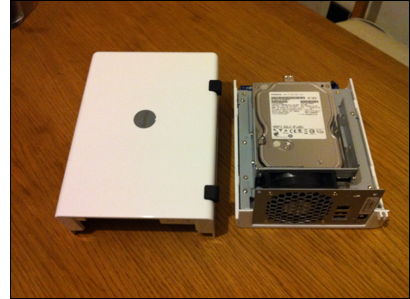
So, the first job was to install the hard disks into the NAS enclosure. NAS units bought directly from Synology are empty enclosures leaving the consumer to choose which bare drives to buy separately according to their needs.

Opening the white plastic case was simple enough, the side panel slides and lifts away. Bare drives are screwed to the chassis using standard screws, included.

Once powered, the NAS drive springs into life. Make sure the device is plugged into your network router or hub.

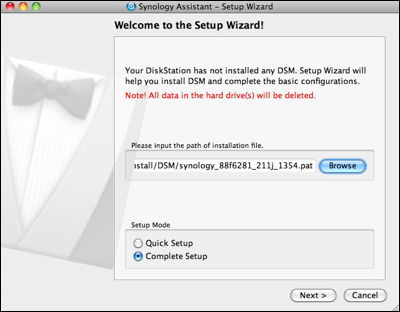
Unlike most products, scanning the network to find the dynamically assigned IP address of the drive is usually process, but as I discovered, not only do you need to scan the Quick Setup Guide, but also use the CD to run the Synology Assistant software. Both were easy to navigate. A Setup Wizard guides you through uploading the Disk Station Manager software. It takes less than 2 minutes to install everything.


Once complete, settings for the DS211 are changed using the web browser interface. I like setups using web browsers because it means settings can be changed remotely on any computer without having to download proprietary software. Nice.

Before any of the apps can be configured, a volume must be created. Incidentally, I ticked the 'check hard disk' option and this looks like it might take some time. So, that's where I'll leave this blog. Check back for more later...


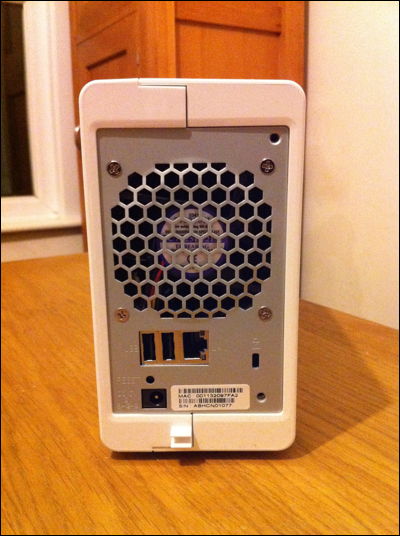
Very few ports on the back. 1Gbit Ethernet, 2 USB and Power. Simple.


iPad Arc Aluminium Stand

Submitted by Jonathan on 10 January 2011 - 8:51pm

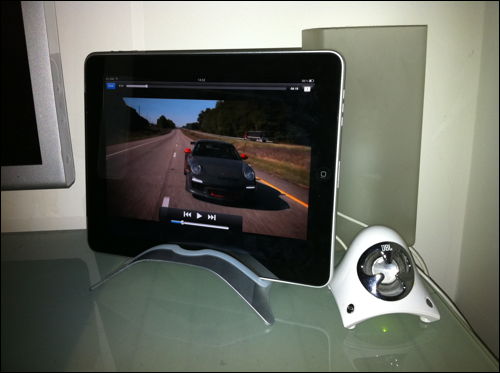
I adore the iPad and there are plenty of websites, blogs and tweets confirming that I'm not alone. I shall spare you yet another repetition of why this tactile and accessible technology bridges the gap between the techno geeks and the technophobes. However, one essential addition to the iPad wealth of accessories is the iPad stand. I quite often use the iPad on a desk top, or more recently on a transatlantic flight, sometimes to watch films, music videos, gaming or just browsing. Whilst touch screens work are far more comfortable to operate when flat on a table top, conversely they are more comfortable to look at when stood horizontally.

This iPad stand works brilliantly on flight tray or desk top. It's not only stylish, designed and built using the same material as the iPad casing, but it's also incredibly light and easy to transport.

I wouldn't have travelled without it.

Categories 

Technology, iPad, arc, stand

Inspirational Learning Spaces in the Classroom

Submitted by Jonathan on 13 October 2010 - 9:50pm

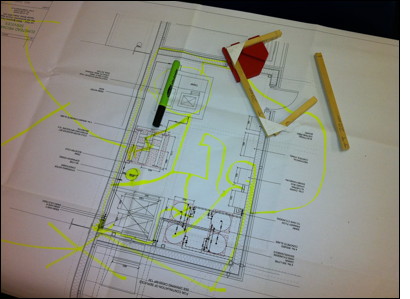
When I walked into school this morning I noticed that our Year 5 and 6s have started their technology projects. What was even more inspiring was the paper used to protect the worktops. Large sheets of architectural design plans formed a fascinating backdrop on which the pupils worked.
According to the class teacher, the pupils were engrossed in understanding the plans and continued to ask pertinent questions about what they represented. What better way than to provide a technically rich workspace to stimulate ideas and the development of solutions to problems.

I loved it and am a big fan of these approaches to really engage pupils. Fabulous stuff! 

Role play can be so powerful to create the right mood and atmosphere for learning.


iPhone Power Station - power to the people and phones

Submitted by Jonathan on 8 March 2010 - 12:29am

The iPhone travels with me everywhere I go. Most days it gets a lot of use from listening to music, taking photos, checking travel and weather reports, accessing email, diary, administering servers and my home (more on this later!) Some software on the phone drains the battery more than others, such as using it as a phone, or the GPS and Google Maps where data is constantly being downloaded. Often the iPhone struggles to even last the day without a top up or connection to my computer. Some days, this just doesn't happen as I'm constantly moving here there and everywhere.
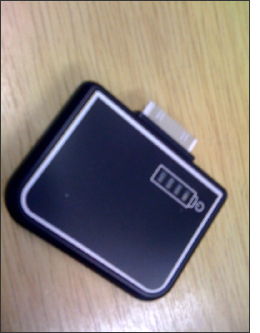
I know about the battery 'jackets' you can buy for the iPhone, but I hate them, mostly because they make the phone chunky and who wants to lose the beautiful design?  No, I needed something I could just plug in, even momentarily and didn't rely on needed to be connected to the mains. There are hundreds of iPhone accessories out there, but few really make the grade.

The Mobile Power Station seems to be a pretty smart solution. It has a dock plug which is simply connected to the bottom of the iPhone with a simple battery level indicator to show how much charge is left in the device. It charges the iPhone and on a full charge will completely charge the phone in about 30 minutes. Of course the phone still works albeit with something piggybacked onto it.

When using Trailguru on the iPhone for tracking distance travelled on my bike this weekend, the iPhone rarely manages to complete a 2hr cycle because the GPS and screen power is just so draining for its battery. However, with the Mobile Power Station plugged into the iPhone which is mounted in the handlebar cradle it's just perfect. It's very inexpensive too.

Charging is simple, simply connect to a standard iPod/iPhone charger and if piggybacked into the iPhone, the charger will charge both.


Categories 

Technology, iPhone, power, battery

Installing the XCarLink adaptor for iPod, iPhone - VW Golf V (MK 5)

Submitted by Jonathan on 17 September 2009 - 11:30pm

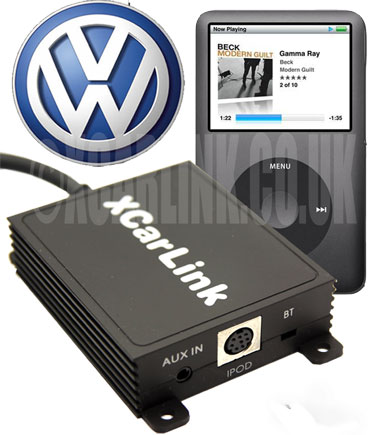
The XCarLink adaptor is simply a box which interfaces between the iPod or iPhone and the CD radio head unit. The adaptor unit about the size of four match boxes and has two cables leading from it. One of the cables connects directly to the iPod or iPhone, the other to the CD changer port on the back of the head unit.


These instructions explain how I fitted the XCarLink adaptor into my VW Golf V (MK 5) TDI SE (2005)

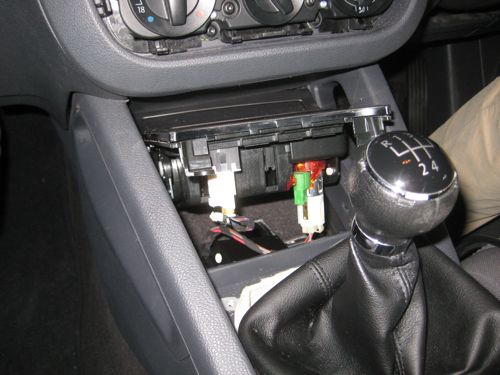
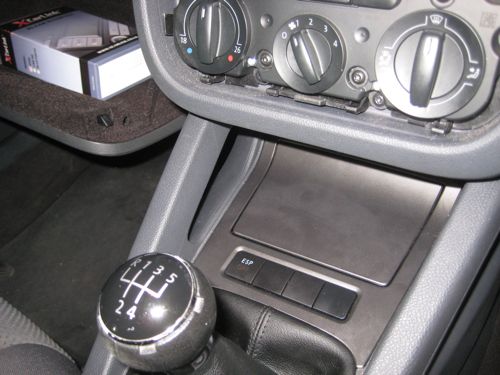
The cable from the adaptor box plugs straight into the available CD changer socket on the back of the head unit. Before connecting, I ran the cable from the bottom of the centre console to behind the CD radio unit. In order to do this, the cigarette lighter and ashtray needs to be removed.

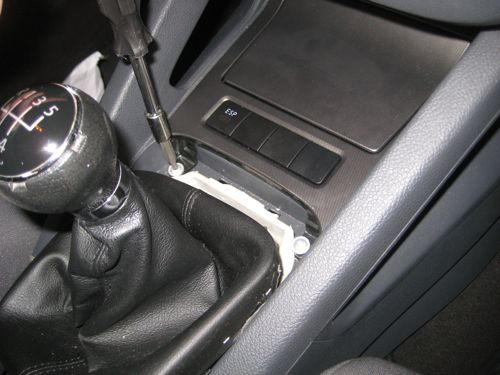
  1. Remove the gearstick cover. It pops out easily with little force needed.

  2. Beneath the cover reveals two screws. Remove these and the ashtray and cigarette lighter unit can be lifted up and out. You'll need to disconnect the cigarette lighter cable and ESP cable (if fitted.)

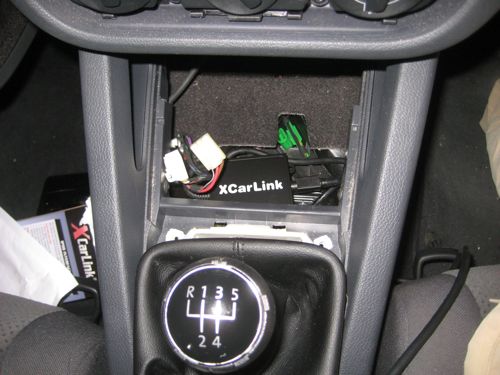
  3. I identified a suitable spot for locating the XCarLink interface unit beneath the ashtray and cigarette lighter unit.

  4. I routed the cable from the XCarLink interface box to the iPod / iPhone down a gap between the carpet and the centre console.

  5. Once all the cables are in place, switch on the CD radio and test the setup before putting the gearstick cover, centre console and dashboard back together.

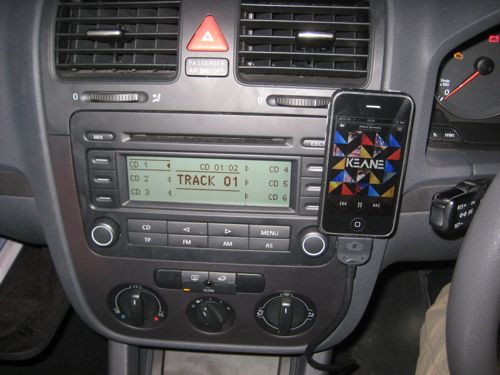
  6. I use a piece of velco (the soft furry piece attached the iPhone) and the hooks attached the the dashboard. The iPhone isn't very heavy and the velco works well to support the iPhone in an upright position and within easy sight and reach for both the driver and passenger.
     

This was an easy install and took less than 45 minutes to complete from start to finish.


Good luck and enjoy!


UPDATE
I've checked out new iPhone accessories since posting this blog to find a suitable mounting system for the iPhone. See my later blog entry for more.

How to remove RCD 300 radio from Volkswagen Golf V (MK 5)

Submitted by Jonathan on 17 September 2009 - 10:58pm

I spent this evening learning how to remove the CD / Radio head unit from my VW Golf V (MK 5) as I intended to fit the XCarLink iPod adaptor. I couldn't find much information about how to remove the radio, so thought I'd best fill the gap. I've added as many photographs as possible to illustrate each step.

My car is a VW Golf TDI SE (2005)

  1. Remove the rubber anti-slip mat which you'll find in the tray on the top of the dashboard. It can be taken out by gripping between your fingers and lifting.
     
  2. Underneath the mat there are two screws which have Torx screw heads. You'll need to have some Torx screwdrivers to unscrew both screws.

  3. Gently prize the tray away from the dashboard. I found a couple of flat-head screwdrivers wedged in at each corner seemed to do the trick.

  4. The top most section of the instrument facia can now be removed. This contains the ventilation grills. Lifting the section from the back, then work your way forward. Again, gentle persuasion with a flat-head screwdriver helped. The section is held firmly at the front with clips which can be released by sliding the panel upwards towards the roof. The section then separates and it can be lifted and placed to one side. Note that you can't remove it completely as a cable prevents you from doing so.

  5. Two further screws are uncovered. Unscrew these to allow the front facia from around the CD radio head unit to be taken off. Again, working from the top, gently prize the facia forward working from top to bottom down one of the sides.

  6. Four Torx screws hold the CD radio head unit in place. Once again, remove these screws and the CD radio can be pulled forwards.

After removing the CD radio head unit, I set about installing the XCarLink adaptor. Read my instructions for fitting the XCarLink adaptor and cables.

Deutz Engine Screensaver - Windows, 95, 98, XP, Vista animated construction of a motor engine

Submitted by Jonathan on 22 July 2009 - 11:01am

Our Scout unit are working towards their Mechanics badge. One of the parents, Mike, works at Ford Motor Company and brought this rather cool screensaver along yesterday evening. The screensaver takes the viewer through the various parts of a motor engine as you watch it being constructed in front of you. Sadly, the screensaver is for Windows PCs only... Watch the Flash animation and download the Deutz Engine screensaver. I wonder if there is a tool to construct Screensavers for Mac OS X from Flash movies? You can now download the excellent screensaver from this site.

Please keep this service running.

Due to the enormous interest in downloading this screensaver from this site and the large amount of traffic coming to my server host, I would really appreciate a donation towards the hosting costs of this service. Many thanks for your understanding.


** Download software list UPDATED 22nd July 2009 **


Downloadable options:


Please support this screensaver development.


** UPDATE 31st October 2007 **


There is another animated construction of an engine, this time a diesel engine made by Perkins which can be downloaded from this website. Download the Perkins 3D diesel engine animation.


Categories 

Technology, Scouts, engine

What If and Shift Happens

Submitted by Jonathan on 24 February 2008 - 2:02am

My Headteacher recently handed me a disc and said that I should watch both 'What If...' and 'Shift Happens'.  My Head had recently attended a course and two presentations were shown to provoke minds into thinking about the future of education, teaching and learning.

I found them hugely powerful and thought-provoking, and wanted to share them with you here.

What If looks back on statements that people in a variety of educational roles have made over the past few centuries, and some comments made, worryingly, since the turn of the millennium. The key message here, of course, is what if we'd listened to all those people along the way. What are we saying today that could be having an impact on what could happen tomorrow?

Shift Happens offers plenty of provocations through the use of statistics and reflects on where the world and technology has been and is heading.

What If poster frame    Shift Happens

Both presentations have really opened my eyes to maintaining an open mind about new possibilities and that we simply can't afford to make the same mistakes as we did in the last Century. My Head often says if we carry on doing the same things as we did yesterday, we can expect the same outcomes as of yesterday. If we want to do better for our children, we have to change what we do.

We are educating a different generation and this means embracing new technologies rather than immediately disregarding them. However, it doesn't mean building a curriculum around the technology, but instead use it to enhance and add value to teaching and learning.

For me, probably the most significant aspect of the Shift Happens movie is this statement:

"We are currently preparing our students for jobs that don't yet exist... using technologies that haven't been invented... to solve problems we don't even know are problems yet."

It just shows how open minded we need to be if we are to prepare our children properly for tomorrow's world. Learning knowledge, key facts and figures won't help the children of tomorrow, yet to give them skills to find out information for themselves, contribute their own understanding and challenge one another are much higher order skills.

What this means in reality is give pupils opportunities to be creative, to make decisions, problem solve, debate, discuss, be inventive and above all else, be themselves. If we allow them to develop their own uniqueness, this is what will set them apart from the rest of the world.

What are your thoughts?

A Geeky Week: from Tiger to Leopard (server) in 48 hours and the rest...

Submitted by Jonathan on 22 February 2008 - 1:16am

I'm a geek and proud of it, although sometimes there never seems to be enough time to 'play' as much as I would like. This past week, well, it's been almost two weeks, (but who's counting?) has been pretty much full of geekiness.  I love tinkering around 'under the hood' and rolling up my sleeves. I'm quite enjoy being the mechanic or the oily rag and I suppose on reflection, it's the challenge of working through technical problems and learning about the solutions that I seem to revel in the most.

It started last week, during my half term break when I headed down to Brighton to upgrade two servers to Mac OS X Leopard Server from a previous Tiger installation. Both servers are now running on Xserve hardware. The Leopard installations didn't quite go according to plan with quite a few unexpected problems. One being the migration (or lack of) of the web services settings from one platform to another. Exporting and Importing settings from a earlier Server release to the latest one (migration) didn't work and so I was left with a very long night ahead, adding the web services data manually and the numerous sites that each machine hosted.

Having got the web services running, I then discovered several pieces of software requiring the GD library in PHP were broken. The standard build of PHP (5.2.4) that comes with Leopard Server doesn't come compiled with GD Library. This meant that I had to re-compile PHP with the GD libraries installed.

I've installed a PHP server monitoring application on another Leopard (client) computer to alert me of any unexpected downtime of either Xserve. I had to enable Postfix using MailServe because this isn't something that is enabled by default.

Leopard Server also requires a realm to be created to enable permissions for users accessing iPHPCalendar using WebDav.

It's been a week of being knee deep in httpd.conf files, MySQL databases and tables, crontabs, and Terminal commands.

These pages helped lots too:

Tiger to Leopard Server Migration, Part One

Tiger to Leopard Server Migration, Part Two


Categories 

Technology, blog, geek, computer, server, php, mysql

More Moblie Blogging sites and a sense of community

Submitted by Jonathan on 20 February 2008 - 12:45am

Twitxr mobile blogging solutionHaving just written about mobile blogging and two online software solutions that I've been using successfully, here's another one, Twitxr.com. I saw this published on Tom Smith's blog, and thought I'd have a play too.

Jonathan's Moblog on Twitxr

From Tom's site, this then led me towards another moblogging site. This one slightly (!) more funky than any of the others I've seen so far. I really love the immediate sense of community and audience that my blog posts now have. The community 'feel' is something Blogger.com doesn't do particularly well.


The London Underground Tube Map for the Apple iPhone, iPod Touch

Submitted by Jonathan on 15 February 2008 - 11:57pm

I carry a little folded up piece of paper in my wallet of the London Underground tube map to help me find my way around the Tube network. It's also helpful to have a map to refer to when there are delays and cancellations on the tube network, and that's more usual than not - or maybe it just seems that way.

I found an underground map for the Apple iPhone, which has been specifically designed for the iPhone's screen size. A single jpg image doesn't work because when the image is optimised for the iPhone, the size and quality of the image is reduced, meaning station names can't be read.

underground_tube_map_apple_iphone

How to use and install on the Apple iPhone

  1. Download the underground tube network files from this site.
  2. Import the archive contents into iPhoto.
  3. Create a new album called something you can remember, such as "Underground" and drag the photos into the folder
  4. Set your iPhone to sync with that album via iTunes.
  5. Navigate to your Photos on the iPhone and the album name you created. Simply scroll between each section of the tube network map.

I've also installed a WebApp which shows the current status of the Underground Network.

Underground Tube Network Status for Apple iPhone webapp

Mobile blogging from iPhone using TypePad, Blogger, Flickr

Submitted by Jonathan on 14 February 2008 - 9:36pm

Sony Ericsson blogging client for Blogger.comI've been running a mobile blog site for a long time now (since 2006), and although my main blog has been rather quiet over the past few weeks, I've found time to reflect on some recent activities using my new iPhone. In the past, I have used the Sony Ericsson software on the handset to send photos captured by the mobile phone's camera straight to a Blogger.com site.

Clearly this software wasn't available on the iPhone, but as with all sites that have a programmable API, there are plenty of other routes for creating blogs, many of them not new of course. Email to webpage technology allows web content to be authored within an email client and then published by sending an email which is read by the server and published. It's a really neat solution and although it has been around for at least the last 6 years it hasn't, for me, had a use until now.

The iPhone has a great web browser, and handles forms really well, so it's great for posting to any website. However, it won't allow you to upload photos because of the restrictions to being able to access the file system (with the exception of hacked iPhones.) The iPhone also has a great email client, which overcomes the problem of uploading images to a blog site.

iPhone email to web technology using Blogger.com

Using Blogger.com's email to blog option, I can take pictures on the iPhone, choose the Email Photo option and send it to a private address that only I know about, but one which Blogger.com receives and then publishes as a blog entry. A perfect solution, and quick too. Here are some of my most recent entries, all taken with an iPhone and blogged straight to Blogger.com using Mail.


Of course, it's not just Blogger.com that enables this technology as Flickr does this too, see my iPhone pictures on Flickr, in fact, you can see everyone elses iPhone pictures on Flickr.

Flickr will also publish your photos and accompanying annotation to most popular blog sites, or to any blog that supports xmlrpc, such as WordPress, Drupal, Movable Type.

For those of you who have a TypePad blog, the developers of TypePad have already created an iPhone interface.

There's something in the air

Submitted by Jonathan on 14 January 2008 - 8:28pm

At two points in the year, there is huge excitement and anticipation amongst Apple supporters about the latest product launches. Tomorrow, Tuesday 15th January, is one such day and we eagely anticipate the launch of the disk-less, super slim ultra-portable Mac. What other products are released or updated remains to be seen, although the MacBook Pro line are due for a revision anytime soon. Likewise with the iPhone, which has now been out 6 months. Could we be seeing a new revision to this product too?

Categories 

Technology

International project goes live with pupils at Rettendon School

Submitted by Jonathan on 9 January 2008 - 11:51pm

Rettendon Primary School PowerPoint imageRettendon Primary School in Essex have just recently begun work on an International project, linking with a small school in Little Cayman. The Little Cayman Education Service community has just four pupils, with a fulltime teacher and learning support assistant.

BETT 2008 at Olympia in London, 9th - 12th January 2008

Submitted by Jonathan on 7 January 2008 - 9:31pm

BETT 2008 logoIt's been a whole year since the last one, and they get better and better each year. This is the largest Education and Technology show in the UK and is aimed specifically at the schools and Education sector.

It isn't all about software and tools, however. The Learner Voice stand, is the feature stand and includes pupils talking and showing members of the public what learning is like in the 21st Century.

Categories 

Teaching, Technology

Stepping Stones 2007 Advent Calendar

Submitted by Jonathan on 9 December 2007 - 11:47am

Stepping Stones School 2007 Advent Calendar
Stepping Stones School has once again produced an Advent Calendar as we count down to Christmas. Last year, Stepping Stones enjoyed a huge following from school children all around the world, and this year, we've bettered that. This year, we are inviting children to submit entries for the advent calendar to be placed behind each day. So far, we have had entries from Scotland, England, New Zealand and the Cayman Islands. If you want to be a part of this calendar, then send me your christmas-y artwork together with the person or group who created the artwork and where you are based. My email address is at the top of this blog site.

Some of you might be interested to see last year's Stepping Stones Advent Calendar.

Categories 

Technology, Stepping Stones

Video technology offers huge potential for transient learners

Submitted by Jonathan on 29 November 2007 - 5:55pm

I've really enjoyed collaborating with the Little Cayman community in the time since I visited them in person two months ago. I had the delight of speaking to Cheyenne, a little girl who attends Spot Bay Primary School on Cayman Brac. Today, and the rest of this week, Cheyenne is learning amongst others in Little Cayman whilst her parents are working on the island, covering the work of the local fire brigade.

I spent some time talking to Cheyenne today, learning more about what she enjoys at school. I asked her about the differences between her school and the little community that she was in today. Soon, Cheyenne will be able to talk to her classmates using the Apple iChat video conferencing technology which is being put into many of the local schools on Cayman Brac right now. This has enormous potential for visiting classmates to immerse themselves within a different classroom environment, yet maintain continuity in their learning by connecting back to their base school.

Read Cheyenne's post on the Little Cayman Blog site.

I couldn't end this blog entry without mentioning the fabulous fire brigade that they have on the island. It consists of just a few men and a whopping Fire Engine, check this out...


Each morning, the fire engine is started up and driven the length of the small runway, and back again to test each component works correctly. The water cannons are also given a blast. To drive one of these definitely featured in one of my boyhood dreams, no doubt in most others too!

Building International links with the Little Cayman community and Stepping Stones School

Submitted by Jonathan on 9 October 2007 - 6:08am

The past week has been pretty tiring, but incredibly worthwhile and satisfying. It began with very clear objectives to build a link between the little learning community on Little Cayman and Stepping Stones School in the UK. Both schools, although small, are fantastic places for pupils to learn. The school on Little Cayman has four pupils aged between 4 and 10, and although the age spread is somewhat different, Stepping Stones School has a similar number of pupils - seven!

Small learning communities work really well, but in order to thrive, the pupils need to experience a much greater social network or youngsters - something that both learning communities have in common. The obvious answer is to bring the two together using video technology, provided wholly through iChat AV on the Apple Macintosh. The photograph above shows the quality of the video as we broadcast live across the Atlantic.

Video conferencing is not a new technology, in fact it's been around for several years - so people might ask, what's the big deal? Well, quite a lot, actually - and some of it isn't immediately obvious, though it is common sense.

Video conferencing technology, in the main, tends to be professional, specialised equipment which is positioned in a particular room, connected in one location. It often requires the need for a technician to set it up - line test the call - perhaps even around the routing with prior arrangement from the network's hosting company. In this project, we are using technology which puts this capability into the hands of the learners, empowering them to be in control of their connections to the outside world.

Each child has a state-of-the-art laptop computer, connected to a wireless 3Mbit Internet connection. They use Mac OS X and iChat to build a buddy list of learners in other locations. They use this to initiate video connections on an adhoc basis.

Arrowe on Little Cayman is talking to Dominic about the music he is making using GarageBand. Dominic is a bit of an expert when it comes to writing music, compared to Arrowe where this is his first time. Wouldn't it be ever so special for Dominic to pass on his wisdom and understanding to Arrowe? Well... that's exactly what happened. The age difference between the two communities of learners means that the older pupils can become role models, advocates or mentors for the younger pupils. We naturally create an environment where the younger pupils chase the role models of the older pupils and perhaps develop in thought and maturity much faster. Who knows, but it will be very exciting to watch as this project progresses over the coming months.

I've had a truly wonderful time here on the island. The pupils, both here and in Stepping Stones School have been amazing and my thanks and best wishes go to them all. I was so encouraged on my first day to hear the class teacher, Miss Veronica, suggest this technology as a strategy for joining up the schools on the sister islands, Grand Cayman and Cayman Brac - it shows an insightful understanding for this new medium which hasn't, I don't think, been fully explored beyond simply making connections.

If you are interested in learning more about this project, here are some links to other sites describing what is taking place.

Building Cayman's Future: Technology enhances Teaching and Learning

Stepping Stones School: International project goes live as pupils video conference to a school in Little Cayman

Also, please don't hesitate to contact me or book a place at the Be Very Afraid event in London, at BAFTA on 22nd October 2007. Contact Lys, lys@heppell.net for more information.

Categories 

Teaching, Technology

21st Century working without power

Submitted by Jonathan on 17 September 2007 - 7:47am

I woke this morning to a power cut which, interestingly enough, is not that unusual to form a surprise. Although perhaps slightly frightening when you consider we are in the 21st Century.

Something about the supply of power in my home town is unreliable. Over the last few years I've bought UPS power supply systems to keep vital equipment running in the event of a power cut - essentially the cable modem, wireless router, home server, and network attached storage device. I really hate systems not shutting down gracefully.

Anyway, so here I still am, writing this blog article, no longer waiting for the power to resume as I can continue quite happily without, for a few hours at least.

Categories 

Technology

Pages

Subscribe to RSS - Technology