
iSync Plugin for Sony Ericsson W880i phones running in Apple Mac OS X
Categories:
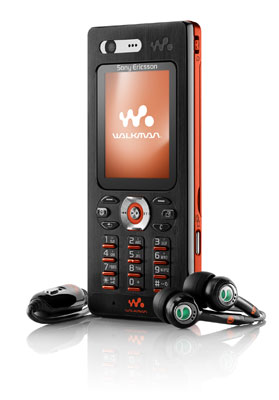
For users of the Sony Ericsson W880i mobile phone, this is a plugin that allows Mac OS X to add your new mobile device to Apple's iSync application - the application that manages your contacts, and synchronises your diary entries in iCal.
Download
Download the W880i mobile phone plugin.
Installation Instructions
To install, follow these instructions...
1. In the Finder, navigate to /Applications --> iSync and control (CTRL) -click the application
2. Select 'show package contents'
3. Navigate to Contents --> Plugins --> ApplePhoneConduit.syncdevice --> Contents --> Plugins
4. Move the folder extracted from the attached .zip file into the Plugins folder in Step 3 (above).
5. Relaunch iSync. Should work.
Please keep this service running.
Due to the enormous interest in downloading this plugin from this site and the large amount of traffic coming to my server host, I would really appreciate a donation towards the hosting costs of this service. Many thanks for your understanding.


Comments
visitor
28 March 2007 - 4:01pm
Permalink
todi
schimmel
visitor
9 April 2008 - 7:21pm
Permalink
Chris Semple
Works perfectly - thanks!
visitor
11 March 2009 - 11:44am
Permalink
Oonagh (Oons) OReilly
Hi Jonathon, I will happily make a donation as I think your site is great...except that my brand NEW sony ericsson W880i is driving me NUTS as it refuses to remain bluetooth connected long enough for any isync to happen.
I have done all the obvious things (checked that bluetooth powersave is switched off on the phone & downloaded your plugin) but I am STILL getting this error message when I try to isync my address book:
Wednesday, 11 March 2009 10:39 PM
[W880i] Connection to the phone failed.
Please make sure that your phone is turned on. If this error occurs again, please restart your phone.
Device “W880i” synchronization failed.
PLEASE HELP??? This should be so easy and it is driving me NUTS. My mac (latest version 10.5.6) says the mobile is not connected when the mobile says it is, and sometimes vice versa...but I have even tried connecting using the DATA CABLE...still no joy.
Any advice? I would never have bought this phone if I had known it would be so time consuming and stressful just to simply sync it! I would be so grateful for your help, I appreciate you are busy. THANK YOU Jonathan.
Oons :/
visitor
5 April 2007 - 9:12am
Permalink
Dorian
I have downloaded your plugin but I have found no setup or install option. Could you please tell me how I can install the plugin to my apple laptop?
Thanks
Jonathan
5 April 2007 - 11:02am
Permalink
Jonathan
Hi Dorian,
Apologies for no instructions. I have added instructions to the article. Hope that helps you.
Kind regards
Jonathan
visitor
6 April 2007 - 10:24am
Permalink
anthony
Hi Jonathan,
Many thks!! I got the isync works for contact but not ical (well, it allows me to click the calender option, then it will have a pop up and say "you need to open ical first" but i already did. The box next to calender still remains uncheck. Any clue what happened?
chrs
visitor
11 April 2007 - 6:11pm
Permalink
hardy
Thanks Jonathan!
Much appreciated, works fine on my iMac5
Cheers
visitor
15 April 2007 - 11:19am
Permalink
Farina
Great plugin Jonathon, thanks!
Like Anthony, I am also having iCal syncing issues allowing me to check the box and opens iCal but cannot get any further than that. Any thoughts?
Cheers
visitor
19 April 2007 - 11:20am
Permalink
Ollie
Plugin works fine, thanks. Do you know where I can get a Mac version of the software that came with the phone from?
Jonathan
6 May 2007 - 8:06am
Permalink
Jonathan
Hello Ollie,
Sorry, can't help you with that. I wonder if others have the software they could share with you?
Jonathan
visitor
4 May 2007 - 5:12am
Permalink
Trav
Hi Johanthon,
will this plug in enable me to hook up the MP3 player to itunes? if not do you know how I can do this?
Jonathan
6 May 2007 - 8:05am
Permalink
Jonathan
Hi Trav,
The plugin only allows you to use iSync with the phone. To transfer mp3 music to the phone, you will have to use the Bluetooth File Exchange application or plug in a USB cable and have the disk mounted on the desktop of your computer. Music can be dragged from your computer to the music folder on your phone.
Hope that helps
Jonathan
visitor
26 July 2007 - 7:50pm
Permalink
Dmitry
Hi Jonathan!
Thanks for your plugin.
Unfortunately I still have a problem to sync my AddressBook with w880i by bluetooth.
After some time of operating everything looks fine but eventualy syncronization fails due to communication interruption. Do you know this issue?
BRG
Dmitry
Jonathan
28 July 2007 - 11:30am
Permalink
Jonathan
Hello Dmitry,
Thanks for your message on this site. I've not experienced this problem before. How big is your address book? I've had problems synchronising large address books.
visitor
15 August 2007 - 8:30pm
Permalink
Björn
Thx for the plugin the isync working where good the litle i have tested it. But it seems that if you have a image added to the contact follow over to the phone! Should i do that ?
visitor
18 September 2007 - 8:56pm
Permalink
Martin
Excellent. "It just works"... I'm becoming a mac convert.
visitor
19 September 2007 - 8:21pm
Permalink
Chris Huston
Thanks dude - worked a treat!
visitor
12 October 2007 - 3:14pm
Permalink
YayaPoweR
Your plugin just works fine for me! Thx a lot!
visitor
15 October 2007 - 12:43pm
Permalink
Toon ten Cate
Hi there,
Thanks for the instructions, but somehowe I don't get the EXTRACTED file you are refering to.
The only things I get are:
version.plist
Resources
Info.plist
com.sony-ericsson.W880.tiff
SyncEngine.plist
PhoneConduit.plist
MetaClasses.plist
Can you help me please.
Kind regards,
Toon ten Cate
visitor
18 October 2007 - 4:51pm
Permalink
CCCC
What idiots Sony Ericsson are not having software for Macs!
visitor
18 October 2007 - 5:07pm
Permalink
Adding Music to the W880i mobile phone
To put music on the W880i I do the following.
On the Mac (G5 Dual PPC) go to Preferences, Bluetooth and select 'show bluetooth status in Menu Bar'
Then turn ON bluetooth on the W880i.
Click on the little BLuetooth icon - top right of the screen on your Mac. Go to 'Browse Device' (I can't recall if i ever had to 'add' the W880i to some list of devices - I have a feeling i didn't need to) - choose the W880i and a window opens up showing you whats lurking inside your W880. Browse 'Memory Stick' and 'Music'. The music folder is where you create music folders.
Now do this:
Click the little 'new folder' icon along the bottom of the W880i browser window (this is on your Mac!) - it's the 3rd icon along from the left. Name this 1st folder in the following way (you have to do this for each playlist or album you are adding - pain - yes I know!!). Do this one at a time for each album you add.......
Radiohead - In Rainbows
Eminem - My music is rubbish
Bjork - Vespertine
etc etc
So after you create a folder - let's say it's the radiohead album you are adding to the W880 - the browser window is blank - that's the contents of this new folder you just created. Cool. Create ANOTHER new folder right there (inside the "Radiohead - In Rainbows" folder) and name it as follows:
Radiohead (basically name this folder with the artist name)
And inside THAT folder create ANOTHER !! folder called
In Rainbows (this folder is 'album' title)
And now you are looking at the blank contents of the folder called 'In Rainbows' - now open up the folder containing the tracks of this album (in your itunes music folder or wherever it may be on your Mac) - and simply select and drag all the tracks into the 'In Rainbows' (album title) folder. The transfer will begin.
This is a bit long winded I know but so far it's the only way I have found to add albums so they are nicely accessible in the W880's walkman menu. This method gives you albums listed by artist and album - which is quite good - and once you've done it a few times it becomes pretty straightforward.
THough if anyone comes up with anything better then please let us know!!
visitor
24 October 2007 - 12:22am
Permalink
stuart
Hi there,
Still having problems actually dragging and dropping the files into the blank contents. Do I have to actually have to call the file the same as the itunes file ?
Cheers
visitor
20 November 2007 - 1:57pm
Permalink
iSpook
Nice work :)
visitor
29 November 2007 - 10:15pm
Permalink
iSpook
Sweet, works under Leopard too :)
visitor
30 November 2007 - 4:09am
Permalink
Manuel
Thanx a lot for posting the plug in.
But i am still having some troubles with the phone's calendar, the events appears sometimes twice and in different times (on the phone), am i doing something wrong ????
thanx again.
PD: I'm using leopard, but it happened too in 10.4 .
PD2: Can't still believe that Apple ripped off the SMS function of the Address Book, that was awesome.
visitor
13 December 2007 - 11:17pm
Permalink
Mezz
Excellent Stuff! Worked a treat for me - no problems at all - Tiger 10.4.11
Thaks
visitor
18 December 2007 - 12:59am
Permalink
Flemming Karlsen
Jonathan, you're the best. It works flawless on the Leopard.
visitor
29 December 2007 - 11:17pm
Permalink
Phil
excellent thx !!!!
visitor
3 January 2008 - 7:04am
Permalink
Robin Hoekstra
Hey there - I Googled my problem regarding an inability to sync my new W880i with my G4 powerbook (10.5 Leopard) and found your blog - LIFESAVER! so easy and works unbelievably well - congrats and thanks so much for taking the time to assist fellow Mac and Ericsson users.
visitor
5 January 2008 - 1:25am
Permalink
Paul
Hi Jonathan,
Thanks very much for making the download available - it worked perfectly on my G5 - really appreciate your skill and effort.
Cheers
Paul
Jonathan
5 January 2008 - 9:04am
Permalink
Jonathan
Hi Paul
No worries, glad I could help.
J
visitor
7 January 2008 - 9:43am
Permalink
Paul
Hi Jonathan,
I've just tried to upload your plug in onto my intel machine at work - nothing pops up. I'm guessing it only works with older macs?
Paul
Jonathan
7 January 2008 - 9:38pm
Permalink
Jonathan
Hi Paul,
I'm sorry I'm not able to help with this one. Can anyone else?
J
visitor
17 January 2008 - 7:07pm
Permalink
Sander
Hi Jonathan,
It does not work for me regretfully, iSync still shows 'This device is not supported by iSync'? Am I doing something wrong?
Thanks
S
visitor
26 October 2008 - 9:13pm
Permalink
iaarah
Hi Sander, I get the same " this device is not supported by iSync" How did you solved the problem
tks
visitor
17 January 2008 - 8:22pm
Permalink
Robin
HELP!! Upgraded to 10.5 Leopard on G4 Powerbook Mac - cannot get onto the internet using my Ericsson W880i anymore - was fine before - any ideas??
visitor
25 January 2008 - 1:30pm
Permalink
Craig
using an imac 2.4ghz intel core duo with leopard 10.5.1
plugin works perfectly
visitor
2 February 2008 - 5:59am
Permalink
alex
Is there a way to make my W880i work on my iMac running 10.3.9?
I am having trouble just getting bluetooth to talk to my phone using 10.3.9
I bought a Belkin USB bluetooth adaptor, but still no joy.
isync does not acknowledge that I have my phone paired, and I cannot browse my phone, it just says "validating" and nothing happens.
visitor
23 February 2008 - 4:36am
Permalink
silverSurfer
The iCal problem where synchronisation fails due to a communication error right at the end seems to be triggered by enabling the 'synchronise all-day events' checkbox. When you turn this off, it completes the sync. So I guess I'll have to go through my iCal and change all the all-day events to regular events.
Hope this helps you guys that were having this problem.
cheers
sS
visitor
23 February 2008 - 4:37am
Permalink
silverSurfer
In the post above I'm referring to the way you select your phone in iSync, choose the 'more options' button and make the change as suggested
visitor
23 February 2008 - 4:40am
Permalink
silverSurfer
In fact if you have any 'all day events' in ICal, whether you've enabled the button or not, it still fails.
So make sure all your events in your calendar are NOT all day events!!
visitor
13 March 2008 - 10:12am
Permalink
chrisb
works like a charm! thanks ;)
visitor
30 March 2008 - 7:29pm
Permalink
Anton
Hi,
I can´t seem to drag the folder into pluginmodules?
Any sugestions?
Thanks
visitor
9 April 2008 - 9:22am
Permalink
Stephen Heppell
lol - having crashed my phone (dead) and freshly installed Leopard - I found I needed this all over again - and it works fine of course. See you Saturday
PS Anton - probably you need to open the Downloads folder in Finder (should be buried in your Users folder) rather than trying to drag from the Downloading window itself...
visitor
14 April 2008 - 3:16pm
Permalink
Mark
I tried following the instructions but I only get the following info.plist, macOS, PKgInfo, resources, and version.plist from your download. In the 'contents' of isync folder after ctrl clicking on it there is no plugins folder what do I do now?
Regards
Mark
visitor
19 April 2008 - 11:20am
Permalink
Nick
Works a dream, thank you very much!
visitor
19 April 2008 - 5:39pm
Permalink
Rob Umfreville
Magic worked perfectly. Thanks
visitor
24 April 2008 - 2:02am
Permalink
Andy Larkin
Top banana - thanks a mill
visitor
24 April 2008 - 5:36am
Permalink
K!ng
hi u all!
well i...loaded Mr. Jonathan Plugin on old-fashion imacg5, and top of the line macbook pro, both Leopard 10.5.2 works great! no issues at all, just follow the instructions, read-'em ...... lol!
Mr J, thanx.
message to the Community : having found this page on the net, using it ...... makes my life more easy, developing open source takes time and effort, so keep it in mind ... let's support it!
May be tomorrow we need something new, and we hope developers work on it or may be have it for us!
Thank you all!
visitor
20 May 2008 - 12:34pm
Permalink
Ruth McCarter
Brilliant. Got MAC 3 days ago. This is fabulous. No need for microsoft office now.
visitor
26 May 2008 - 8:27am
Permalink
Alex
Hey great work,
Could you write a Plug in for the T650i and isync3 ?
visitor
26 May 2008 - 12:11pm
Permalink
Dan
looking at replacing my phone and just wondering will this work with a W890i???
visitor
17 June 2008 - 7:40am
Permalink
j0k3r
Hello.
So, we couldn't sync contact pictures, yes? :(
Also, is there any difference between your plugin and http://www.davidforster.com/2007/02/26/w880_isync_plugin ?
visitor
17 June 2008 - 11:20am
Permalink
François Roche
Works perfectly even with Leopard and iSync 3 :) thanks !!
visitor
14 July 2008 - 6:42pm
Permalink
stevesaysthanks
Thanks Johnathan!
It's the more computer-literate among us that let other people (me) avoid the grief resulting from large tech companies being spiteful with each other and not having open platforms. why don't they just play nice?
Cheers
visitor
18 July 2008 - 9:18am
Permalink
Simon... Australia
Thanks mate, I should have looked for this a long time ago, it's a bewty!!!
Cheers
visitor
11 September 2008 - 9:33pm
Permalink
Dan
Fantastic plugin my friend, many thanks! Just one little question though. Is there any way to stop contacts with one name appearing with a dash after them once synced to the phone (i.e. "Mary" becomes "Mary -").
visitor
26 October 2008 - 8:15pm
Permalink
FrogMan
You' re the Man! Thanks a lot for this plugin. Just what i needed in order to get my old Ericsson working with my Mac. Cool.
Thanks a bunch.
FrogMan
visitor
9 November 2008 - 2:43pm
Permalink
Jan
works great (iSync 3.0.2)
thx
visitor
17 November 2008 - 1:04pm
Permalink
Jacopo Bruni
Great Job, works perfectly!
visitor
27 November 2008 - 11:26am
Permalink
Francis Shephard
Thanks for this, its ended a cycle of frustration.
visitor
26 December 2008 - 10:17pm
Permalink
Jerome (France)
Hi,
Lots of thanks for the patch...
Efficient and easy.
Great job.
visitor
27 December 2008 - 9:32pm
Permalink
Ethem Tolga
Thank you for the plug-in.
visitor
2 January 2009 - 5:51pm
Permalink
Elena Crego
Hi, I am new on Mac and I used to sync my contacts and the agenda on my Sony Ericcson W880i with my Sony Vaio laptop. Does someone know if it is possible? I downloaded the plugin, but it seems it only allows me to get to Internet with the phone.
Thanks,
visitor
23 January 2009 - 5:10pm
Permalink
Macca Matrix
Fantastic... Thanks for your help
visitor
4 February 2009 - 3:09am
Permalink
chamanzan
Thanks! worked like a dream on Mac OS X 10.5.6 iSync 3.0.2
visitor
7 February 2009 - 7:23am
Permalink
pontus
buhuu *crying my eyes out and swearing over stupid apple and SE*
This still doesn't work, it finds my phone but states "this device is not supported by iSync."
macbook (64 bit core 2 early 2008) os x 10.5.6 iSync 3.0.2
visitor
13 February 2009 - 11:21am
Permalink
chuck
hi.. ive tried this before and it worked.. thank you very much. but when i upgraded my hard drive then have to do it all over again. i cant seem to get it right.. already did the procedure many times again n again and still my isync cant detect my w880i.. can you help me. thanks alot. i really would appreciate it. =)
visitor
3 March 2009 - 9:36am
Permalink
antok wahyudi
Great... thanks. Its work Fine
visitor
16 June 2009 - 9:23am
Permalink
Mark Qvist
Thanks!
visitor
24 July 2009 - 8:32pm
Permalink
Connor Treacy
So glad this exists. It worked perfectly for me. Thanks!
visitor
30 August 2009 - 10:25pm
Permalink
Arend
Works perfectly with bluetooth in Snow Leopard, thanks!
visitor
16 September 2009 - 9:38am
Permalink
Nasra M. Roshan
Thank you Jonathan,
very nice-fast solution.
Best Regards,
Nasra.
visitor
22 September 2009 - 9:56pm
Permalink
Pedro Figueiredo
Great work, thanks!
visitor
14 October 2009 - 9:26pm
Permalink
S
Worked like a charm! Thanks!
visitor
28 October 2009 - 3:31pm
Permalink
Joe
Hi Jonathan,
Using Mac OS x 10.5.8. Followed the instructions and when I click Add Device it says no device found. Should the phone be on Phone or Transfer mode. Do I need to install anything else for this to work? The computer definitely recognises the phone as it comes up in Network connections as Sony Ericsson w880i and Sony Ericsson w880i 2 although both say not connected.
Cheers,
Joe.
visitor
29 November 2009 - 6:24pm
Permalink
Axis
Hi Jonathan!
This stuff works great for me, thank you!
visitor
12 January 2010 - 10:21am
Permalink
Wayne
I have had conflicts with this plugin and iCal how do I fix this and how do I un-install this plugin as I no longer need it? Thanks.
visitor
25 June 2010 - 9:07am
Permalink
mike
thanks man!
visitor
12 July 2010 - 7:42pm
Permalink
René
Thank you very much!
visitor
26 August 2010 - 11:25am
Permalink
Alex
thanks a lot, works perfect!
visitor
13 July 2011 - 10:51pm
Permalink
lara
thanks a lot from hamburg !! still working ;)
Arleyr Lineg
29 April 2012 - 8:21pm
Permalink
Pretty great post. I just
Pretty great post. I just stumbled upon your weblog and wanted to say that I have really loved browsing your weblog posts. In any case I’ll be subscribing to your rss feed and I'm hoping you write again soon!
Add new comment