Jonathan's developments, thoughts and ideas on teaching, technology and learning.

Portable Bluetooth speaker - the Veho 360 M4

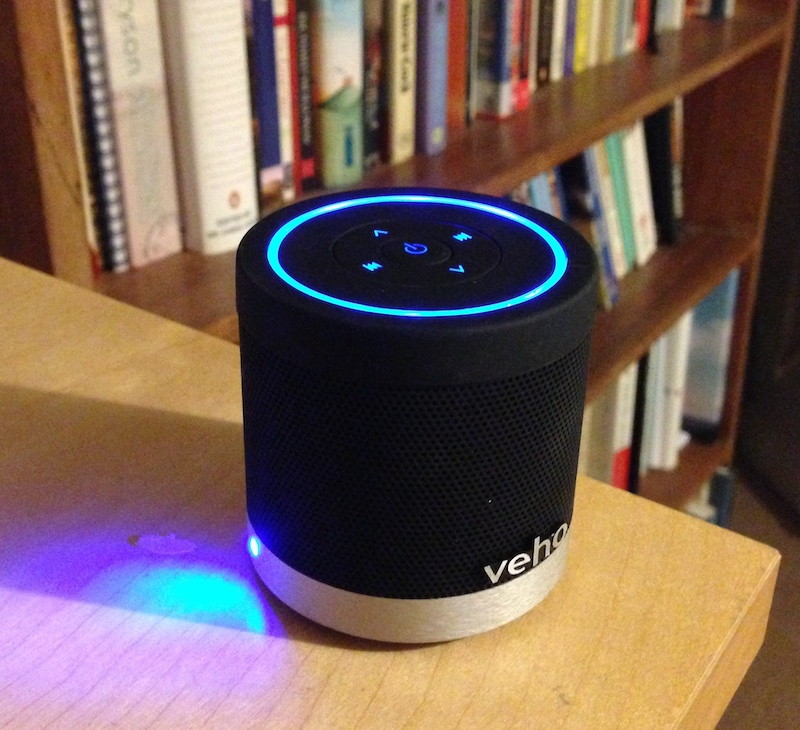
As many of you know, I often retreat to the sanctuary of my allotment and greenhouse at every opportunity. I love its peacefulness and love the social nature of meeting like-minded gardeners. However, there are times when I miss listening to a radio station, or music and whilst some use small portable radios, I've opted for a portable Bluetooth speaker which interfaces with my iPod or iPhone. It's small, compact and has an inbuilt rechargeable battery which makes powering it so convenient and easy to keep powered.

One major weakness of small speaker systems is the lack of bass and this isn't completely solved by the Veho. Its small size makes it almost impossible to overcome the problem of producing deep, rich bass notes, however, it makes a very respectable attempt at trying to.

The Veho speaker system is very well equipped:

  • rechargeable battery pack (built in)
  • micro USB for charging
  • audio in jack socket (3.5)
  • Bluetooth connectivity
  • micro SD card slot for playing music directly from memory storage

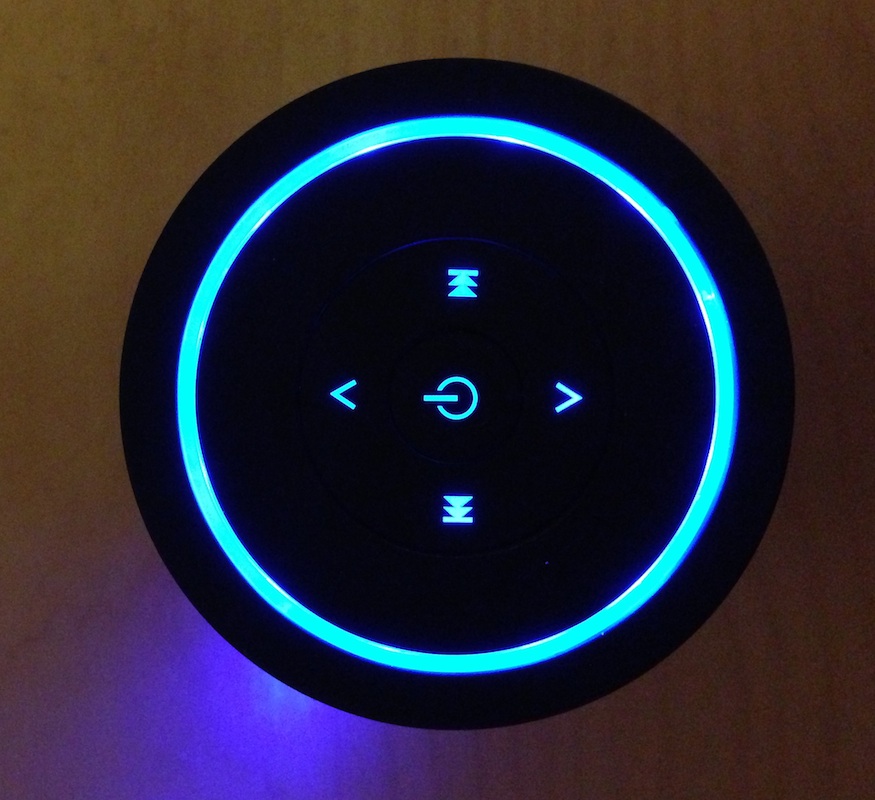
The controls on top of this unit are also well designed, with volume, skip forward / back, and power (both stop and on/off.)

Raspberry Pi Power Supply

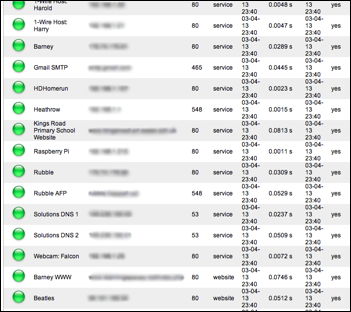
I've been running my Raspberry Pi server for the past 9 months now. It's been a tremendous success running server / device monitoring & downtime alert software called PHP Server Monitor. As the name suggests it is written in PHP which makes the software very easy to customise and tweak. Currently, PHP Server Monitor is configured to send emails when any one of the devices it is monitoring fails to respond. It also sends an email alert when the device becomes available again.

Here are just some of the devices being monitored. I have obscured IP addresses for security reasons.

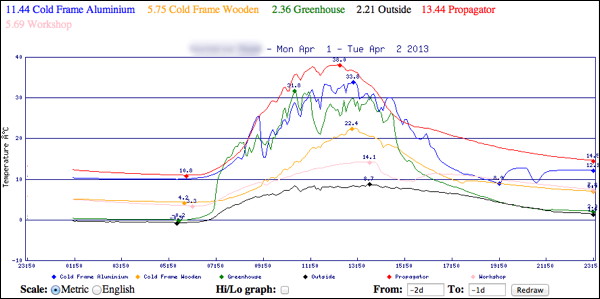
Another piece of software running on the Raspberry Pi is 'thermd', a 1-wire device logging and graphing tool written in Perl. I have 1-wire temperature and humidity sensors dotted around my home and garden, monitoring freezer / fridge temperature, front room, upstairs, heating system temperature. Outdoors, I have data from outside temperature sensors, greenhouse, propagator, cold frame sensors. Coupled with a rain gauge and light meter, I have plenty of data points being made available across the Internet to my iPhone wherever I am. The home automation software also hooks into this data to make decisions on whether to heat the house, water the plants in the greenhouse, turns lights on etc. The Raspberry Pi is switched on 24/7 and is powered by the sun.

Here is the graph produced by thermd. This is just displaying temperature sensors located outside.

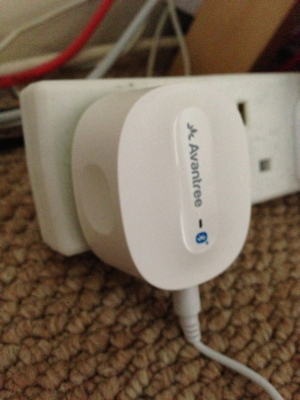
Solar energy is stored in large batteries and a 12V feed runs via a multi-way cigarette socket. The Raspberry Pi USB cigarette lighter adaptor is plugged in to this multi-way adaptor. You can find 12V USB chargers from most places, but I found this one by following this link to Raspberry Pi Power Supply


Desk Pets - the gadgeteers favourite pet

As a Deputy Head Teacher of a primary school in Essex, I have become renowned for my cupboard of gadgets, electronic toys and gizmos. The collection started from a humble beginning, researching the interaction between young children and toys, looking specifically at the learning that takes place. It was a fun(!) research project and gave me plenty of scope to try lots of different types of toy.

Of course, the electronic gadgets now feature in my teaching, with Control Technology very much at the forefront of the ICT curriculum. With the children playing with iPads, building roller coaster simulations on the Mac, using Hex-bugs, roamers, bee-bots, and the like, there are always plenty of devices to explore.

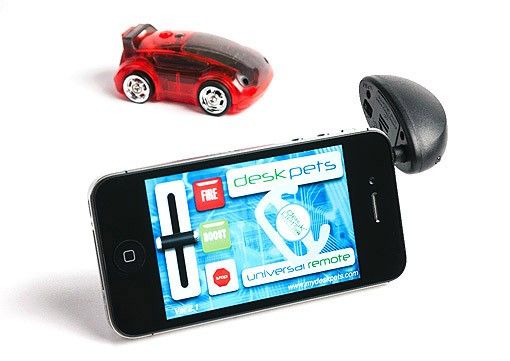
The latest addition to my "collection" is the DeskPet which is an iPad / iPhone accessory.

The children have responded well to using the DeskPet which is essentially controlled using an iPhone app with a transmitter plugged into the headphone jack. This was a surprise and had anticipated something plugged into the Dock connector. I suppose using the headphone jack makes the DeskPet quite versatile and therefore not limited to iOS devices. Weirdly, I couldn't get DeskPet to function initially, but then realised that both my iPad and iPhone were muted. Control signals to the DeskPet must be in the form of sound waves, which are completely inaudible, so presumably operating at the very high frequencies.

The children have really warmed to the DeskPet and love setting themselves challenges of following courses and routes. This is not only a great addition to my cupboard, but one that is very popular too!

Networking with the Raspberry Pi - Apple File Protocol changing its name

When I installed my first Raspberry Pi and enabled the Apple File Protocol (AFP) so that I could connect to its file system from my Mac, all was well. It defaulted to using it's own name "raspberrypi"

However, with two Raspberry Pi's on the same network, I needed to identify them individually.

All that is required is a file to be added to the file:

/etc/avahi/services/afpd.service

If you don't have one of those, simply create it:

sudo pico /etc/avahi/services/afpd.service

and copy and paste the following:


   RPi-0
   
      _afpovertcp._tcp
     
548    


In the line beginning:   <name replace-wildcards="yes">%h</name>
replace the %h with the unique name you have decided upon:
 
<name replace-wildcards="yes">RPi-0</name>


Raspberry Pi and PiFace

My PiFace arrived last week and this was the first time I've had a proper play using it with the Raspberry Pi.

I needed to do some things first to get it working, and I thought I'd document it here for future reference. Your Raspberry Pi will need to be connected to the Internet for this install.

INSTALL

1. Firstly, the Raspberry Pi interfaces with the PiFace through SPI, so this will need enabling.

sudo pico etc/modprobe.d/raspi-blacklist.conf

Insert a # at the beginning of the line

 blacklist spi-bcm2708

    like so
     #blacklist spi-bcm2708
     
    2. Second, install the PiFace Digital libraries and change the permissions of the SPI interface. Luckily, running this command will automate the entire process.

    sudo apt-get update

    wget -O - http://pi.cs.man.ac.uk/download/install.txt | bash

    And reboot your Pi once installed.

    sudo reboot

    TESTING

    Use the PiFace emulator to test the input and outputs for the PiFace board.

    You'll need to log back into your Raspberry Pi and start the GUI environment (startx)

    Open the Terminal application and type:

    piface/scripts/piface-emulator

    This will enable you to test the inputs are recognised and the outputs software controllable.

    USING PIFACE IN PYTHON

    I was itching to begin controlling the PiFace board from within Python. I wrote a simple program to demonstrate it working.

    import piface.pfio as piface
    piface.init()
    switch7 = piface.digital_read(7)
    print switch7
    if switch7 > 0:
       piface.digital_write(1,1)

    This code simply switches output one on if switch7 is closed.

    iPad Mini case

    The iPad Mini is designed to be carried everywhere. It wants to just slip into a small bag. Now that my wife uses hers to read, it gets put in her handbag wherever she goes. As with all Apple products, they look gorgeous naked and dreadful when fully clothed in a huge unwieldy case.

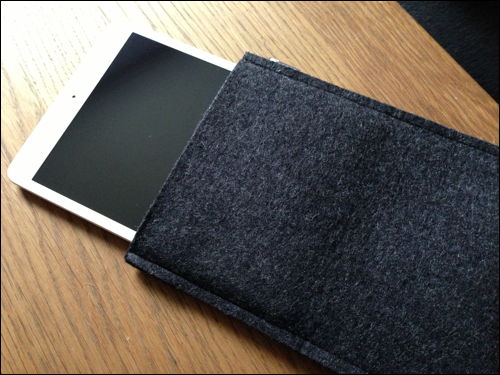
    I think we have discovered the perfect case which offers practical protection from scuffs and scratches whilst being carried, to enabling its natural beauty to be showcased whenever in use.

    This is the Encase designed pouch in a charcoal wool finish. Snug, sleek and very well protected.

    More iPad Mini cases can be found online here.

    Energy to Go

    ... is what is said on the box!

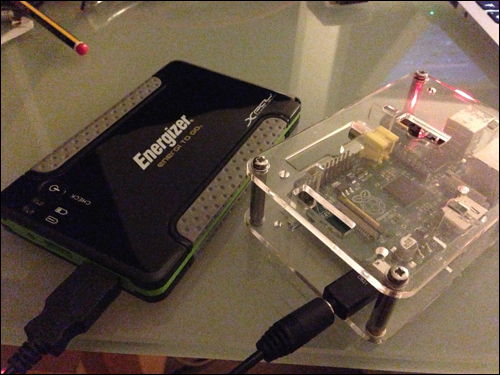
    This Energizer battery pack, originally designed to recharge iPhones, iPads, iPods or any other device requiring a USB charging adaptor. It's a very small and light power pack which has two USB ports on one side. This means it can charge two devices simultaneously. This photo shows me using the Energizer pack to power the Raspberry Pi computer. 

    I have plans to be able to power a Raspberry Pi computer in a remote location, where mains power isn't available, for example on my allotment, and use the Pi to monitor environmental conditions, such as temperature, rainfall, sunlight and humidity. I'm currently running tests to see what the expected battery life is for the Energizer power pack. I'll post the results of these tests on my blog in due course. I do know that it will power the Raspberry Pi for 8 hours quite comfortably.


    I've also used this power pack to charge up my iPhone and iPad mini. it's really effective and because it is light, doesn't' add any significant weight to my shoulder bag.

    Would definitely recommend getting one of these, especially if you have a smartphone that requires charging at least once a day. 

    Find it online under the iPad mini accessories page on the Mobile Fun site.

    (Just another brick in ...) The Wonder Wall

    Tonight is TeachMeet night, at the BETT 2013 show. It's a complete sell-out, and was within minutes of the tickets going live.

    It also appears that there are many presenters too, more speakers than there this is time for them all to present. The random speaker selector engine will be in full swing this evening.

    My nano presentation (that'll be just 2 minutes then) is all prepared and can be downloaded from here.

    I'll be sharing how I have used a blogging tool and how posting an entry via an email is a really simple way of capturing a photo and posting some text online to celebrate a child's achievement. I've called this the Wonder Wall.

    Whether I'm chosen to present tonight or not, you can probably get the gist of what I'm talking about from here.

    (Just another brick in...) The Wonder Wall (PPT)


    To Dock or not to Dock...

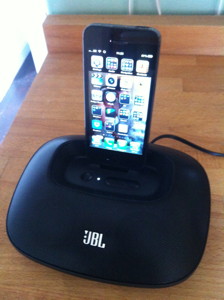
    This Apple iPhone 5 dock from Mobile Fun is one of the first sporting the new Lightning Connector. When I travelled to Las Vegas during Christmas, I noticed that Bose have launched a speaker system incorporating the new dock connector too. 

    The dock comes with a Lightning cable which is very handy as it provides another cable - useful when you rely on just the one that came with the phone.

    I'm pleased that the dock is heavy enough to make it feel quite solid, yet light enough to pack away and travel with.

    The only criticism is the lack of support for the iPhone 5 when it's sitting on the connector. The iPhone is reliant on the support from the connector - which just isn't man enough. It's really very flimsy and will, at some point, break. The dock probably needs a support behind the connector to take the weight of the phone. Time will tell.

    #SLTChat - Sundays from 8pm

    Twitter really can be one of the best forms of CPD that teachers and senior leaders can access and engage with. This evening I participated in the weekly #SLTChat session hosted by Ross McGill (@teachertoolkit)
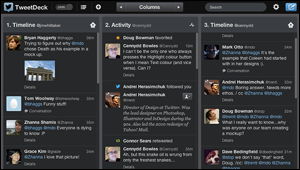
    Throughout the hour-long twitter session, several questions are posted by Ross to which fellow Twitter followers respond with their views. The evening became a mass of tweets which interestingly enough shakes out to form a cohesive discussion. I was pretty unsure at first how to make sense of dozens of tweets being posted within seconds of each other. Of course, each post is limited to 140 characters, so there's actually not a lot to read. However, synthesizing the sheer amount of data coming from a range of people offering some quite diverse viewpoints was at times difficult to follow.

    One tool that was certainly well worth its weight in gold was TweetDeck, without which I'd have really struggled. I personally use the Twitter app on a daily basis, but it simply isn't up to the job of following a range of tweets with a specific hash tag.

    TweetDeck allows you to create 'columns' each displaying a specific feed, meanwhile maintaining the timeline of all tweets from those your follow, alongside messages, interactions etc. I set one column to display #SLTChat tweets. I did end up using Twitter app for contributions to the chat. What TweetDeck really needs is a 'new tweet' button which creates a new tweet containing the hash tag of the discussion you are following. This would save quite a bit of time when posting.

    Tonight's agenda was centred firmly around Gove's plans to introduce the EBAC, eradicating GCSEs and marginalising the creative, foundation subjects. Of course it's a much bigger argument than my simple summary. You can read the whole #SLTChat debate here.

    Get online next Sunday evening, 8pm sharp. Install TweetDeck meantime, and I'll see you online.


    Docking needn't be so hard: Lightning Adaptor anyone?

    Despite being a through and through Apple fan, devotee, geek(!) I still feel slightly annoyed at the continual changing of cables and connectors, not least because of the sheer expense at replacing cables, connectors and the inconvenience of not having a wealth of the right cables at any given moment. Having recently upgraded my iPhone 5, I, of course, got heaps of 30-pin cables, which are of less use right now. Please form an orderly queue....

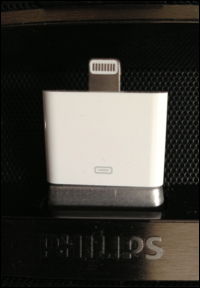
    Then there are the devices that actually HAVE the 30-pin connector built right into them. I have an Alarm-Clock with the 30-pin iPhone dock connector and also a Phillips docking speaker system with the same connector. Not much can be done here other than use an adaptor. Not great, but a solution nevertheless.

    It's not necessarily pretty either, but it does do the job. Sound quality is uninhibited and this is still an iPhone 5 charger too. My wife's iPhone 4 can still be used in the docking speaker as well. Maybe the best of both worlds?

    Categories:

    a-JAYS headphones for tangle-free listening to iPhone, iPad, iPod Touch

    These a-JAYS are unusual in that I wouldn't have chosen the brand ordinarily. I'd have opted for more familiar, bigger brands such as Sony, JVC etc.



    However, I was completely taken by surprise at how brilliant the sound quality both in range and depth. These in-ear headphones are perfect size and help to block ambient sound leaving the purity of the sound resonating from the ear pieces.

    Bass sounds were particularly delightful.

    The cables running to each ear piece are fairly unique too. a-JAYS have opted for a wide flat cable to avoid horrid tangles. It seems to work too. There is nothing more frustrating than reaching for headphones only to spend a good couple of minutes untwisting and untangling cable. These really work and I wouldn't hesitate in purchasing another set in the future.

    These headphones are perfect for listening to iPod Touch, iPad, iPhone, Kindle Fire. There are other Kindle Fire HD accessories...

    Categories:

    TeachMeet Essex (Chelmsford) - the home of professional CPD for teachers

    I'm now very proud to have attended a TeachMeet Essex session held in Chelmsford, Essex. The host school, King Edward Grammar School (www.kegs.org.uk) was an amazing venue with its large tiered seating in the main hall. A delicious range of food had been prepared by the students themselves.

    Nearly 200 teachers arrived for the 6pm start, with 20 presenters prepared to speak for 7 minutes (micro presentation) or 2 minutes (nano presentation.) The thing is, the batting order is entirely randomised through the use of the 'speaker fruit machine' - you only had a moments notice. Interesting.

    The quality of the speakers was staggering and I would challenge anyone who could find another CPD event that could match the passion, dedication, knowledge, relevance shared, in just the 2.5 hours we had tonight.

    I spoke about the use of the Raspberry Pi in the Primary Curriculum. This is a project that I'm already developing with Helena Gillespie at University of East Anglia. I'm also teaching our Year 5 & 6 cohort, programming using a range of programming environments, such as Scratch and Python.

    If you are interested in what I said, you might like to look at my presentation (slides)

    and / or

    Watch the (then) streamed version of all the presentations at TeachMeet Essex

    Finally, here is the Computer Science: A curriculum for schools document that I referred to at the end of my talk. This document was written by the Computing at School Working Group in March 2012. It is incredibly decisive and outlines the entire Computer Science curriculum for Key Stages 1, 2, 3 and 4. Well worth a read.

    Download YouTube content in Mac OS X Mountain Lion, Safari and other browsers

    There's always been a longing to be able to download clips from the ever popular YouTube site. It seems that YouTube continually change their web interface which restricts various tools from being able to download content. I've been using Tooble for some months, but it appears that this tool no longer works for downloading YouTube content.

    I have since found FastestTube which is a plugin for all the popular browsers, Safari, Google Chrome, FireFox, Opera and Internet Explorer.

    Download it now, install and get downloading from YouTube. It'll take just a few moments.

    Skyfall: Bond is Back

    Bond is very definitely back. Daniel Craig has become one of the best Bond actors there has been and I guess that probably means he will shortly be replaced. When I say, shortly, one of the worst things about seeing a Bond film in the cinema is that you know it will be 18 months or 2 years before watching the next one. I'm a real advocate and simply love this British classic.

    Skyfall was simply awesome and one that I could watch time and time again. I found the plot easy to follow, nothing too cryptic and complicated, almost back to the traditional Bond films of Roger Moore and Sean Connery. I loved the way in which stunts drift between fantasy and true to life. Many of the stunts are performed by Daniel Craig himself and this adds to the realistic screenplay that exists.

    There were a few tiny disappointments. Having just made his way through a busy Underground platform and onto a packed Underground Tube train, Bond finds himself head to head with an empty Underground train coming straight towards him. There were enough shots, I thought, to try and make that appear a bit more realistic. It's a big feature of the film and I just thought it was lacking there.

    Also, the final few scenes where M and Kincade escape through an underground tunnel to safety, only a couple of hundred metres from the ensuing villain, Silva. It was both weak and sad, following the passing of M's character played by the fabulous Judi Dench. Judi Dench has defined M as Daniel Craig has defined Bond. I just hope that he has at least one more Bond film in him.

    Plenty of usual Bond humour throughout the film makes this a 'must-watch' movie. Enjoy.

    The trouble with WGET... is stopping those pesky output files

    I think I must have been plagued for about 5 years with the age old issue of WGET requests creating unnecessary and unwanted empty files following a WGET request. WGET is tool for retrieving files via http, https and ftp via a command line interface.

    I use WGET extensively for running cron jobs across the various blogs and websites running on my server. Each time the cron job is run, an empty file, i.e. cron.php is created. If a cron.php file already exists, it creates another cron.php 1, cron.php 2, cron.php 3 etc.

    You can imagine after just a few days having hundreds of these breeding like wildfire.

    Stupidly, rather than fixing the problem, I created a solution. To run another cron task which periodically deletes the cron files, 

    rm /Users/jonathan/cron.*

    This kind of works, but then I started using WGET for a whole heap of other tasks, and yes, the output files mounted up.

    Half term holidays affords me the space to find these solutions, and it's a simple one.

    When structuring a WGET request, simply add

    --delete-after

    to the request, i.e.

    wget --delete-after http://www.southwoodfordnhw.info/cron.php

    Works perfectly and as described. Relief at last.

    iPhone 5: a case in point

    I'm thoroughly delighted with my new iPhone 5. I say new, but I've had it a whole month since the release date on 21st September. 

    With previous iPhones, I've always maintained that to place this beautiful piece of kit inside a plastic case, would be like adding wrapping a Ferrari in bubblewrap, only to preserve the immaculate bodywork. Personally, an iPhone is an everyday device. It will get used, abused and scratched from time to time.

    However, ever since dropping and smashing the rear cover of the iPhone 4, and having never really been able to replace the lens cover properly to provide outstanding photographs, I've been more hesitant than to just go 'au naturale'. Therefore I've plumped for a 'bumper' style case just to provide protection to the edges and the glass front face should the worst happen.

    The Gear4 case is probably one of the sleekest available. It seems to blend in well with the original design. Not a bad choice for an iPhone 5 case.

    Categories:

    RaspControl - Vital Statistics about your Raspberry Pi

    RaspControl is a small PHP application for providing a simple web interface for displaying information about Raspberry Pi. Useful because on a headless Raspberry Pi, simply heading to a webpage enables you to get an overview of its state of health.

    First, download the RaspControl software from here:

    https://github.com/Bioshox/Raspcontrol/zipball/master

    Next change the permissions of start.sh Read / Write / Execute permissions by navigating to the RaspControl folder.

    sudo chmod 0777 ./start.sh
    
    Then run the command to start the server.
    sudo ./start.sh


    Wire-less Care-free Type-more Keyboard

    For a while now, I've been searching for the perfect wireless keyboard. Not necessarily for any serious typing, a full size one is needed after all. However, there's something very neat about this particular keyboard, its size.

    Originally I thought I'd use this for armchair control over my home entertainment system, a 24" iMac with wireless mouse. It means I can send commands and controls to the Mac using the key commands across the room using its Bluetooth connectivity. It works very well at this and I'm delighted with it.

    I then tried pairing the keyboard with my iPad, iPhone, and now the latest, my little Raspberry Pi computer. The Raspberry Pi needs a bluetooth adaptor, but that was easy to source and hook up. Using an iPad 3 keyboard has made such a difference to typing information effortlessly.

    What I love most about the keyboard is its function. It comes with a USB cable (for charging) and a small pouch with a lift-and-over end for securing the keyboard. A really nice device, perfect for use in the home and for traveling. Fab.


    Raspberry Pi configure screen sharing with VNC

    I've spent the past week exploring what my Raspberry Pi can do. It makes a great little server as it's tiny and consumes negligible power, about 3.5 watts. Of course as with any Linux box, there is little need for a monitor, so I've configured VNC to work seamlessly on my Raspberry Pi.

    Here's how:


    1. Configure your Raspberry Pi with a static IP address.

    2. Open LXTerminal and type

    sudo apt-get install tightvncserver

    Complete the setup as prompted
    pi@raspberrypi:~$ vncserver

    You will require a password to access your desktops.

    Password:
    Warning: password truncated to the length of 8.
    Verify:
    Would you like to enter a view-only password (y/n)? n

    New 'X' desktop is raspberrypi:1

    Creating default startup script /home/pi/.vnc/xstartup
    Starting applications specified in /home/pi/.vnc/xstartup
    Log file is /home/pi/.vnc/raspberrypi:1.log

    3. Create a script to ensure that VNC starts at boot time.

    Type: cd /etc/init.d
    sudo pico tightvncserver
    and add this to the file (you can copy and paste)
    #!/bin/bash
    ### BEGIN INIT INFO
    # Provides: tightvncserver
    # Required-Start: $syslog
    # Required-Stop: $syslog
    # Default-Start: 2 3 4 5
    # Default-Stop: 0 1 6
    # Short-Description: vnc server
    # Description:
    #
    ### END INIT INFO
    #! /bin/sh
    # /etc/init.d/tightvncserver
    #

    # Carry out specific functions when asked to by the system
    case "$1" in
    start)
    su pi -c '/usr/bin/vncserver'
    echo "Starting VNC server "
    ;;
    stop)
    pkill vncserver
    echo "VNC Server has been stopped (didn't double check though)"
    ;;
    *)
    echo "Usage: /etc/init.d/blah {start|stop}"
    exit 1
    ;;
    esac

    exit 0

    4. Make the script executable
    sudo chmod +x tightvncserver

    5. Created the correct symbolic links for reboot and shutdown:
    sudo update-rc.d tightvncserver defaults

    6. Let's test the script. Kill the VNC service with this command:
    sudo pkill Xtightvnc

    7. And run the new script to start the VNC service:
    sudo /etc/init.d/tightvncserver start

    and you should see

    New 'X' desktop is raspberrypi:1
    Starting applications specified in /home/pi/.vnc/xstartup
    Log file is /home/pi/.vnc/raspberrypi:1.log

    Multiple ways of multiplication

    Back in the 70s, 80s and 90s children were predominately taught to multiply using paper and pencil methods. In the naughties (2000 onwards) the government, rightly, urged teachers to ensure pupils can use mental mathematics to solve multiplication problems using partitioning strategies. This has had a significant impact and in the last 5 years, we've introduced pencil and paper methods to support mental calculations. The Grid method of multiplication is a very successful strategy for children. In fact, three years ago, two pupils in my class produced this guide to the Grid Method.

    How to solve multiplication problems using the Grid method

    Of course this isn't the only way, and children find it amazing when they are shown a variety of other ways. I get them trying the difficult methods and evaluating the success of each one. 

    Here's how the Chinese solve multiplication problems, 

    and interestingly enough, new this week, how Ethiopians are solving the problem.

    My First Arduino Project: Ethernet Enabled Voltmeter for Solar Batteries

    12.73v
    12.73v
    12.73v
    12.73v
    12.73v
    
    HTTP/1.1 200 OK
    Date: Sun, 15 Apr 2012 10:44:03 GMT
    Content-Type: text/plain; charset=utf-8
    Connection: close
    X-Pachube-Logging-Key: logging.PlG0hXDwYXVgUyvba56H
    X-PachubeRequestId: a0b4fdf5d12e25345228f17ad9d2f7ba145601ea
    Cache-Control: max-age=0
    Content-Length: 1
    Age: 0
    Vary: Accept-Encoding
    

    If you're wondering what this is all about, well this is the output in the Serial Monitor from my first Arduino Uno sketch, written specifically to capture voltage and post to the Pachube data logging / publishing website.

    I have recently become very involved in powering my workshop solely from Solar energy. I have a 12V panel sitting on the roof angled at 38 degrees facing due South, connected to a Solar Charge controller and 4x 125Ah Deep Cycle batteries.

    I wanted some way of being able to measure the state of charge of the batteries and have this data logged over time and be accessible across the internet.

    Months earlier I had bought an Arduino Uno and Ethernet Shield but hadn't given either much attention, I'd not even written a sketch before and had only read about the possible projects these little microprocessor devices could fulfill.

    The hardest task was in writing the software, but luckily I had found two sites on the Internet where I could combine and edit the code to suit my purpose.

    One sketch activated the Ethernet Shield and posted data to Pachube whilst the other sketch calculated voltage using a voltage divider with its input on the analog pin 0.

    Here is the working sketch.


    	/*
      Pachube sensor client
     
     This sketch connects an analog sensor to Pachube (http://www.pachube.com)
     using a Wiznet Ethernet shield. You can use the Arduino Ethernet shield, or
     the Adafruit Ethernet shield, either one will work, as long as it's got
     a Wiznet Ethernet module on board.
     
     This example has been updated to use version 2.0 of the Pachube.com API. 
     To make it work, create a feed with a datastream, and give it the ID
     sensor1. Or change the code below to match your feed.
     
     
     Circuit:
     * Analog sensor attached to analog in 0
     * Ethernet shield attached to pins 10, 11, 12, 13
     
     created 15 April 2012
     updated 19 April 2012
     by Jonathan Furness
     
    http://arduino.cc/en/Tutorial/PachubeClient
     This code is in the public domain.
     
     */
    
    #include 
    #include 
    
    #define APIKEY         "INSERT YOUR API KEY HERE" // replace your pachube api key here
    #define FEEDID         FEED ID HERE // replace your feed ID
    #define USERAGENT      "Arduino" // user agent is the project name
    
    
    int batMonPin = 0;    // input pin for the divider
    int val = 0;       // variable for the A/D value
    float pinVoltage = 0; // variable to hold the calculated voltage
    float batteryVoltage = 0;
    float ratio = 3.99;  // Change this to match the MEASURED ration of the circuit
    
    // assign a MAC address for the ethernet controller.
    // Newer Ethernet shields have a MAC address printed on a sticker on the shield
    // fill in your address here:
    byte mac[] = { 
      0xDE, 0xAD, 0xBE, 0xEF, 0xFE, 0xED};
    
    // fill in an available IP address on your network here,
    // for manual configuration:
    IPAddress ip(192,168,1,70);
    // initialize the library instance:
    EthernetClient client;
    
    // if you don't want to use DNS (and reduce your sketch size)
    // use the numeric IP instead of the name for the server:
    IPAddress server(216,52,233,122);      // numeric IP for api.pachube.com
    //char server[] = "api.pachube.com";   // name address for pachube API
    
    unsigned long lastConnectionTime = 0;          // last time you connected to the server, in milliseconds
    boolean lastConnected = false;                 // state of the connection last time through the main loop
    const unsigned long postingInterval = 10*1000; //delay between updates to Pachube.com
    
    void setup() {
      // start serial port:
      Serial.begin(9600);
     // start the Ethernet connection:
      if (Ethernet.begin(mac) == 0) {
        Serial.println("Failed to configure Ethernet using DHCP");
        // DHCP failed, so use a fixed IP address:
        Ethernet.begin(mac, ip);
      }
    }
    
    void loop() {
      // read the analog sensor:
    //  int sensorReading = analogRead(A0);   
    
      // if there's incoming data from the net connection.
      // send it out the serial port.  This is for debugging
      // purposes only:
      if (client.available()) {
        char c = client.read();
        Serial.print(c);
      }
    
      // if there's no net connection, but there was one last time
      // through the loop, then stop the client:
      if (!client.connected() && lastConnected) {
        Serial.println();
        Serial.println("disconnecting.");
        client.stop();
      }
    
      // if you're not connected, and ten seconds have passed since
      // your last connection, then connect again and send data:
      if(!client.connected() && (millis() - lastConnectionTime > postingInterval)) {
        sendData(batteryVoltage);
      }
      // store the state of the connection for next time through
      // the loop:
      lastConnected = client.connected();
    
    {  
      val = analogRead(batMonPin);    // read the voltage on the divider  
      
      pinVoltage = val * 0.00488;       //  Calculate the voltage on the A/D pin
                                        //  A reading of 1 for the A/D = 0.0048mV
                                        //  if we multiply the A/D reading by 0.00488 then 
                                        //  we get the voltage on the pin.                                  


      batteryVoltage = pinVoltage * ratio;    //  Use the ratio calculated for the voltage divider
                                              //  to calculate the battery voltage
     // Serial.print("Voltage: ");
     // Serial.println(batteryVoltage);
      
      
    //delay(1000);                  //  Slow it down
    }
    
    }
    
    // this method makes a HTTP connection to the server:
    void sendData(int thisData) {
      // if there's a successful connection:
      if (client.connect(server, 80)) {
        Serial.println("connecting...");
        // send the HTTP PUT request:
        client.print("PUT /v2/feeds/");
        client.print(FEEDID);
        client.println(".csv HTTP/1.1");
        client.println("Host: api.pachube.com");
        client.print("X-PachubeApiKey: ");
        client.println(APIKEY);
        client.print("User-Agent: ");
        client.println(USERAGENT);
        client.print("Content-Length: ");
    
        // calculate the length of the sensor reading in bytes:
        // 8 bytes for "sensor1," + number of digits of the data:
    
        int thisLength = 9 + 5;
        client.println(thisLength);
    
        // last pieces of the HTTP PUT request:
        client.println("Content-Type: text/csv");
        client.println("Connection: close");
        client.println();
    
        // here's the actual content of the PUT request:
        client.print("voltage1,");
        client.println(batteryVoltage);
     //   Serial.println(thisLength);
            Serial.println(batteryVoltage);
      } 
      else {
        // if you couldn't make a connection:
        Serial.println("connection failed");
        Serial.println();
        Serial.println("disconnecting.");
        client.stop();
      }
       // note the time that the connection was made or attempted:
      lastConnectionTime = millis();
    }
    .h>.h>


    Last Sunday, the Arduino Uno with piggybacked Ethernet Shield began posting reliable data to the Pachube website. Here are the LIVE graphs produced from this project.


    Proving a point, a stylus for iPad

    Steve Jobs of Apple was famously quoted in 2010 "If you see a stylus, they blew it" when talking about stylus and handheld devices. Anything separate from a device is subject to failure, simply being lost, forgotten or broken. I think Steve is right.

    However, I did consider what benefits a stylus might bring to the user experience and explored using some software called DocAS for capturing my notes on an iPad, during meetings etc.

    The mobile phone stylus worked brilliantly, more accurate than using a finger and makes handwriting directly on the screen possible. There are adjustments you can make to the thickness of the writing which is important.

    DocAS allows you to open a PDF document on the iPad screen and simply add sketches or diagrams directly onto the screen. Annotations are added in the same way.

    The usual functions are possible, saving / exporting / printing as you would expect in any iOS software.

    The stylus has a soft nib which makes contact with the screen. The material used means that the iPad's screen is very well protected and won't get scratched. The stylus is also very light, so doesn't add very much to the overall weight of carrying iPad and accessories

    My initial view was not to bother with a stylus device, but I think having played with one, it certainly has its uses. I often attend conferences and workshops and where to put notes following these events is troublesome. Having all my notes stored in one place, particularly if these accompany the presentation slides or briefing document. I'll be requesting the presentation slides ahead of the talk from now on!

    Categories:

    A Life in Sync

    iCloud, Dropbox, IMAP are now the tools of choice for keeping my digital life in constant sync with all the devices I use from iPad, iPhone through to Macs at home and work. It's cross platform, so works on Windows and Linux computers too. Ever since the DVD, USB stick, CD, hard disk, floppy disk, tape and before that, punched tape systems, we've had a desire to carry data around with us. It served us well, but now, at long last we can negate the need to carry anything with us at all.

    Dropbox has revolutionised where and how data is available to me whichever and wherever the device is located. Dropbox simply maintains a local folder on 

    each computer that you use. As you add files and folders to the 'Dropbox' folder, Dropbox quietly works seamlessly to migrate that information to all theother devices.

    What I love most is that Dropbox is transparent, seamless and autonomous in operation, and gone are the days of forgetting to click the 'sync' button which so often caused much heartache when you neglect to do something so simple.

    Why not create yourself a Dropbox folder to keep your life in sync.

    1. Create a Dropbox account

    2. Install the Dropbox software on your iPad, iPhone, Mac, Windows, Linux systems and you're good to go.
     
    An added bonus of Dropbox is the ability to share files between friends, family and colleagues. Even collaborating on single files works well. 


    iCloud is even more transparent, and actually intends to only keep your own data synchronised between devices. It doesn't have the ability to maintain a folder of files yet it does ensure photos, music, books, apps, calendars, contacts, notes and mail are maintained across all your personal mobile and desktop devices. Again, an awesome technology which simply works seamlessly. I have no complaints it just works.
     
    If you're not already using it, you should. Ensure you have upgraded to iOS5 and you're away.


    Also, read more about Share-Gate SharePoint migration for all your education and business needs.

    Google Docs and Gold Challenge

    This week, I've been busy using Google Docs to create an online spreadsheet that can be updated by our teaching staff at Kings Road Primary School as we begin our Gold Challenge, raising money for Kids Inspire.

    What was particularly revealing is that not only does Google Docs allow multiple users to work with the spreadsheets, but it also allows this data to be published in other sites. I played around with using the Graphs function to create a thermometer come totaliser graph as an easy way for our pupils to follow the progress so far and it is this graph that I'm able to publish, keeping all the other sheets containing the names of pupils, private. Essential for any organisation where you don't wish to publish sensitive information.

    I've written a news article about the Gold Challenge  and was able to insert a live view of the distance achieved so far. I'm really impressed by just how easy this is to achieve. This is a live view of the distance travelled by the staff and pupils in our school, so far.


    Pages

    Subscribe to Jonathan&#039;s Blog RSS