
BT Home Hub and bad manners
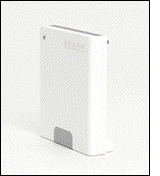 Does this happen to you too?
It feels like most evenings, at around this time, the BT Home Hub checks for a software update and perhaps updates the firmware of the device, who actually knows (!?) - but in doing so, drops the connection and stops whatever I'm doing at the time completely. Not so bad for web browsing, but very bad for uploading files and an application which requires the user to maintain a live Internet connection.
It's nothing short of dreadful and I find it incredibly frustrating that as a user,
- I receive no warning that my Internet connection is about to be lost (otherwise I could prepare for it)
- I have no choice about whether I want to have my Internet connection service disconnected
- I have no way setting an alternative time when updates can take place.
Surely in most people's lives, 4am is much much better than 1am ?
In fact my own server access logs tell me that the least access to my pages takes place between 4am and 5am. Bizarre. Why don't BT think to set automatic updates at this time too?
I recently ran into a whole heap of trouble when the BT Home Hub refused to reboot after an update. After several support calls to BT Support... I finally got through to a Mac specialist who explained that the version of the Home Hub firmware was corrupt and that I needed to reinstall the firmware. Handily enough, the firmware is available on the installation CD and that I could reinstall the Home Hub's firmware software myself with the equipment I had... how cool is that!?
OK, not that cool really as I shouldn't have had to do this in the first instance.
...but hey, I'm all into fixing things myself.
Simply,
- Insert BT Home Hub CD.
- Connect an Ethernet cable between Mac and BT Home Hub
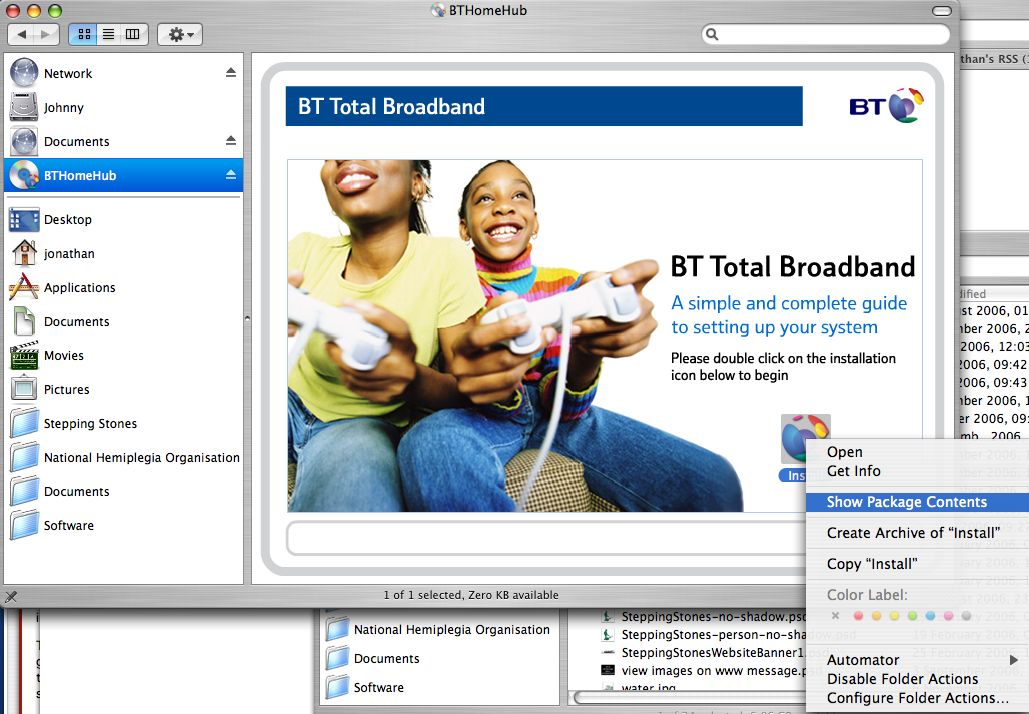
- CTRL click the Install icon.
- click on Show Packages.
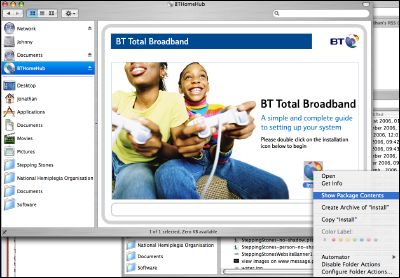
- Look inside a folder called 'UpgradeWizard' and click on 'menu'.

- Follow screen instructions.
Hope this is useful, but that you never need to experience the pain for yourself.
Please keep this service running.
Due to the enormous interest in this page and the large amount of traffic coming to my server host, I would really appreciate a donation towards the hosting costs of this service. Many thanks for your understanding.


Comments
visitor
11 January 2007 - 12:19am
Permalink
Shirley
Hey! It happens to me too but I hadn't thought about why the hub behaved badly! Thanks for the explanation and the advice, Jonathan.
Apart from the update - and I also wish there was at least a five-minute warning - I'm very pleased with the BT Home Hub. And the service is generally fast as well, great for downloading and not too bad for uploads compared to other ISPs. Or maybe I'm just lucky.
visitor
16 February 2007 - 8:48pm
Permalink
Robert Rawson
You will find the Home Hub is fine but the quality of line and or the distance from the exchange is restricting your ability to receive maximum speeds
Jonathan
16 February 2007 - 9:39pm
Permalink
Jonathan
Thanks Robert. I would agree with you that distance from the telephone exchange is the determining factor in how fast the broadband service is. However, although not my experience, others report using alternative routers and finding a better quality of service.
visitor
17 February 2007 - 10:52pm
Permalink
DavidBarrett
This is true, however I live 200m from the exchange and still cant get the ful 8mb/s so its not the only factor!
visitor
28 March 2007 - 9:45pm
Permalink
ryan
living too close to the exchange will limit your download aswell..you would be better at about 1/2 mile - 1 mile away...also if you got a 60 yr old line that wouldnt help matters.....cheers ryan
visitor
29 April 2007 - 10:24am
Permalink
yeeeh
yeeeh i think it MIGHT also be to do with the fact that the person you're downloading from probably wont give u a dedicated upload speed of sumthing as ridiculous as 8 mb/s. when bt says 8mb/s they mean capacity not the download speed you will have for life
visitor
9 July 2007 - 8:03pm
Permalink
mat alex
even though it says you can have 8mb broadband the factors involved to acheive a true 8mb are many , u may have an 8mb package but your router-exchange distance is 1 factor,another is the speed of your line to that exchange,the type of wire and how old it is also plays a part in speeds,u may see an upstream of around 5-6000kbps for fetching pages to you but your download speeds may only be 4-800kbps which isnt even 1mb,now if u read the isp's terms etc ull notice it says UPTO 8mb thats a clause for them legaly so in theory they cud give u dialup speeds i.e 56kbps and get away with it as they say UPTO, a true 8mb broadband is only realy 8mb through cable not a foneline,the fone line depends on distance the data travells,the computer proformance u have,the local and national usage on there servers and a whole host of other things whereas with cable its a fibre optic (like the lights that change colour u can get) thats a fibre optic (light) not a pulse through a copper wire like bt etc, light travells faster than electricity through a wire so the data loss is very VERY minimal, if you want a true 8+mb connection go with virgin media or similar as they are doing upto 20mb speeds at the min,i use virgin media and my upstream is currently 19558kbps (19.5mb)and my download/downstream is currently 18023kbps ..(18mb just over), another factor in all this is the wlan card speeds u have , the ethernet port speeds ur pc has etc,
i used to be with an isp called bulldog and they said i could have 32mb!! 32mb in the uk is at this time impossable and the true speed i got with them was around 10mb on a good day....at worst it was around 3mb,
the uk is currently behind the whole planet on broadband but is updating as we speak
in france you can get 15-50mb broadband,in germany u cant get any lower than 30mb ,america has 20-50mb and japan is currently testing 200mb over a new technology due out in a few years
if u want to inprove your speed you can try various things from isps to simple download managers
visitor
24 October 2007 - 7:42am
Permalink
Gary
Someone mentioned earlier about going with Virgin Media. I WOULD NOT recommend this as I work in IT and sometimes help people with their broadband lines and Virgin have been nothing but a problem. One case I am dealing with has been going on for 9 months, have spent about 150 hours on the phone, wrote to them to complain and tried to get written confirmation of the problems. They have not even responded so am taking the case to the Communications & Internet Service Adujdication Scheme (CISAS)to see if they can resolve this issue as a middleman. The speed I am getting in that one case with an 8mb line is between 60 - 250 kbps, then was advised to downgrade to a 2mb line to give more of a constant rate and no change. I must admit hardly any ISP is a good ISP now days as they have to offer a cheap service and support it using cheap labour, but they seem to be making their money on support calls, I think the cost to customers phoning their ISP was about 32 million last year for ISP technical\customer queries. But just to say DO NOT go with virgin, you will be ok if you have no issues but if you do have problems then good luck on getting them resolved
visitor
17 April 2011 - 9:23pm
Permalink
@mat alex Your
@mat alex
Your misunderstanding broadband speeds 800kbs IS around an 7-8Mbs connection.Look up the difference between Killa bits and Killa bytes.8bits=1byte so an 8Mbs connection gives you a max download speed of around 700-900kbs, NOT 8 megabytes per second.
This is how ISP's confuse ppl like yourself.An 8mb connection package lets you download a 1 megabyte file in 1 second, not a 8 megabyte file in 1 second.
And those upload speeds you posted are impossible in the UK youve made a mistake.
Heres a converter in case the math is too much
http://www.translatorscafe.com/cafe/units-converter/data-storage/calculator/megabit-to-megabyte/
Daern
21 September 2011 - 8:34pm
Permalink
Talk about confusing people...
Your misunderstanding broadband speeds 800kbs IS around an 7-8Mbs connection.Look up the difference between Killa bits and Killa bytes.8bits=1byte so an 8Mbs connection gives you a max download speed of around 700-900kbs, NOT 8 megabytes per second.
This is how ISP's confuse ppl like yourself.An 8mb connection package lets you download a 1 megabyte file in 1 second, not a 8 megabyte file in 1 second.
You may wish to do some reading yourself:
kilobytes are designated kB (small k, big B)
kilobits are designated kb (small k, small b)
So, a 1Mbps broadband connection (1 megabit per second, big M, small b) would equate to around 128kBps (128 kilobytes per second), so a 1MB (megabyte) file would take around 8 seconds to download.
Be very careful about your use of case when writing about bytes and bits otherwise you simple serve to further the confusion that you are condemning!
And they're certainly /not/ killa-anything either!
Daern
visitor
10 February 2008 - 3:12am
Permalink
BT Guy
No one ever gets the full 8mb. Around 0.5mb is lost due to overheads on a ADSL line.
visitor
3 March 2007 - 3:28pm
Permalink
Shannon Naylor
Can anyone help me find my WEP key for my Nintendo DS and PSP it wont set up automatically :(
visitor
10 February 2008 - 3:16am
Permalink
BT Guy
If you have no idea what your Key is, then you will need to reset your router and enter a new key. This time write it down. If you have a BT home home look on the sticker on the back of the router and you will find it.
visitor
17 August 2007 - 4:48pm
Permalink
jarviser
I agree, more likely to be the line and/or interference. Provided you have the latest firmware (6.2.2.6 at time of writing) the hub will not try to upload a new one. However if the hub is 6.1. and fails to get the upgrade it will continually seek new firmware which is why the manual upgrade process fixed the problem. Mine too needed a full reset after getting its new firmware but it has performed faultlessly ever since, and at 6 times the speed after I disconnected the bell wires from terminal 3 at the master.
visitor
15 September 2007 - 6:29pm
Permalink
Mike Kelly
I beg to differ. BT has openly acknowledged that, when certain conditions apply, the connection is dropped. I have experienced this periodically when using Limewire myself. At 1pm BST each day my download speeds drop considerably. Where I was getting 700kb before, the rate would drop to
When Challenged BT acknowledged that they reduce the bandwidth for those users who use P2P software. Most dont notice, but the heavier, or more experienced, users do. (I am an IT specialist, so count myself in the second category).
visitor
6 January 2008 - 4:16pm
Permalink
James
That would explain a lot! I could tell it wasn't right when I was running P2P software!
visitor
18 December 2009 - 9:02pm
Permalink
Andy
Perhaps, as an IT specialist, you could use the correct terms to avoid confusion.
Speed throttling is NOT the same as having the connection dropped. A dropped connection means the total loss of broadband access. Speed throttling maintains the connection but limits up/download speeds.
Ryan Trashtalker
14 February 2012 - 2:37pm
Permalink
Derp
Don't try to pretend like you know something. The HomeHub is a piece of cancer. End of story.
visitor
24 April 2007 - 8:01am
Permalink
donaldinlondon
Took me a while to work out what was going on with my connection being 'randomly' disconnected during a 'silent' HH upgrade. I'm on my 2nd HH and 3rd HH 'phone and in spite of all my efforts with the BT Helpdesk in India still find the 'phone also randomly disconnects during calls - v v annoying indeed!
BT clearly have an issue with their upgrade procedures. It is simply unacceptable to go on with the circus that currently prevails!
I'll give it a while longer then it's back to AOL with me.
Jonathan
24 April 2007 - 9:58am
Permalink
Jonathan
Thanks Donald.
I had an issue with the BT Business Broadband yesterday here at school. BT claimed not to have made any changes to their network operation or setup but I discovered, unbeknown to us, that they had changed their DNS settings causing our machines to not have access to the Internet through web browsers.
The solution was to modify the DNS server address on all our machines.
Jonathan
visitor
2 July 2007 - 7:09pm
Permalink
topboy
Similar story blah blah blah
Got bt homehub (deathwatch beetle of routers) before christmas, and personally think i was conned into it. I installed it fine, did everything it said on the tin. So thought away we go, until about the middle of april...started getting drops in connection.
No problem i thought ...phone up heldesk and get it resolved. Little asian fellow on the other end answers and seems to to tranlate drops in connection for slow speed connections (yeah think it is in the bt training manual to tell you what they think is wrong). they booked me in an engineer and said they would work on it.
sure enough they sped up my connections, but still had my connection dropping....curse them!
Be prepared here comes the shopping list
I have gone through four filters, three rj 11 cables (including one high speed), two new phones, two new phone sockets, a full pc system reinstall, plugged in sky, unplugged sky, moved homehub off pc, away from speaker, unplugged extension phone. installed homehub software god knows how many times!............phew.
I am starting to think that bt have a secret plan to make us all learn hindu or something.
the point to all this is this
i have noticed that when my home hub drops connection (and i would like to know if anyone else can confirm this) if i make a phonecall for any length of time it reconnects. If they are any techys are out there that can explain what this is. I'd love to know!
I have recently replaced my monitor as it got into a fight with a bb gun and unfortunately lost, and it is looking the homehub is going to suffer the same fate unless someone has any ideas
cheers Topboy
visitor
22 September 2007 - 10:02pm
Permalink
Bri
Topboy is quite correct - phoning the line, or better still making an outgoing call on the BT line line will re-establish an ADSL link which has 'gone to sleep' , in fact you can hear the ADSL being re-established as you make the call on the earpiece of the landline handset.
Nothing to do with the router ( I have a linksys ) great little unit - but occasionally I will come
home - no Internet - I just phone my mobile from the landline, don't even need to answer the call - and you can hear the ADSl coming back to life - I don't know why it works but it does
cheers bri
visitor
7 April 2008 - 6:38pm
Permalink
andrew
Wow, I hope that works, really gets on my nerves.
THX!
visitor
16 August 2007 - 10:34pm
Permalink
purplehaze
OMG am i relieved to see i am not the only person having trouble with bt home hub. the indian tech guys are making me feel its all down to me. had a bt engineer round a couple of days ago and thought we solved the problem of the line dropping at random times and fluctuating connection speeds. it worked fine for a day, however now i'm back to square one and getting really fed up phoning technical help and them telling me "done a line test and every thing is fine"and "try another micro filter" etc etc. Would it help me changing ISP or would i have the same problem with the next service provider?
visitor
23 February 2008 - 11:11pm
Permalink
pissed of in bridgwater
in the math question line i stated ask an indian he'll come upwith the party line!
its about time we all refuse to deal with companies that force us to deal with foreign call centres who lately all seem to be called timothy or sean and stop putting up with corporate lies
visitor
8 January 2008 - 12:49am
Permalink
Claire
Hi,
I've had Home Hub for around a year now and not once have I got my wireless connection working properly. With numerous calls to India, with technical staff who neither speak English or Techie from what I can see. After routing around inside my laptop remotely 3 or 4 times they managed to bring up some permanent error mesages in my laptop and give me 3 seconds of wireless connection before hanging up. So I've been using the ethernet cable ever since, which is looking a bit worse for wear now after been jossled around on a laptop so much. I was informed by 'BT Tech' that my wireless card wasn't good enough. A card in a brand new laptop that can easily pick up my 4 of my neighbours wireless connections - maybe I should just pay them for internet access?
I've also recently purchased a new pc, which unfortunately has windows vista on it. The BT installation disk freezes on the main installation and never recovers.
For those who just want the broadband in their pc however it is possible to install it into windows vista. You run the installation disk twice with the ethernet and usb cable plugged in to both pc and home hub. It will crash both times, but your internet will also be working by the second time. Just open a browser and tap in a website URL and it should appear. You won't have access to BT Hub Manager or Soft Phone, but you're internet will work as long as the ethernet cable stays in the pc.
It's no good for me as I need that cable for my laptop, but it might help those with only 2 pc's in the house, as there are 2 ethernet ports you can use the hub and vista. It'll be installed badly, but will access the net at least. I've installed it working on 2 Vista pc's ..but everytime I unplug the second pc for my laptop to have internet, the internet in the pc dies.
So overall it seems you can't access the internet with windows vista and a usb, or with wireless on the BT Home Hub.
visitor
24 February 2008 - 9:10am
Permalink
Richard
I have a BT home hub and have had the same wireless drop out probs as you - wired always works, but the 3 wireless units in our house constantly drop off - few tips I have found to help -
change the broadcast channel (11-13 works best for me, but experiment)
leave all hub settings the same (then when you reset you don't have to go around all the wireless units inputting new WEP code!)
complain - eventually they gave me a new hub and so far have only had to reset it once, which is a great improvement - explained that it was not a PC/interference/line probe as all 3 wireless units dropped off and that my previous linksys never had a prob...
Overall I think the BT hub is useless - had a Linksys unit on AOL Silver before that I never had any problems, and on which connection speeds were more constant.
Jonathan
13 January 2007 - 7:37pm
Permalink
Jonathan
Hello Shirley,
Thank you for your comment here... but clearly we are amongst several thousands of users who are also subscribed to BT's Broadband service and using the BT Home Hub. Of course the problem needn't remain, since one of the updates could include a new control panel that allows the user to configure the auto update procedure.
I agree about the quality of service and speed at all other times, download speeds are fast, and upload speeds reasonable given the technological limit imposed.
Hope you are well,
Jonathan
visitor
16 January 2007 - 8:12pm
Permalink
Ian
I think my experience with the BT HomeHub reaches new levels of customer dis-service.
I have Orange as my ISP and wanted BT Broadband Talk. Having been told this was no problem the equipment they sent me was incompatible with my Netgear router and to their credit they sent me a HomeHub as a replacement. I followed the simple instructions, entered my Orange user id and password and hey presto everything worked OK, and it has continued to work OK until yesterday when my internet connection disappeared.
Many hours later after having spoken to more people in India that their President I was finally let into their secret. My HomeHub was originally running software version 6.1.1.M until their secret raid on my kit on Sunday night, after which it now runs 6.2.2.6. It was then revealed that the latest version has been specifically written to prevent the HomeHub addressing any ISP other than BTBroadband. Added to which it is not possible to re-load an earlier release and it would be pointless anyway as every time they updated it I would lose my connection.
So with some instructions from a faceless individual who never has to stand and answer to the customer my kit was disabled. No letters or emails, no warnings or apologies, just dead. Their answer when asked what they were going to do about it......nothing. They aren't prepared to give me the necessary access and therefore have nothing to offer as a solution.
Had I been servicing a business with my Talk number or passed it out to many people I would have been very tempted to look for damages as a result of breach of contract. As it is I've just exercised my customer rights and cancelled the Talk contract.
I was a very contented customer and now I'm just really p..... off.
Jonathan
16 January 2007 - 11:19pm
Permalink
Jonathan
Crumbs... that is a total nightmare... seems that BT have little regard for customers, only kit and ensuring updates are carried out. As for disabling the kit from being able to be used with another ISP, that's just ludicrous and stupid. I've never really understood why mobile phones are locked to a provider, other than to protect the provider and ensure that users are forced or 'locked into' the provider. Kinda smells of fear and insecurity if you ask me.
Clearly, BT want their Talk package to only work on their network - again bizarre.
I still hate the nights of being kicked off, even momentarily. It's just bad manners.
I'm sorry to hear of your ordeal, I'm confident you aren't alone here.
visitor
3 May 2007 - 6:03pm
Permalink
Dan
BT Homehubs are pretty terrible in my opinion
visitor
30 May 2007 - 12:22am
Permalink
Michael O'Toole
You are aware that Orange do their own "HomeHub" of sorts, and you can to the best of my knowledge use it with a BTSoftphone-type application.
visitor
23 May 2009 - 11:38am
Permalink
gerald ives
I entirely agree I get cut off about every week,spend hours on the phone to india good job it is a free number. They only manage to get it sorted for a short while. Rol on the end of the contract,then I can get rid of it all. Who can I complain to at B.t.???
visitor
20 January 2007 - 8:31pm
Permalink
Chris
The only thing i hate about the Bt home hub is the fact that we have 3 computers connected to in and as soon as someone downloads they steal all my connection and i end up with 600+ ping on most servers and am kicked i have never had this with any other service, BT is the best i have had so far been with AOL, Tiscali, and Sobroadband i am never disconected like you guys, but as soon as anyone starts a download the rest of us have to wait for it to finish.
Jonathan
20 January 2007 - 10:39pm
Permalink
Jonathan
Hi,
Are the three computers connected wirelessly or through Ethernet? I've not experienced this issue and I have had three computers connected to the box.
visitor
2 March 2007 - 11:56pm
Permalink
adam
that never happened here,why are you paying for faulty broadband?
visitor
29 April 2007 - 10:29am
Permalink
yeeeeeeh me again
yeeeeh its not bt's fault you just have to tell your bittorrenting friends to limit their download speeds from UNLIMITED to something more sensible such as LIMITED. split it evenly between 3, dont worry about the .33 im sure you can work that out between you in a match of rock paper scissors - best of 9
visitor
20 January 2007 - 10:22pm
Permalink
felim
hi guys
can anyone please tell me what's the test speed result for the bt home hub,because my one reeds 900 kbs not even 1 mgb ,and i am paying for 8 mgb
Jonathan
20 January 2007 - 10:39pm
Permalink
Jonathan
yes of course, will let you know tomorrow.
J
visitor
21 January 2007 - 2:56am
Permalink
Tim
This damn hub, i work during the day on weekends, so i like to come home, nab some tea, and settle down to some games with my friends, now this can go on till early in the morning, sometimes even 3AM, such as it was tonight.
i installed the damn thing today, in the middle of an online match, suddenly, "Disconected from server", the damn thing was updating, 10 mins later found all my friends had gone offline through impatience.
this is inconvinient, and sadly knocking on to the long que of complaints i have for BT, is there any way at all in which i can stop the damn updates, surely there must be an option so that i can update when i want to, like in the afternoon when i head out to work?
visitor
21 January 2007 - 11:48am
Permalink
David
I agree it would be a nightmare to be logged off without warning, especially if you were in the middle of on-line banking or on-line ordering. I can't find in any of the above text, what sort of time the Hub does up-date. Is it early morning, early eving or what??
visitor
21 January 2007 - 8:26pm
Permalink
felim
hi guys
can anyone please tell me what's the test speed result for the bt home hub,because my one reeds 900 kbs not even 1 mgb ,and i am paying for 8 mgb
thanks
Jonathan
21 January 2007 - 11:16pm
Permalink
Jonathan
Here is a screengrab of the BT Home Hub connection details:
As you can see 8,128Kbps is the downstream speed.
visitor
15 April 2009 - 11:58am
Permalink
Shirley
Hi Jonathan
The screenshot is similar to mine, but I have no idea what the downstream 8128Kbps relates to - the guy on technical support today seemed to think this was the actual speed, but it clearly isn't. I called broadband support today because I'm getting very low and fluctuating speeds (from 0.8 Mbps to 2.4 Mbps). Apart from the tech trying to tell me that he tested and I'm getting 8Mbps (I wish!) he tried to tell me that the problem is at my end - flush the cache (already done), plug in ethernet (didn't make any difference), and - priceless - that being on the phone to tech support would make the connection noticeably slow, for example in accessing the Google search page. As a long time customer of BT, I was fairly sure that the problem needed to be escalated... and the tech refused!
Well, eventually I got the call escalated. Normally it is a fast and sound connection, and as I haven't changed anything I expect the result will be as usual - eventually BT will reluctantly admit that it is a problem fixed at the exchange and all will be back to normal.
Meanwhile, I guess I'll tidy my desk and other offline stuff.
visitor
22 January 2007 - 1:26am
Permalink
felim
thanks jonathan
visitor
23 January 2007 - 3:51pm
Permalink
Stacks
well my Hub came on Saturday and the longest I've stayed connected is now 34 minutes but the norm is about 16! Now spent the last 3 days when I get home from work on the phone to the Indian tech support people who eventually told me that this is the norm and the the Hub is "learning" how to get the optimal config and will be like this for 10 days with intermittent outages. Intermittent is not every 16 fcuking minutes!!
Anyone else experience this sort of hehaviour with the hub? The wireless light stays on but the Broadband and internet lights just go out and only come back if I switch it off and on again at the mains.
V annoying!
visitor
29 January 2007 - 11:34am
Permalink
Mark
I "upgraded" to BT Total Broadband just before Christmas and it took 3 weeks before it settled down to find a suitable speed. The instructions tell you to wait 10 days (so I did) then the polite people in India gave me a list of 20 things to do to make it stable. However, the one that worked was changing the microfilter. It seems that the microfilter supplied with the HomeHub is made to work with the HomeHub and others might not be so good.
I now have a 3.5Mb/s uplink and it seems stable.
DSL is line-length dependent. 8Mb/s works if you're 100m from the local exchange.
visitor
17 February 2007 - 11:19pm
Permalink
j.k.
i have exactly the same problem, and i am exactly p.ssed off!
used to have a BT voyager router, now its home hub, but the old one was ever so good, never had a problem with connection.
i am now a one of customers they regret purchasing total broadband and bthomehub, not because tech problems, but because neglect and ignorance of BT!!!
visitor
6 April 2007 - 10:19am
Permalink
carl
yes it is a faulty hub ask for a replacenent
visitor
5 May 2007 - 3:49pm
Permalink
will
yep i have the same problem with this, i have to turn it off at the mains to reset it, the internet light always goes out, and then i just cant surf the internet, is there away to fix this?
thanks
pls reply asap
Jonathan
6 May 2007 - 8:09am
Permalink
Jonathan
No, can't see a solution there, sorry - I'm glad to report that I'm now not using the BT Home Hub at all - what a relief!
Jonathan
visitor
29 December 2007 - 1:49am
Permalink
LOVE_YOU_INDIA
Buy Router like Delink,Belkin,etc. don't go for the cute looking BT HOME HUB, it is a low grade router with high features.Yes you will get limited support from BT THD regarding this other router,But they will help you with most of the things...But the other routers will connect quickly to the server if the line is working and the connection will not drop due to router problem.
visitor
23 January 2007 - 4:39pm
Permalink
Anky
Have had BT Broadband for 4 years, little to complain about. Just as I start to consider other options they call and offer me better service lower costs etc. The latest deal included Home Hub. Cool, I get to replace my Belkin wireless router modem (now 4 years old and getting a bit long in the tooth).
4 hours later, the HH has been ripped out, Belkin back in place.
I set the HH up with the wired server no problems, then tried to get my notebook with USB 802.11g attached. Could see the network >80%, but WEP key not correct (yes I did read it from the grey label on the back). I use the set up disk from BT (same result), I try the PC in my home office, It sees the network, accepts the key, detects proxy settings but no internet access.
Enough I do not need this.
Wife still wants to use it, any idea's?
visitor
12 February 2007 - 6:19pm
Permalink
Try changing the default
Try changing the default gateway settings and the preferred DNS options, I had the same problem but this resolved after I ran some network diagnostics on the (Non) routing traffic.
visitor
22 February 2007 - 5:34pm
Permalink
Keith
Hi Anky. I have the same problem. I'm using the install CD from BT but it claims the WEP code is wrong. (it's not, it's the one in the grey box onthe back of the unit). Did you ever find a solution?
cheers.
visitor
4 March 2007 - 10:53am
Permalink
Ross
Try changing the WEP Key, in the advanced section. Mine works fine with my own key.
visitor
4 March 2007 - 7:19pm
Permalink
Rod
Anky
I too have had BT Broadband for about 4 years and the rest of your story sounds like a carbon copy of my situation. I did give the BT HH 3 days though before I ripped it out and replaced it with my original Netgear hub! I could NOT understand why on my Dell laptop I was able to install the software but on my desktop (with a strong connection signal) it kept on telling my the WEP key was incorrect!!
Aaarrggh!!
I was interested in the idea of making broadband telephone calls so would be interested in how to overcome this WEP problem and/or change the default settings (How to..)?
visitor
23 January 2007 - 8:38pm
Permalink
felim
Hi stacks
i'm really having trouble with mine also is a home hub,my one didn't even reach 1 meg speed test,they told me to wait for 10 days,still the same ,i have phoned again they told me another 3 days,still the same speed they told me to wait for another 2 days ,is still the same,i really think that this hub is a low quality components inside it .if you go to the web site called :www.2wire.com and click on speed test and let me know please.
Jonathan
24 January 2007 - 5:35am
Permalink
Jonathan
BT Technical support aren't really helping very much. I was told to wait a whole weekend for the BT home hub fault to be 'automatically' corrected. My own hunch was right - the hub hardware was missing its software so there was no chance of it resolving the problem itself. Could you try reinstalling the software on the Home Hub and see if that solves your problem?
Have you tried connecting the hub to any other extension in the house? Could the quality of the BT line be a problem? Or perhaps a cabling issue to one of the sockets?
Here are my test results:
Test 1
Your current bandwidth reading is
2.39 Mbps
Test 2
Your current bandwidth reading is
2.93 Mbps
Test 3
Your current bandwidth reading is
2.80 Mbps
Are yours much different?
visitor
29 January 2007 - 11:35am
Permalink
Mark
I don't think the HomeHub is 2wire - I thought it was Thomson
visitor
24 January 2007 - 12:20pm
Permalink
Gordon
Hi All,
Have been with BT Broadband for several years and generally very satisfied with uptimes, though speed is one area I'll never be 100% satisfied with, unless I move to a house next door to an exchange. I agree the people on the service desk read from scripts with no imagination and assume that everyone on the other end of the line is a total newbie.
Back to uptimes: I use a Vigor 2600 ADSL router - fantastic piece of kit but not a brilliant user interface. Last I checked the uptime was 31 days. Previously I've noted 60days plus and over. Therefore, your reports of limited uptime with the HH are worrying, as that is what I was considering going for to get the Talk option (though I may get-by with using the 220V - see below).
On to Speed: I've got a quoted 8Mb/s link, but then so has everyone else these days. My problem is that I'm near the end of the line and as far from the exchange as possible. Therefore, adslguide.org.uk (for example) reports my speed as 1.8Mb/s (best I've ever achieved even at 08:00 on a Sunday), though other sites have reported as low as 800Kb/s. It will never go above 1.8MB/s though, simply due to line length - even though BT's own speed capability check quotes the max I could possibly get is 4Mb/s. I've also checked the speeed using a BT Voyager 220V (capable of VOIP but not actually used for such) and get the same results.
I think the speeds quoted by previous respondents are, therefore, more likely to be related to line length and quality. Though I have to admit to confusion as to why it takes 10days for a piece of kit to 'determine the optimum settings'! I'll check with a colleague to see if he's had the same probs with his HH.
PS. The Voyager 220V also has given good uptimes. I know, since it was previously connected to a second line in the house.
PPS. To disconnect un-announced for downloads/upgrades is appalling! So much for always-on connections. I agree the upgrade time should be user selectable and I'll be pushing this point very strongly with any comms. I have with BT.
visitor
11 March 2007 - 1:31am
Permalink
Tron
I hate that tech advisors (from all ISPs) always tell the customer that it's the equipment that's adjusting within the first ten days. That's just not true. The DSLAM at the exchange is adjusting. Within the first ten days, while connected (even if you're not using it) the exchange will send different speeds down the line. This tends to lead to masses of disconnections as the line can't support some of the speeds sent (line length, blah blah...) After the ten days, it will (well, should) then stabilise on the highest speed that your line supported.
The main problem is that DSL MAX is adaptive, so the more people on your exchange with the same or higher access priority as you, the slower it's going to go. Though it *shouldn't* have much of a drop in speed even at busy times.
visitor
27 April 2008 - 11:20pm
Permalink
Tekk
It seems that everyone thinking that moving closer to their local exchange will cure speed problems... the fact is it may, but not necessarily. You may not be connected to the closest exchange. You are always connected to the closest exchange with spare capacity. Your closest exchange may not have free capacity and thus you could acctually be connected to an exchange several miles away.
The techs you call do not read from scripts and have not for about 5 years. However, it may sound like that because there are only a few possible problems and only a few possible solutions. They are going to sound like script readers but the only thing that is scripted is saying your name 3 times, what is classed as suitable proof of passing your security checks, the opening - "hello - your through to..." and the closing "thanks for calling...". The rest of the work they do is done through a proceedure that *all* techs use called SBS - or Step by Step. If you miss a step you could miss the solution so good techs go through the SBS poor ones assume they know the answer and skip bits - they are the ones to avoid.
I doubt that the techs all think everyone is a newbie, however, 99% of the calls are from newbies and that includes many of the people who say "I'm an IT expert..." anyway experts would only call BT Broadband's tech support for a tiny proportion of problems and wouldn't need the tech to answer questions but to simply report the fault to BTW (BT Wholesale).
UpTimes: Every 24 hours your IP is refreshed this could result in a new IP, which means a disconnection and reconnection is required. I have not noticed my HH updating nightly and find it unlikely that Thomson's write and release patches on a daily basis - way too expensive a process. Also, remember that the HH does not belong to BT but to Thomson - BT just license it. This license is why the HH is locked into BT - why should they pay Thomson for a license just so that some other ISP can take advantage of the technology. Most ISPs lock their licensed hardware. - That is the same for mobile phones. Therefore, BT have no control over the update time, or freqency of the owners of the hub. If you don't like your free hub get another one - most free hubs from most ISPs are junk and the HH is far from being the worst.
Hardware: Imagine a car dealership which only has two types of car. One is free and the other you need to pay for. Common sense tells you that the free car is not going to be as good as the paid for car. Buying a hub, can improve your speed, and stability of connection. Just as having Gold jacks connecting your cables is better than having rusty ones. How many of you have Sky or another Digital device connected to your line? Well some hardware is happy with it and some are not - so a change of router can help with inconsistent lines. Yes, filters can be a complete pain, but changing a filter can double your speed in less than a few seconds and certainly less time than it takes for you to get an answer from any ISPs technical support line. Finally, BT Broadband provides you a limited service as most ISPs do. That is the cables, exchanges etc are not owned, maintained or controlled by BTBB. BTBB just like AOL and others have to contact BTW (BT Wholesale) and requst an engineer is sent to fix faults in the exchange or your premises.
BTW only warrants that they need to provide a cable to your property from the exchange they do not guarantee it will work. However, if you do have a working phone line BTBB says they will provide (if they can) a signal to your MAIN Juntion Box, that is the big one that sticks out from the wall. If you have more than one that sticks out from the wall then it is an unofficial upgrade not under any warranty or guarantee. All BTW dependant ISPs are in the same boat here.
VOIP: You can use many different systems for VOIP not just the HH Phone - which is okay, nothing special - but then it is free. BT will even provide (if you ask nice) a converter which will allow you to plug any normal phone into your router and use it as a fully dedicated VOIP phone.
Speed: The big one. If you use VOIP you lose bandwidth to the VOIP phone, or if you are like me to the VOIP phones (multiple), line noise, line length and many other factors determine your speed including how many other people or online at your exchange using your cards, where you are connecting to etc. Use Microsoft.JP at 9pm GMT and get blazing fast speeds (the Japanese are sleeping) MS.COM is end of business for the Americans and yep - all the kids are home from school and using up the US network bandwidth. I don't recall from the top of my head, but I think anything under 200kb Speed test result is a fault, anything above is not - that is for all ISPs in the UK using non-cable solutions.
I think people are getting confused between the speed of the line and the speed they receive. If your router tells you you have an 8MB line that is not your BB speed. That is the speed of your line! Your BB speed is dependant upon your BB Package. Residential customers have a contention ratio of 20-1. That is up to 20 other people are sharing that 8MB conection, often it is only 10, but it could be up to 20!. So you should be happy with 800KB download speed on an 8MB line. Business standard has a 10-1 ratio with Business Network having something like 5-1 on average. Although you can get Assurred connection where you have the line to yourself.
Your upload speed is based a portion of your download speed. You are using Asymetric lines - that is your upload and download connection is on the same line. You can get SDSL, Symetric connections (expensive) which will give you the same upload and download speeds. The only way to increase your upstream speed without going for SDSL with most BTW based ISPs is to go for a network package, I only know of BTBB as providing this service which increases your upstream to a max of 800KB (remember its shared so about 10% of your downstream - or in this case about 80Kb in real usage)
The line settle period of 10 days is part of the ADSL2 standard agreed and adopted by all participating ISPs. The system is now automated so that over ten days the system can determine your top speed. Basically it starts at a middle speed 4MB, if you suddenly lose connection, even if it is you playing with the HH the system says that 4MB is too fast for you, and cuts you down to 2MB... and so on. The next day the system speeds you connection up until you lose connectivity.. it the starts back down the scale again. 10 days was determined during testing to be the shortest period of time the average user required to run their system to get the best speed possible.
ISPs: If the ISP uses BTW as the line provider then they all perform the same in provision. Their differences are only in cost, customer service, technical support, and the hardware supplied. Splitting your BB and Telephone (PSTN) provider is not a good idea. It is like buying a car from Australia, which can only be serviced using Autralian know-how, yeah you can drive it here in the UK but if you have problems with it - then you are going to have to try to co-ordinate your local garage and the Australian experts and hope things work out well.
Well I guess you have heard enough of my voice. If you do have any other questions on BBW based BB you can contact me directly using: dave@computercrimeservices.co.uk
Thanks for your time.
visitor
27 January 2007 - 5:52pm
Permalink
rich
ive had speed issues ever since i started using the BThomehub.An engineer came out and tested my line at 3.4mb with his laptop and voyager router.However im getting less than 512kbps with 2 different bthomehubs(they sent out replacement).Ive now asked for a replacement voyager router.
visitor
28 January 2007 - 2:08pm
Permalink
Owain Davies
hi there. im 14 years old and have a nintendo ds. i think i can use the home hub to play my games with other people across the world. i am asking if u know where i might find a WEP key. could you e-mail me at owain_davz_1992@hotmail.com plz. thanx
visitor
28 January 2007 - 3:59pm
Permalink
Im finding im loosing access
Im finding im loosing access to the internet but think like MSN still work , the only way to get back browsing working again is to turn off / on the hub then you get another few hours before browsing stop again. :|
visitor
1 February 2007 - 10:58pm
Permalink
Leigh Villiers
Yeap, I have the same problem...
I'm on my 3rd BT HomeHub, the first of which just never worked, the 2nd the wireless never worked (BT man in India told me to use it wired!!!) and the current one needed a secret update by another man in India whilst I was on the phone before the wireless would accept the WEP key.
Now it keeps dropping the connection which is a hugh problem for me as I'm an IT contractor and I use VPNs to the office and everytime the hub dies I need to reset the VPNs.
I think i'll end up going back to my trusty linksys.
visitor
29 January 2007 - 2:19pm
Permalink
Stacks
Now spent average of 2 hours every night for the last 9 days on the phone to BT's technical departments in India and today they tell me they are sending out another Home Hub becuase they think that might be the problem. No one seems to able to do a standard line check or to send an engineer round to check things out. Might still be in the same situation in 5 days time when the new one arrives!! The connection now only stays alive for about 5 minutes befire I have to restart the Hub.
visitor
2 February 2007 - 9:13pm
Permalink
dp
loosing connection as well. the HH looses internet access, though msn messenger stays connected. switching the hub on and of helps, but a few hours later it does the same. I have a feeling it has something to do with the DNS Cache being overloaded or something like that, and it can be reset through the ipconfig/flushdns
Jonathan
3 February 2007 - 1:10pm
Permalink
Jonathan
Interesting that you say MSN messenger stays connected which suggests the network connection isn't dropped and, as you say, points towards a DNS issue since MSN doesn't require the DNS server. Clearing the DNS cache on your PC using ipconfig/flushdns hasn't anything to do with the Home Hub... bit of a puzzle.
visitor
10 April 2007 - 10:52pm
Permalink
Khanh
I have exactly the same problem since iv'e been with BT broadband. I've tried everything i can find info on. Still no luck. i've tried, changing the channel, hub update - but keeps failing no matter what, wired connection, just hopeless. please let me know if you find the solution. Kca03@hotmail.com
visitor
4 February 2007 - 1:34pm
Permalink
Phil
We have a BT Homehub that randomly cuts off too. Also it won't give a ping higher than about 400ms for online gaming. Typically it's around 1000ms. Yes, that's right - a one second ping. I may as well send my keystrokes by mail... Any one got some configuration tips for this piece'o'crap?
Jonathan
4 February 2007 - 6:17pm
Permalink
Jonathan
Not sure there is much to configure to be honest. Are you connected by Ethernet or Wireless?
visitor
5 February 2007 - 8:08pm
Permalink
randeemags
Hi Jonahtan,
Thanks for this wonderful site, it gives loads of information. My situations seems to be different. I just subscribe to BT Broadband option 2, I tried to set up the broadband as per their instructions, BUT....only the wireless light is switch on, despite so many times i tried to do it all over again, pressing the button at the back, disconnect cables, change filters, etc, still it does not work....am still struggling how to make this work....the customer service was of no help as well, I was told that they will send me a new hub, which, hopefully will enable me to access the net, for now, am still using dial up while waiting for this broadband to fully work out....needless to say, the line has been activated several days already, it's just the hub does not work properly. Hope you can help and/or share some inputs.....thanks...
Jonathan
6 February 2007 - 9:10am
Permalink
Jonathan
I discovered that when my Home Hub went wrong, assuming the electronics were functioning correctly, I could completely reinstall the software on the Home Hub from the CD. I'm imagining that you are on a Windows PC machine and so I'm not familiar with the procedure but I am sure similar software is available on your platform. Would this be worth exploring whilst BT send out a replacement unit which might be days away yet?
visitor
6 February 2007 - 4:11pm
Permalink
Randeemags
Thanks for your comment, I do have Macbook too, it's just that, am not sure if I could go through with the installation of the Hub, considering the broadband light is not coming out, the only light that comes out on my hub is the wireless part only despite the line has been activated already fro broadband for almost a week now .....nonetheless, I was told that they will have to send me a new hub, hopefully this time, it will definitely work....fingers crossed though.....:)
Jonathan
7 February 2007 - 12:54am
Permalink
Jonathan
Yeah, I wondered that about the Home Hub. Mine appeared to have no life in it at all, apart from one light. I plugged in the Ethernet cable that came supplied with the unit, causing the Data light to appear.
Then follow the instructions as above. It was easy.
Fingers crossed it arrives very soon.
How are you finding the MacBook... gorgeous machines aren't they?
visitor
7 February 2007 - 4:06pm
Permalink
Randeemags
oh yeah, macbook is great, though i have not explored it to its fullest, due to this most awaited broadband connection where I can go wild with my macbook, for now, I settle for iphoto and imovie, it's a good piece of entertainment device indeed....I did try to connect the hub to my macbook, and still it didn't work, only the wireless and the data switch on when i connect the ethernet cable, apart from them, nothing else came to life....just have to wait for the hub am afraid......cheers...
Jonathan
11 February 2007 - 12:39am
Permalink
Jonathan
thanks for your response.
Good luck with the Home Hub this time around. Send us an update if your problem is resolved.
visitor
14 February 2007 - 4:56pm
Permalink
Randeemags
Hi Jon,
Just got my problem sorted, an engineer was sent to fix the problem at the exchange, now, am enjoying internet to its fullest, am using my mac through wireless connection.....can you help me how to view my safari in full screen? it seems that it's not full screen and there is no command for maximize like in windows.....thanks for your help...
Jonathan
15 February 2007 - 1:32pm
Permalink
Jonathan
Hello,
That must be a feature (!) as Apple have never really resolved this. Clicking the green button, as you know, simply resizes the window to the full height.
However, click here to maximise this window.
I found this handy button, amongst others at J.Y. Design - thanks guys.
J
visitor
15 February 2007 - 5:15pm
Permalink
Randeemags
thanks a lot....am enjoying my macbook now, exploring every bit of details possible.....cheers..
visitor
5 February 2007 - 10:19pm
Permalink
Dave
Just a quick one. I have a speed problem with my BT home hub ever since BT Vision has been installed (although I think its more to do with resiting the hub than the Vision box). Basically I'm getting download speeds of around 240k whereas I have always had (since the hub went in last year) speeds between 4mb and 8mb. I need to call BT about it...
But on the subject of disconnecting from the net...I have experienced a problem using a Belkin 'dongle' type wireless receiver for my PC in that it drops for seemingly no reason sometimes and takes ages to detect the internet connection at times. My laptop using a Belkin PC card never has ANY problems connecting to the net via the hub. After speaking to my father who is with another ISP but has the same issues with the Belkin dongle, I am looking to replace it with a BT dongle (which their engineer gave me free). Could be an idea if anyone is having problems
Jonathan
11 February 2007 - 12:47am
Permalink
Jonathan
Hello Dave,
Firstly, although wireless is great and offers enormous freedom to computer users, it is still notoriously unreliable. I'm not sure there are many days when wireless "just works" for me without any issues. I do connect to several wireless access points, so maybe I'm perhaps a heavier user than most - but even so, todays technology should just cope.
Where possible, I still recommend connecting desktop computers with an Ethernet cable. In fact, in my place of work, I take the opportunity to plug in whenever possible. Not only do communication issues go away, but data is transferred SOOO much faster too... gigabit networking on these MacBook Pro's (!)
The BT dongle you mention - is that a wireless adapter or the ADSL line filter that you plug into a BT socket. I wasn't aware BT supply networking equipment other than their wireless routers. I have certainly seen more reliability when you pair a manufacturer's wireless adapter with a wireless access point / router of the same manufacturer.
Hope this helps,
J
visitor
28 February 2007 - 9:26pm
Permalink
BT HITS ENGINEER
Did know for fifty pounds we will visit your home install the homehub,we prove faults on adsl, sort y its not working we have a direct number to tech centre we carry filters wireles dongles,laptopcards spare hubs we r also buisness fault and install engineers so u r getting lots of experiance u must be mad to put up with all this agro when u can pay this .Most problems r pc faults or diy wiring in houses
Jonathan
20 March 2007 - 1:00am
Permalink
Jonathan
That's helpful to know. Can imagine DIY cable issues being attributed to most problems in home installations.
visitor
11 June 2007 - 10:19pm
Permalink
BT Global Services Engineer
Beware of a £50 "Visit". This can turn into £60 an hour plus parts visit. The direct number to tech centre is in India.
visitor
21 June 2007 - 6:22pm
Permalink
Mick
My friend is have a nightmare with her home hub. It's costing double that for a BT engineer for an hour! Then another hundred something for every hour after that!!
visitor
6 February 2007 - 12:51pm
Permalink
Stacks
got my 2nd Home Hub through in the post on Saturday and to my amazement it actually works!! Have not had a single dropped connection for over 48 hours now and although the speed is nowhere near 8meg it is normally gets up to between 3-5.
Sent a stroppy letter to the Director of Customer Service at BT asking for a refund of costs during my down time and a refund of the cost of me spending many many hours on an 0845 number to the nice people in India but got nothing back from them yet. I suppose I will have to wait for my next bill before I get on the complaints trail again!
It seems from the reading I've done and my experience that the Hub is very unreliable. If mine goes wrong again I will just go out and buy a different one rather than having to go through all this again, it's just too much hassle.
Jonathan
7 February 2007 - 12:49am
Permalink
Jonathan
yeah, hassle you don't need really. As I say time and time again, us users wouldn't feel nearly so bad if there was a proper network of support offering high quality advice.
Good luck on your letter asking for a refund of costs... seems entirely reasonable.
In the meantime, here's hoping your Home Hub continues to work for you.
visitor
6 February 2007 - 1:16pm
Permalink
Michael
I have given up with my Home Hub Box and gone back to my orginal Netgear Box. I have just purchased a Linksys PAP2 Box which I am using for my Broadband Talk Connection. I am still expirencing problems with the service dropping out every 9 mins or so. I have to then reconnect the box and get a Dialtone.
Has anyone been having similar problems with either the Home Hub or Sofphone??
Jonathan
7 February 2007 - 12:51am
Permalink
Jonathan
Hello Michael,
Plenty of problems with Home Hub as you'll see above. Read some of the comments above and see if there is some advice there.
thanks for your comment.
J
visitor
22 April 2007 - 9:44pm
Permalink
Ray Brown
I have just read that BT are with drawing support for third party adaptors.
Would you please advise me of the Set-Up for a PAP2T linksys adaptor, I am finding help hard to find.
visitor
11 February 2007 - 9:03am
Permalink
Paul
Had my BT Homehub on the 6th not managed to get any apeed out of it. Just to make the point, I am less than 100m from my local exchange! I'm sorry I ever upgraded. The Homehub is useless so BT suggested I go back to using my Voyager 2091! Surely a sign of a major weakness in the new system. Still wondering where all the speed has gone, connecting slower than a 56K modem. Upgrade, worst decision I've ever made!
Jonathan
14 February 2007 - 7:56am
Permalink
Jonathan
I'm saddened to say, but looks like Steve's YouTube video is the best advice so far. From all the comments people have made so far, this appears very much to be a hardware problem rather than a BT line service issue. By all accounts, when you use an alternative router, the problems cease.
visitor
12 February 2007 - 10:36am
Permalink
steve
http://www.youtube.com/watch?v=PJvcgyIhzmI
Jonathan
14 February 2007 - 7:57am
Permalink
Jonathan
Fantastic... :-)
visitor
15 February 2007 - 10:49pm
Permalink
Stubee
HH went in today, seemed ok until we started using the Voip phone. As soon as the call was put through the internet stopped. If I could get it to work I would check the speed (but she's still on the phone).
Have read much of above. My main concern is that as we are at the end of the line our speeds are going to be low. This 8M broadband was supposed to improve on the other 1MB and provide the voip phone. I recall from the original sales call that I could cancel the package up to the point the line went live (or rather before I could test it) and not after.
Not thinking that it would be totally useless I believe I may now have signed up for year for a package that's worse than the one it's replaced.
Not looking good....
visitor
16 February 2007 - 11:26pm
Permalink
peter gray
hi weve just been told we are getting our hh number 4!
nothing but trouble since we first installed it
have spent hours on phone but keep being treated like one knows nothing..
every time unplug trhis plug in this reset cmd ping! ect....
i think we should all send them back and sue for misrep on tv..
but don't forget first you must report to india bt , them bt engineer to be given the important uk engineer... and a nice new hub! thinking of giving them to people that upset me as presents..
visitor
17 February 2007 - 6:38pm
Permalink
Chas
The Home Hub appears to be the worst mistake BT ever made! Have been a loyal BT customer for many years, using the voyager etc... but after spending the last 4 months battling with the HH, I have given up and will be switching over to a Belkin.
The down time has been ridiculous and has caused endless problems with 2 laptops and a desktop being used in the home at the same time.
visitor
18 February 2007 - 7:40am
Permalink
Tim
Hi there, I figured i would post here and play a little devil's advocate (appologies in advance).
I've been with BT for 7 years now for broadband and i have to say that i have had very little by way of problems with them. Their customer service has been excelent all the way through and i use them because you have the option of ignoreing all the extras like Yahoo! and only using the connection. This is fine for me as i'm an internet computing studdent.
on the flipside, i have had a few small problems (more annoyensies) with the BT Home Hub. First the restart>upgrade thing, but more importantly the software on the hub itself. a couple of moths ago i accessed the hub to set the routing for my webserver and found i couln't navigate the system because all the software had changed. the menus, icons everything. i had to learn it all over again.
for those of you that have commented on the internals of the box, it is actually a custom built Thompson Speedtouch router-modem, since Thompson is pretty much the industry standard inthe UK for router modems, i can't see there being any problem by way of this.
However, the system software is built and released by BT themselves, this is evident simply by the level of customisation and branding within the software itself.
Perhaps instead of complaining to bt as indaviduals we should try to find out what department is responsible for writing the firmware and form a pressure-group to make them program in the features that would be most useful to us and accept our feedback to fix bugs etc...
Change can be forced by numbers - Start a revoloution! :D
visitor
22 February 2007 - 8:46am
Permalink
Darren
never had the disconnection problem. however did have the uploaded software crash my home hub. It took me 5 mins to find the disk go through it find the upgrade wizard run it and back up again. ten days to get a stable connection very strange it took no time at all for me. however the problem i am having is that now (after i ran the upgrade wizard) my phones connected through the hub no longer ring. Yes i know that there is a setting in my hub to stop phones connect to it from ringing, however i cannot now connect to the hub (though internet still works.) The home hub help program cannot connect to the hub and i cannot see it in internet connections. This one looks like it has got the better of me. So looks like the only option is to forget my talk line (no probs there) go get an old fashioned phone and plug it back into the hole in the wall. Unless someone else knows better. :)
visitor
4 March 2007 - 2:45am
Permalink
Kneale
If you ever reinstall the firmware from the cd then you need to activate BT Talk again at www.bt.com/bbv
visitor
22 February 2007 - 9:28pm
Permalink
Garry
Hi all, well I had a problem with the WEP key. I rang BT Support (India). The guy asked me to uninstall IE7!!then reinstall since then and for the last 4 days I have had total hassle. Whilst my internet connection is OK and the speed is excellent, I have lost access to Internet Options thro Tools or thro Control Panel. I cannot print my e-mail or open attachments. i cannot print off the internet or download - for eg yahoo toolbar. My delete button is not recognised on the internet.
Four days and they still cannot resolve the issue.
An absolute disgrace - think i will go back to broadband and my voyager router!
visitor
19 August 2007 - 9:15pm
Permalink
Kenton
Same for me - when I pushed, I was told that there was an inompatibility issue with IE7 and that I needed to complaint to microsoft!!! Since uninstalling IE7 I can no longer get my computer to validate it's own software which means I can't reinstall IE7 - and to cap it all my scripts have stopped running in the help section
visitor
23 February 2007 - 7:26pm
Permalink
Brian
Got BT Home Hub set up on 1st feb since then had nothing but problems. A friend of mine who is very computer literate came round and spent hours to try and get the router installed had loads of problems. In the end the broadband wasn't staying on. So in the end we had to get a BT Engineer to come and set it up and the cost of ££££'s and even then he had to get outside help as he couln't set up correctly. Everything now is set up on wireless, but every now and then all the lights go out on the router box and I have to wait some times for hours to connect back to the internet. And some times to re-connect I have to disable the wireless and re-enable it. Even though the wireless is showing very good signal strenth. The extra phone what I have plugged into the box can sometimes cut of completly when I'm using it. This is all very annoying as I use ebay alot and when the HH cuts outs its annoying as sometimes I loose the items I'm preparing to bid on as the internet connection has gone down !! The call centre which must be from India can be a painful experiance as sometimes they don't know what you trying to explain to them. I would definatly not recommend BT HH Broadband to anyone cause even thought the broadband is quite fast the router you get is terrible.
visitor
23 February 2007 - 10:02pm
Permalink
alexander mcrobbie-munro
hi there people of bt s madness on the homehub for the past 2 days I spent trying to get a friends homehub up and running on a new comp running windows vista.....despite frequent calls to India today the guy told me he wasnt competent onwindows vista and that an engineer would call tomorrow, so I have to be at my friends house for 9am not that I mind Id say Im very competent on a pc......however I keep getting an error code 814 no network adapter installed yet the nic is plugged in and light up also tried using the usb connection to no avail went and downloaded vista drivers from www.btyahoo.com/drivers installed still same problem however we now have all lights on home hub light up.....also I can get the laptop connected to the net but not the tower has anyone came across 814 before and can they assist please
visitor
26 February 2007 - 12:20am
Permalink
Martin
yes i have read all of the above comments and not found anything i cant relate to.. well except the indian tech support... as i have been wound up too much to talk to them i insist on talking to the supervisor well
BT TECH "how may i help you"
MARTIN "by putting me through to somebody i can understand"
(i know it sounds racist but i have a hearing problem and its bad enough trying to understand somebody with a queen's english accent)
but yes i agree where you all come from between 00:55 and 01:15 my internet cuts out... i refuse to put up with it and just unplug it from the mains... i work nights 4 nights a week and the rest of the week i have trouble sleeping so i come and have a chat or a game.. its damn right inconvienient when your internet connection drops out after writing a post in a forum (the length of this one) and then you click ok and it says "your bt homehub is not connected to a broadband line" pain in the AR$E if you ask me! so 15 days ago...... i replaced the bt homehub with a crappy horrible belkin wireless router.... it may be crappy, horrible, dusty and unused.... BUT IT HAS CUT OUT TWICE IN 15 DAYS! much better than twice a day! as for the whole 3 pcs switch a download on yada yada... it still happens... but its bt not the router... as if i have a bittorrent client running on more than one machine it kicks the adsl connection.. (EG light starts blinking rather than static) if this happens much longer i will be reading the TOS and finding some loophole how to end the contract early due to their incompetence! FYI i have copied this message... just incase... although i dont need to with a BELKIN???!!! router.... surely bt have got to be better than belkin... b0110x!
visitor
27 February 2007 - 10:28pm
Permalink
paul
hi guys well ive just got the hub the speeds where fine at the start ,but it kept cutting out somtimes,and now the last few days my speed is 135kbps spent 2 and a half hours on the phone with india today as my speed is supposed to be 4.5 mb .Im using it wireless ,tried using the ethernet cables no use,keep getting kicked from online games to high ping have to phone india tomorrow again phewwwwwww anybody got advice .thanks
visitor
28 February 2007 - 2:36pm
Permalink
Isaac
Does the Home Hub work with 3rd party ISP's? The BT India say no and BT UK say yes i.e you have change settings in hub manager....
They wernt clear to be honest?????
Jonathan
28 February 2007 - 3:10pm
Permalink
Jonathan
Hello Isaac,
My understanding has been that the BT Home Hub hardware is locked into BT's Broadband service, so this wouldn't permit you to use the equipment with another ISP. I don't think it is possible to access the configuration settings to enable you to configure the equipment for any other ISP either.
Hope this helps,
Jonathan
visitor
30 May 2007 - 12:38am
Permalink
Michael O'Toole
Although unsupported and unorthodox you CAN flash the BTHomehub with it's intended and original Thompson firmware removing all traces of BT from the inside of the box, this allows it to act as an ordinary Router.
visitor
27 June 2007 - 4:30pm
Permalink
Gaz
Isaac,
I too wanted to use by BT HH on another ISP's (AOL) DSL and allow me to use a BT BB Voice (VoIP)line. (albeit that the other ISP uses BT ADSL). BT UK advised me that it would work, as did 2 guys from tech support in India. In fact, the guys in India gave me the script to access the advanced HH settings and change the internet username and PW to my other ISP.
However, having tried to do this I get authentication errors, despite the username and PW being correct. I have just spoken to India tech support again and this time I am being told that the HH will only work with BT Broadband. If this is correct then I have wasted money on the hub, plus ordering a BT BB Voice line that I cant use.
I have reverted to my faithful Netgear DG834 router for the internet, but this does not have a connection for VoIP services.
Does anyone know if the HH can be used with AOL and if so how to resolve the authentication failure, or, can you connect the HH to another router and just use the HH for the BBV?
Thanks,
Gaz
visitor
28 February 2007 - 4:23pm
Permalink
Alan Tucker
As a long-term (and ignored) 2 Meg BT broadband user, when I threatened to leave I was offereda good deal on 8 Megs and a free HomeHub and Hubphone etc. But, I found the HomeHub quirky and went back to my trusty Voyager 2091 - quite painless and easier to configure, for an old techie like me. That meant I couldn't use the newly supplied Hubphone, but I got around that by 'associating' the Hubphone account and extra phone number with BT Broadband Talk Softphone - so now my laptop has a built-in wireless BT phone, with its own number.....!
I notice the Hubphones sell for a reasonable price on ebay, but the HomeHubs are literally given away, whereas the old Voyagers still sell for a decent price. Not surprising. I live in the depths of Dorset, miles from the exchange, and really old BT cabling, but the Voyager chunters along happily at 7 Megs, whereas the HomeHub struggled to get past 5 Megs for the short time I used it - once BT remembered to take off the old 2 Meg limit......(sigh)
Is it a coincidence that the HomeHub is shaped like a small tombstone ?
Regards, Alan.
Jonathan
28 February 2007 - 7:34pm
Permalink
Jonathan
Hello Alan,
Thanks for your detailed account of the above. So many users report a similar story, unfortunately. Interesting that many of them had a Voyager router before the BT Home Hub.
I loved your quip about Home Hub being shaped like a tombstone... it's so apt and without coincidence I think!
Jonathan
visitor
25 April 2007 - 11:15am
Permalink
Bob
I had a voyager 2091 no problems until it broke, still under guarantee so phoned help desk. Long story but not worth telling. Eventually they sent me a home hub not the promised voyager replacement. I have now spent hours asking them to send a replacement voyager it will probably be easier in the end just to buy a new router. All I get from India is the extras that can be done with home hub. I just want standard internet access.
visitor
28 February 2007 - 8:46pm
Permalink
Marcela
Hi there,
I've had the HUB for the past few months wiht no problems. However, since receiving a new desktop Dell PC with Vista (I used XP before) the connection to my PC keeps falling at least 20 times a day. I don't think that there is a problem with the actual HUB as my wireless on a laptop is fine, but the desktop's connection just cuts off. I've spoken to both BT (was asked to restart the HUB) and to Dell (was asked to talk to BT as maybe the HUB is not Vista compatible??) but no luck with sorting this problem out yet. Does anyone have any idea?? I'm starting to get pretty fed up with coming home every night and hearing my brother moan about this problem...
Many thanks
Marcela
Jonathan
28 February 2007 - 9:08pm
Permalink
Jonathan
Sadly, I can't help you on this one. With Vista only recently released, it may take a while for other people to experience similar issues to yours. Watch this space - it's a very popular page, someone is bound to respond.
Jonathan
visitor
4 March 2007 - 9:28pm
Permalink
DK65
Hi there,
I too had the same problem with the new vista, my friends just got a new computer which had the vista already installed, we followed all the instructions to install the BT HUB (my friend too used an XP computer before upgrading to the new vista computer) the connection to his PC worked fine with XP plus it works fine with a laptop that too was working on XP.
This is the messgae i keep getting : with the new vista BT Internet I've tried everything but nothing works:
(814 The underlying Ethernet connectivity required for the broadband connection was not found. Please install and enable the Ethernet adapter on your computer via the Network Connections folder before attempting this connection. )
i've just found some info on BT site with Most BT-supplied modems and routers are compatible with Windows Vista.
BT Voyager 2091
BT Voyager 2500V
BT Home Hub
BT 1250
BT 1800HG
These routers are compatible with Windows Vista. We suggest connecting your router to your PC using either Ethernet or wireless. However, if you prefer to connect your computer by USB, you will need to download a Vista-compatible USB driver From BT hope this helps
I'll follow up to give update when issue has been resolved
dk65
visitor
8 March 2007 - 12:07pm
Permalink
DK65
Found the problem with the 814 error I needed to switch off the computer, when it was turned off, I then needed to press & hold down the Delite button on the computer, Then restart it holding the delite button down, when it had fully loaded I needed to check/tick all the drivers/usb ports, to enable them / switch them on? The ZOOSTORM computer Manufactures forgot to enable the above before sending them out.
visitor
8 March 2007 - 5:36pm
Permalink
Marcela
Hi there,
We're actually using ethernet so there shouldn't be a problem from that side. I've just spent an hour talking to BT and they've asked me to disable MacAffee and should call me back within 2hrs during which I'm supposed to check the performance of the PC. It's a nightmare as noone seems to be able to figure out what's wrong. I think that there is an incompatibility issue with BT HUB and Vista (no matter what BT says) and the system just can't cope with it so it crashes down regularly. What is, however, even more worrying is that the whole systems seems to be freezing now as well - I'm pretty sure these two things are connected. If I figure out how to correct this problem I'll let you all know, otherwise we'll have to reinstall XP and wait for about 6 months until these problems are sorted.
Thanks
Marcela
visitor
2 April 2007 - 2:45pm
Permalink
Ash
Hi there,
I have recently purchased a new Dell PC with Windows Vista and upon upgrading my BT to the new Hub I have had constant problems trying to install let alone actually get it working. It hangs when installing the BT Broadband Desktop Help program. I attempted to connect both ethernet and USB (whilst also trying to install the USB drivers on another attempt). End result - nothing!! And like somebody else has mentioned - now my PC is running really slow and taking an eternity to respond to any mouse clicks or typing.
BT should really do some intensive testing before saying that the Hub is compatible. Or at the very least bring out some specialist software just for Vista OS.
I'm going back to my old School Speedtouch 330 which is awful but does the job very efficiently. I was only upgrading my router to get faster speeds - wish I hadn't bothered now.
Any suggestions most welcome - I'm always up for trying new things.
Jonathan
2 April 2007 - 5:11pm
Permalink
Jonathan
Hi Ash,
Thanks for your post. I haven't heard any suggestions yet, but I'm sure they will be forthcoming in time - just need a much greater take up of BT Home Hub users using Vista.
Good luck.
Jonathan
visitor
23 May 2009 - 7:13pm
Permalink
gerald
The problem is not sorted out yet.MY HUB 2 keeps disconnecting.I have spent tree days this week with india,trying to sort things out. When it is sorted,my computer has a different home page and behaves differently. A lot of things need to be set up again. It is very stressfull.Nobody listenes to complaints. The staff in india try to be helpfull,and I suppose it is not their fault.
visitor
3 May 2007 - 9:49am
Permalink
Eric
Hi Marcela
Recently got Sony vaio laptop with Vista and BT Hub and initially kept loosing the connection when wireless. More reliable with the ethernet cable attached but still dropped out. I continually lose IP Configuration and often the default gateway. After nine calls to India -Nekibur, Puja, Kastourie, Mukaish, Ansar, Chakrie, Venu, Anshul and last but not least Ritu, I'm no further ahead.
I have to switch on the computer first then the hub. If I do it the other way around or switch them both on at the same time I can't connect. I can't even put the computer in sleep mode when not in use without having to switch them both off then start again.
Passed from Technical help to the line check dept and they could find no fault so referred back to Technical help.
I contacted the free 90 day softwear support folk for the computer and they confirmed it's definately the hub. 'Just request a replacement'
I tried that and they seem in denial and will not send a replacement and seem to imply that wireless is not guaranteed. After all my calls to India it's frustrating at having to pay to be shafted but after reading some of the comments here I might be better off sticking with the faults I have. This website is the best therapy I've had. I'm not alone !!
visitor
1 March 2007 - 5:05pm
Permalink
Dave
Got my HH last Tuesday, had 30 seconds of tediously slow internet access since, my Belkin Wireless PCI card very rarely sees the HH.
Going to try it wired tonight and change the default channel (1) on which the HH works, to see if this helps.
If not, im not ringing India, I will go back to my old BT router, and be happy that my new deal is saving me a fiver each month.
Dave - IT Manager (Nottm)
visitor
1 March 2007 - 5:06pm
Permalink
Dave
Thanks for this Blog / Site by the way.
Cheers
Jonathan
1 March 2007 - 9:52pm
Permalink
Jonathan
no worries,
Hope you've had success tonight.
Jonathan
visitor
2 March 2007 - 12:43pm
Permalink
Dave
I took my PC downstairs, to within 2 meters of the HH.
Uninstalleed all the BT software that came bundled with the HH, and hey presto immediately I got a wireless connection. Rebooted my PC to see if it would detect automatically, and yes it did.
I am a green type person, and usually like to keep my router switched off to save on electricity, so I rebooted my HH, and when it came back up - guess what, I got no wireless connection.
I restarted the windows, zero wireless service and got a connection straight away, move the PC back upstairs and again connected wirelessly without a problem, I surfed for a while and VPN'd into work etc... no problem.
So then I switched off my HH and PC and I will see what awaits me tonight.
Oh I also tried to connect with my old voyager router - allthough I connected wirlessly without a problem I could not get out onto the internet, dunno if BT change some settings to stop you or not?
visitor
2 March 2007 - 1:59am
Permalink
Robbie on-the-phone-to-india-again
Ive had enough, I just want my Mac to work again. If I go back to using my Voyager 1250 can I still use the internet phone that BT have provided? I only changed (upgraded!! huh!) because the wife wanted the phone facility. I have spent more time trying to get this home hub thingy to work than it would have taken with a dial up connection. I dont earn any money when I am on the phone trying to rectify problems I should'nt have, I upgraded because I was led to believe it would be easy and I would save money, the total reverse is true, its difficult and costs a fortune in phone calls and lost productive hours. Can anyone help? will my old voyager 1250 work with the new phone?
I am a relative dunce when it comes to computer jargon, so if answers could be kept to a level I might understand I would be gratefull.
Many thanks
Robbie on-the-phone-to-india-again
visitor
7 March 2007 - 4:01pm
Permalink
Mike Gilson
Argh! BT Home Hub is a swear word on my house. Never have I had so much trouble. I am sick of it and it is going in the bin tonight. It was a huge step backwards from a 3 yr old Linsys wireless router - but by the time I discovered this, i had sold the router on eBay :-(
visitor
10 March 2007 - 3:22am
Permalink
Martin
as per my previous comment
"yes i have read all of the above comments and not found anything i cant relate to.. well except the indian tech support... as i have been wound up too much to talk to them i insist on talking to the supervisor well
BT TECH "how may i help you"
MARTIN "by putting me through to somebody i can understand"
(i know it sounds racist but i have a hearing problem and its bad enough trying to understand somebody with a queen's english accent)
but yes i agree where you all come from between 00:55 and 01:15 my internet cuts out... i refuse to put up with it and just unplug it from the mains... i work nights 4 nights a week and the rest of the week i have trouble sleeping so i come and have a chat or a game.. its damn right inconvienient when your internet connection drops out after writing a post in a forum (the length of this one) and then you click ok and it says "your bt homehub is not connected to a broadband line" pain in the AR$E if you ask me! so 15 days ago...... i replaced the bt homehub with a crappy horrible belkin wireless router.... it may be crappy, horrible, dusty and unused.... BUT IT HAS CUT OUT TWICE IN 15 DAYS! much better than twice a day! as for the whole 3 pcs switch a download on yada yada... it still happens... but its bt not the router... as if i have a bittorrent client running on more than one machine it kicks the adsl connection.. (EG light starts blinking rather than static) if this happens much longer i will be reading the TOS and finding some loophole how to end the contract early due to their incompetence! FYI i have copied this message... just incase... although i dont need to with a BELKIN???!!! router.... surely bt have got to be better than belkin... b0110x!"
nope the belkin kept cutting out too.... not as often but it did... infact it was weird because sometimes the router would not respond.... so much as to give my PC a bad IP address making have "limited connectivity" now, i have used that router on a freeserve and a sky internet connection so why is bt F(luffing) it up?? answer... they suck huge chunks of posteria!
well now successfully using an origo ASR8400 (no wireless but it works!) been connected for 28 hours now with no hiccups.. i think i'm going to call bt and no-doubt i'll be transferred to someone who can't speak english! but either way i'm geting fed up with them. i left NTL because of poor connection quality(that and they couldnt get an engineer out to fix faulty equipment (by faulty equipment i mean CABLEMODEM CAUGHT FIRE... lightning hit the exchange) for 3 weeks... AND THEN HE DIDNT SHOW!
but go origo/safecom/whoever you call yourself now.... its old equipment BUT IT WORKS A DREAM!
visitor
11 March 2007 - 4:10pm
Permalink
Daniel
Hi, i've installed the home hub and my wireless adapter, but when installing the BT software CD, when checking my WEP it fails on my laptop, it worked on my pc..What do i do?? Help
thanks
Jonathan
20 March 2007 - 1:06am
Permalink
Jonathan
Can you select the type of WEP password to enter? There are different ways to encrypt the password, perhaps your laptop has defaulted to a WEP config that doesn't match the Home Hub config?
visitor
1 April 2007 - 4:06pm
Permalink
Leroy
Had the same problem with my lap top, installed BT software and could not gain access to router. India no help informed me it was a problem with my wireless device on the laptop. So un-installed all BT software and restarted using Windows wireless connection and success, connected ok and surfing the net.
visitor
13 March 2007 - 9:39pm
Permalink
Paul F
I have tried HH and failed miserably, stuck it in the bin and went back to my voyager.
BT helpdesk is a waste of time and money.
visitor
16 March 2007 - 8:01pm
Permalink
johnny10hands
After a friend at work asked me a question about the BT Home Hub, I stumbled across this site in search of an answer. It also answered some of my questions as to why I keep getting disconnected (which up to this point I thought was something to do with my PC) Performed a speed test at speedtest.net and was gobsmacked to see I wasnt even making 512kb/s So after coming to the conclusion that the Home Hub is a complete pile of Donkey Shit, I spent ages hunting around for my old voyager 2091 and set that up again. Have no time or desire to fanny about with discussing the issue with overseas call centres, who I am sure do not/will not recognise that there are fundamental technical and user issues with the hub.
Jonathan
20 March 2007 - 1:03am
Permalink
Jonathan
Hi,
That seems to be the rub exactly...
It's a very lonely feeling when call centres try to make out that you are the only person with this particular issue and won't admit to there being a problem created by themselves.
Seems lots of people are heading back to their Voyager routers.
visitor
30 July 2007 - 2:22pm
Permalink
Mart
I wonder if anything has improved at this time.
Am I the only one who actually has a problem with my Voyager wireless router? I found the wireless connection to be deteriorating since a couple of months. I can't find a cause, although I have been connecting more computers to it than before. I have a mixed laptop/desktop environment and found generally the laptops to have almost no problems and the desktops Internet dropping out at random moments.
BT wasn't able to find anythign wrong (with my broadband) so I asked for a replacement router.
They offered the BT Home Hub, which is due to arrive in a couple of days. Reading this I fear the worst: my connection wasn't reliable and this will be even worse from there?
The problems I've had with the Voyager:
- A very fluctuating wireless connection, suddenly dropping to the point of loosing the Internet connection and not finding the Wireless Network.
Full reboot of PC needed, which didn't always help.
- Sudden loss of Internet connection, most around 17:00 to 19:00 somewhere.
- Sudden drop of Internet connection, sometimes after someone switched off their laptop.
Notice a familiarity with the BT Home Hub issues...
visitor
29 March 2007 - 10:06pm
Permalink
ant32
i understand most of your hassles , my bthomehasslehub has also been resetting all the time, day or night makes no difference, left on for weeks to update and intergrate but makes no difference, i also am about to dig out my old 2091 modem due to increasing lack of anger control,
missus does an online live radio broadcast and as you can imagine the thing switches off or locks up
if it locks up all net pages are blank, but a javawidow like irc can run no probs this is wierd,
why is that stayin connected and not the web,
the only way i can fix this is reset the router manually then lose all port forward configs i have set for my 3 comps
this is a headache i have had since b4 xmas and bt have yet to find a solution or replace my cash , but they said they will once problem is found to be their fault.
this site is proof its their fault and glad to have found it.
sorry to hear all your hassles and good look with sorting them all out.
thanx for you time :D
regards
ant32
visitor
17 March 2007 - 1:36pm
Permalink
Jimmy the Peanut
Why not just change the time setting manually within the hub manager software back a few hours? That way the update will take place later.
It's not an ideal solution, but it's not as if the internal clock on the homehub has any other use.
Jonathan
20 March 2007 - 1:05am
Permalink
Jonathan
Ah! Brilliant suggestion, thanks for that - seems so obvious really.
The only other reason for having the system clock is for logging data purposes - but I've not found that very helpful.
J
visitor
19 March 2007 - 11:58pm
Permalink
JBAR
I am giving up on my HomeHub and going back to my trusty ZyXEL router. I would still like to use Broadband Talk though and want to use the Home hub as a 'slave' router, purely for the Broadband Talk capability. Has anyone else tried this? Thanks.
Jonathan
20 March 2007 - 12:48am
Permalink
Jonathan
I've had no experience of this personally, but would be interested to know whether it is possible. I assume you would configure the slave setup via the Ethernet protocol rather than have two routers connected to the same ADSL line - which I'm pretty sure isn't possible.
visitor
20 March 2007 - 9:32am
Permalink
JBAR
Hi Jonathan. Yes, I've tried setting up the HomeHub to point to the ZyXEL as it's Gateway/DNS server put so far without success. I was already successfully running with the ZyXEL as a slave to the HomeHub; the ZyXEL has a very useful DNS Relay function. It meant I could get round the HomeHub's apalling wireless range!
visitor
9 May 2007 - 8:56pm
Permalink
Bonus
Hey JBAR, how did you manage to configure the Zyxel router as there is no user name or password on the HH?
I have a 661hw-61 that I want to use as my AVAYA VoIP phone is struggling back to my office server
My HH (6.2.2.6) is OK for wired access but the wireless sucks and I am on number 2
Any help appreciated
Cheers
Bonus
visitor
27 June 2007 - 4:39pm
Permalink
Gaz
If you find, or have found a way I would be pleased to hear how you did configure the HH as a slave JBAR.Gaz
visitor
11 October 2007 - 11:40pm
Permalink
jarviser
I have configured a HH as a slave to another HH here
http://www.jarviser.co.uk/jarviser/repeaterhubs.html
You can't use the broadband voice facility on the slave.
I suppose I am in the minority here as I like the home hubs! (sorry!)
Jonathan
20 March 2007 - 12:56am
Permalink
Google
visitor
24 March 2007 - 3:29pm
Permalink
David Russell
The BT Home Hub is complete garbage. You would think that a router designed specifically for use with BT Broadband would actually be able to cope with it reasonably well - not so! We plugged ours in the other night, and (as well as being subjectively 'slower' when web browsing) our connection speed (to the internet, not to the router) was 2.7Mbps. When we reinstated our US Robotics USR9110, the connection speed went UP by about half a meg.
Being BT's official router, it must be really bad to get a slower speed on BT's broadband service than a year-and-a-half-old third party one!
visitor
3 April 2007 - 5:51pm
Permalink
Kurt
Hi, I have a VPN phone from work - this stopped working with the Hub at xmas since the upgrade to 6.2.2.6.
This has happened to several users in my office, but more recently newer users have not had the problem.
I have missplaced by CD but it had old software anyway.
Does anyone have newer software than 6.2.2.6 or would they be interested in sharing the cd files if they got their Homehub in the last couple of months?
By way of trade... i had the my laptop was WEP/ connecting problems - it was given to me by a relative - I reinstalled genuine XP and my wireless card driver and never looked back.
Also upgrading to IE7 was an issue when it was a beta - it was better with FFox - noW its ok with the release of 7 in production.
Chin up all!
Jonathan
3 April 2007 - 8:11pm
Permalink
Jonathan
Hi Kurt,
I'm very happy to make the contents of the CD available to you. However, I can't do this until a bit later this week, or the next. Would that be ok? Someone might be able to help you sooner. Not sure on the version, but mine is fairly recent... August '06.
Hope that's ok.
Thanks for the info about your wireless connectivity problems and how you've solved them.
Jonathan
visitor
5 April 2007 - 10:42am
Permalink
Kurt
Thanks Jonathan - anytime is fine - appreciate the assist.
Jonathan
5 April 2007 - 11:58pm
Permalink
Jonathan
Hi Kurt,
Not sure if you are after the Windows or Mac disk image of the BT Home Hub software. Here is a Mac disk image. Let me know if you require the Windows version.
BTHomeHub.dmg
==========
Windows PC version
BTHomeHub.zip
visitor
8 April 2007 - 7:59am
Permalink
Kurt
Thanks Jonathan - appreciate you taking the time to do this.
visitor
5 April 2007 - 5:13pm
Permalink
jon
Hi,I am having a problem connecting to wireless on my home hub, Everything seems to be ok, all the green lights on the hub or steady. but when i go to wireless network connections and connect on my wireless conection it tells me it cannot connect to the home hub. maybe i'm being thick but i have not managed to go wireless yet and its driving me mad. help please. thanks jon
Jonathan
5 April 2007 - 11:24pm
Permalink
Jonathan
Hi Jon,
Just wondered if, when you connect to the wireless connection, it asks you for a password to connect? At some point you will need to enter the WEP key which is the serial number printed onto the back of the Home Hub box.
Perhaps try right-clicking the connection and try connect? It should prompt you for a password.
Does your wireless connection on your laptop work on other Wireless networks. Perhaps that needs some configuring too?
Give the above ideas a try and come back here if you are still having difficulty.
visitor
6 April 2007 - 10:48am
Permalink
Jon
Hi Jonathan, thanks for the reply. I have never gone wireless before on my laptop so its all new to me. When i go to my bt wireless connecting manager my connection is there with the home hub serial number also but when i try to connect it says unable to connect to home hub and serial number. Also when i turn my computer on a box comes up to connect my home hub phone, so i put my phone number in and my password and just keeps saying unable to connect please try again later, but keep trying and no luck at all.
Jon
visitor
6 April 2007 - 1:57pm
Permalink
kurt
Sorry - should have said - may I have the Windows please - cheers and Happy Easter
Jonathan
7 April 2007 - 8:36am
Permalink
Jonathan
Hi Kurt,
See above. Hope that's helpful to you.
Happy Easter
J
visitor
7 April 2007 - 3:17am
Permalink
NetFisher
Listen people... The homehub it Really Crap, cut out,etc. And I say that from experience... There are no tweaks that you can perform... there is no tweaks, and that is that... you can try to get it to work on torrent sites...you can try to get it to work on normal D/Loads...BUT...it is a SHIT router. That is That. So stop spending your time on something that isn't going to give you what you're looking for...You noobs keep saying that i am getting such and such speeds and it's not what i should be getting...well, consider this... time of day. I get 600+kB/s after 01:20am every night,until 10:20am every morning...thats on a so-called 8meg connection. It drops to 6kB/s after 12 noon. That's called isp FUP(Fair Usage Policy) They dont advertise it when you sign up to their package but its there.All isp's are now using this FUP as a way of controlling your download quota. Even though you signed up for unlimited your bandwidth will still be restricted by the FUP. So stop moaning!!! Your lucky to be able to downloads at speeds in excess of the 2meg connectiion that we all had 3 years ago!!! You're downloads will come in eventually, but stop being so impatient!!! Technology is still in it's infant days..! SO BE PATIENT!!!
visitor
7 April 2007 - 3:41am
Permalink
NetFisher
Please bare in mind also...BT is still in the hands of the UK government...it might have been privatised and all that shit...BUT...it is still in government hands. They are still subsurdised on the gov'ment payroll and as such will always be an agent of their employers! In this day of corporate control...do you really trust an agent of the gov'ment to be your B/Band ISP? Especially a tinpot Gov'ment like the Labour Party? THINK AGAIN...
visitor
14 April 2007 - 10:22pm
Permalink
ray
would some kind guy please tell me the linksys pap2t internet voice adaptor settings that will operate with broadbandtalk
visitor
21 April 2007 - 5:25pm
Permalink
Josh
I'm connected to a home hub wirelessly but every time I turn my p.c off and back on it won't connect, however when I reinstall it it works fine, anyone else had the same problem and do you kno how to fix it
Thanks
visitor
23 April 2007 - 1:00am
Permalink
Rick
i am on a so-called 4.5mb connection. but that's maximum, it can drop to just over 2.5 most all day long. in terms of download speed, i can get in excess of 200k per second any time. now, anything over 200k i am satified with. i struggle to think where some of you people are downloading stuff from which would enable you to utilise these kinds of speeds anyway? i'm more concerned with upload, since i'm using bittorrent. we all know the upload is less than 10% of your download speed anyway with these phone lines that were never intended for use with this kind of technology.
anyway, throughout the day bittorent and other file sharing networks chuggs along at dial up speeds. just after 1.20am (like you said), it all runs as it should do. whether this is because the lines are not as busy, because people have gone to bed, i do not know? so basically, i can only download properly off bittorrent at night.
but what i will say is that at the moment i've noticed all file sharing networks are virtually useless to me from the hours of 10.30am to 1.20am. it never used to be like this! and this is since i've gone to the bt home hub. i've tried going back to the voyager 100 usb modem and disabling all firewalls and still no joy. i really can't understand it at all. and it's really pissing me off. because when you log onto ares and there's an extremely popular movie with hundreds of users, you know there's something wrong when it won't even connect at all...
visitor
6 May 2007 - 12:43pm
Permalink
Finn
Have you tried changing the ports your P2P software is using? BT and other ISPs can block certain ports at times when traffic is heaviest?
Jonathan
6 May 2007 - 1:38pm
Permalink
Jonathan
Hi Finn,
Really appreciate the support that you are offering to people here. I hadn't considered changing port numbers, I'd assumed peer to peer networks operate on the same ports. What port numbers might you suggest people use?
visitor
7 May 2007 - 10:58am
Permalink
Finn
Jonathan, I would suggest using between ports 5000-65535, plenty to choose from.
visitor
24 April 2007 - 9:20pm
Permalink
Karl
Oh MY
I got my HH today, after using a netgear router solidly for the last 12 months, and allready i am getting kicked. hence why I am here, I only get 512 as I am 6 miles from exchange, BT refuse to send an engineer out as they feel I should not be getting broadband at all....
the thing is I only want it for the damn phone, I would love to go back to old bessy (netgear) but is there a way to get the phone to work on any other router other than the white slab of crap....
Karl
visitor
6 May 2007 - 12:39pm
Permalink
Finn
Thanks for the reply Johnathan, hope you get the date stamp fixed. Hi Karl, you may know this already but you will have to wait 10 days for your router and line conditions to be "Trained". I found this out recently and after an intial speed of 1MB, I am now at 6MB. I also found out that I had to remove ALL the bell wires from my BT boxes i.e. wire(s) on number 3 in the extension AND main sockets.
Jonathan
6 May 2007 - 1:57pm
Permalink
Jonathan
Hi Finn,
Fixed. Needed your comment to force me to find the problem and fix it. It was a bug with the template and needed to insert some extra code. Dates and times are now displayed underneath posts.
Again, you've certainly got some really useful advice which you no doubt had to discover having gone through the 'mill' like many of the users visiting this page. Thanks again.
J
visitor
17 August 2007 - 4:41pm
Permalink
jarviser
Re the bell wires, I too removed all mine and speed on the hub (as measured at www.speedtester.bt.com) went up from 0.5Meg to 3Meg. Until BT bring out their inductive filter hub it's the best way to speed up the hub and prevent dropouts due to RF interference.
visitor
26 April 2007 - 9:10pm
Permalink
darren
i have just got a home hub and each time i turn off the lap top the broadband light goes out on the hub and the only way to get it back is to turn the unit off and on again
any advice
cheers
visitor
3 May 2007 - 8:52pm
Permalink
jason
Hi,
I have a bt HH and my speeds on utorrent will not go higher than 12kbs, it will start at 700+kbs which is the speed i have been getting since i've had the HH for about 4-5 months but after a couple of minutes it will drop to 12kbs, I have opened ports, i do not use a firewall and my torrent status is green. This is so frustrating.....any ideas anyone?
This started about 2 weeks ago.
visitor
6 May 2007 - 12:46am
Permalink
Hi, how about getting some
Hi, how about getting some dates on these posts?
Jonathan
6 May 2007 - 8:00am
Permalink
Jonathan
Hello....
Yep... agree. The good news is that each post is date and time stamped, and for some reason date and time stamps stopped working after a recent upgrade. I'll look again to see if I can find a fix.
thanks for the reminder.
Jonathan
visitor
7 May 2007 - 3:54am
Permalink
TazzyUK
I've had the BT Home Hub for about 2 weeks. I do have the disconnect issues as the Hub keeps resetting itself (Usually after I have gone to bed and set the PC and software for an all night download! :-()
I moved from Demon to BT option 3 (Unlimited downloads...to a degree!) as Demon have a 40gb 'fair usage limit' and thats not enough for me.
I shall try the firmware update as suggested. No point in anyone quoting their DL/UL speeds as there all gonna be different and as someone mentioned, speed it determined by quality of line and distance to exchange (amongst other things as well). So just because someone gets 8.2mb connection doesn't mean you will!. I get a 7.6mb connection and it was exactly the same when I was with Demon (and not Hub/router related).
I'm afraid the 'ol' India support lines are evident with BT as they were with Demon. It seems most of the time you know more then they do!. I have to constantly interrupt and say things like "yea TC/IP properties...yea I'm already there..while the tech is still telling me to to go into control panel (then network connections, then local area connection then TC/IP properties etc etc)??
I know they have to explain it all step by step for the novices etc but it's just so frustrating.
On top of that there is a communication problem. Not there fault but sometimes it's hard to make out what there saying! (depending on how strong their indian native language comes through the english!). Of course as mentioned, there also reading from a script. They have to navigate through that script according to what answers you give them. The answer they give is just one of a number of suggested answers as given by the script dependant on what information you provided. Sometimes it works and sometimes not!.
I went from a Voyager 205 ADSL router to the HomeHub. I found my Voyager would 'roller coaster' my bandwith up & down (when downloading) from practically zero bandwith to up semi-high. My BTHH doesn't and I'm downloading & uploading at decent speeds!. I do get the disconnect or hub reset problems but I'm hoping that will be sorted at some point (am I hoping too much?!).
I find that when it does happen, it's really frustrating that there is no hub reset switch (or even an on/off!). I have to unplug the power lead for a few seconds to get the hub to restart!. Software restart from the Hub manager software doesn't work when the connection is lost after the hub has it's reset or disconnection problem!. The fact that it happens not long after I've gone to bed is really annoying as I had set the PC & software up to do a long download session! ARRRGGHH
Anyway, I'd thought I would share my experiences.
This link is for those who have had a 'Bricked' BT Hub (and maybe you dont want to have to wait for 'another' replacement!!)
Dont attempt unless your reasonably familiar with PC's, associated hardware and firmware/Bios updates.
http://www.davidmillington.net/news/index.php/2006/08/28/bt_home_hub_manual_bios_update_guide
Tattybyes
Taz
visitor
7 May 2007 - 4:27am
Permalink
TazzyUK
In Ref to the chappies (and chapesses!) who are having problem with Utorrent on their BT HomeHub
Have you tried the Utorrent tweak guides?. Settings and advice to get the best out of your Utorrent software and download sessions
http://www.johntp.com/2006/04/19/how-to-increase-download-speeds-of-utorrent/
http://forum.utorrent.com/viewtopic.php?id=3912
This next link is very useful for Router/adsl related posts inc BT Home Hub
http://www.the-scream.co.uk
and this additional link for people who want to use the BTHH on another ISP!! (or try..lol)
http://www.the-scream.co.uk/forums/t22917.html?
P.s Ref to my previous post. I didn't mention the switch on the back of the HomeHub 'Wireless Association' which doubles up as a reset switch...sorry...just found out myself!)
visitor
7 May 2007 - 5:03am
Permalink
TazzyUK
Latest Firmware for the BT Home Hub is 6.2.2.6 (started 2 January 2007)
They reckon it should upgrade automatically on it's own!
* ---------- Quote ---------- *
"The rollout of the BT Home Hub firmware version 6.2.2.6 started on 2 January 2007. It can take one month before all BT Home Hubs are upgraded to a new version of the firmware, so please be patient.
The upgrade is done automatically overnight and there is no need to call the helpdesk to receive the upgrade.
If your Home Hub hasn’t yet been upgraded after one month, the following advice will help you to receive the upgrade as quickly as possible:
* Leave your Hub switched-on, including at night
* If you have set up the DMZ / 'Assign public IP address to Hub' feature in the Games & Application Sharing section of the Hub Manager, your Home Hub will not be automatically upgraded. To receive an upgrade, disable the feature and leave your Hub switched on. The feature can be re-enabled after the Home Hub has been upgraded.
Your BT Home Hub should then be upgraded within the next 7 days."
* ---------- Unquote ---------- *
These are the Happy BTHH customers!..lol
http://www.shop.bt.com/invt/car121?htxt=NuTMOeMqF7ge4EnAjV3FS2kbhrORZXsOc4ba464Y4dcFIaAinWQ1hJNt2jMgebi5KCTQyMZWC%2BBz%0AVRH9F0MCEg%3D%3D
Easy to show all the happy people!. (saying that though, I'm reasonably happy so far!)
BT Home Hub Facts & Figures:
"The BT Home Hub is slowly invading homes up and down the country... but just what is it?
This page takes a closer look at BT's Home Hub, provides some information on the features, and offers pointers for those looking for help or advice on using the Home Hub".
http://www.frequencycast.co.uk/homehub.html
Hope there is some helpful info in there!
visitor
7 May 2007 - 5:15am
Permalink
TazzyUK
Sorry to invade with all this BTHH blanket of Info. As I'm finding it...I'm posting it so that many other people wont have to 'trawl the net' looking for it.
I shall probably do the firmware update myself tomorrow, unless the Hub magically updates itself over night!. I cant see this happening as the new firmware has been out for 4-5 months now and mine still says '6.1.1.R'
Let you know my progress (If I dont get back fairly soon, you'll know I bricked my BT Home hub!..lol)
I'm not recommending this to anyone but because I've done loads of Bios updates on my own PC's (motherboard Bios updates, CD/DVD drive Bios/firmware updates), I'll have a go on the Hub (Even hacked my PSP!)
visitor
8 May 2007 - 3:07am
Permalink
TazzyUK
I read an article on how someone managed to stop the auto updates to the hub.
PM me for more info on that.
Jonathan
8 May 2007 - 7:43am
Permalink
Jonathan
Just wanted to say a huge thanks for all the information you have posted - there is masses of really helpful information which I am sure will help many users work through their issues with the Home Hub.
I no longer have my Home Hub, otherwise I'd be glad of your advice for stopping the auto updates. I had no problem with the updates being installed, particularly, but not having any control over when they took place and how they interrupted my online experience was just dreadful.
thanks again,
Jonathan
visitor
8 May 2007 - 7:50pm
Permalink
TazzyUK
So Jonathan, your reason for not having the hub?
Changed ISP, Router ?
and wasthat chang related to the 'update problem'?
Thanks
p.s. I ended up downgrading my firmware! lol
Jonathan
9 May 2007 - 11:47pm
Permalink
Jonathan
Ah, simple explanation. Nothing as dramatic as throwing it out of the window - like the owner of my local pub has done!
I have moved from the accommodation that was provided with my job here in Hindhead, to another flat where I can choose the ISP. Not touching BT Broadband with a barge pole in new place.
The update problem started with a failed auto-update, rendering the hub useless. As far as I know, updates are still being applied to the HH, but it doesn't affect me anymore. :-)
J
visitor
12 May 2007 - 9:04pm
Permalink
Debbie S
So, read through all the above, now regretting to change to BT (completely happy with Orange, but personal/business circumstances were, I had to change, wish I'd gone with what I knew, hay ho!), however, please guide me through the problems with wireless??? my Dell laptop can see the HH but says the WEP key is incorrect . . . any help? (laymans terms!)
Jonathan
12 May 2007 - 10:45pm
Permalink
Jonathan
Hello Debbie,
I've not had experience of connecting a Dell or Windows XP / Vista computer to the BT Home Hub at all, but I do know that the default password for the wireless connection is the serial number printed on the back of the white unit. This password is a WEP 40/128-bit hex password, so you will need to ensure that you have selected that particular type of password form.
Hope that helps you.
Jonathan
visitor
17 May 2007 - 6:57pm
Permalink
chris
i am generally enjoying the home hub i have not had a problem it was so easy to use i just plug in each computer over ethernet and it did the the rest i plugged in my xbxo 360 through ethernet and no problem. i then got a psp and only had problems with working out how to setup for wireless but that was simple in entering the corrct code in the right place.
but then came the nigtmare suddenly my internet is being dropped while im online using msn or web browsing and i then check connection but it still there apparently but my hub is lieing once again.
as for bt they are not going to release a patch to set up auto update as this could lead to people back dating telling the hub not to update and then changing isp and bt do not want this.
but over all bt are the best broadband provider around i think especially if you compare them to talk talk broadband god the nightmare with them
visitor
22 May 2007 - 4:33pm
Permalink
Carl
I've been using BT voyager router 2091 but over the last 2 months my 8mb/s line speed has been dropping to below 4mb/s. I live about 200 yards from the exchange so would expect a fast speed. I've spent hours on the phone to India but no joy & had 2 BT engineers to our house who now say its the router at fault they have sent a home hub but after reading above not sure if i should bother to install it. I'm just looking for ideas or if anybody else has had the same problem. I have found if I unplug the DSL cable then plug back in I have 8mb/s for about a min before the line drops & then reconnects @ 4mb/s, if anybody could help this would help sanity.
PS did you know that if you ring BT in India you can ask them to transfer you to BT tech UK which is in Dublin, they say they can't do it but they can, just ask to talk to there supervisior if they say no & after reporting fault ask for PIN number & direct 0800 number.
visitor
24 May 2007 - 10:54am
Permalink
Dean
I'v taken time out to reach each comment, Jesus what am I getting my selfinto with this home hub LOL! Iv been with BT option 3 since it came out, untill now through a discount I accepted their offer with a discount. Iv always used the BT Voyager 210 router with no problems what so ever, constant stable connection with no loss of connection. It equipment is arriving next week and nodoubt I will return with msg's for "...HELP" LOL Ps iv gone for the option 3 again, with their new TV Service.
Ps good blog you have going here mate, pleased I clicked yours via google. Dean
visitor
29 May 2007 - 12:34am
Permalink
Opethian
Wow. You just saved me a lot of trouble.
I currently have the BT Home Hub at home, and I use an HP laptop to download upload large amounts of media and graphics, and most of the time I leave my workstation at it through the night.
Waking up I see that the hub is either:
a.) Connected and still working.
b.) The broadband light is on, but the internet isn't.
My laptop runs on Vista Home Premium, and has a switch to enable/disable the wireless. Unfortunately, my laptop (or this maybe Vista) does not reconnect automatically when the connection goes down, so I do either one or all of these things:
a.) Flip the switch for my wireless connection on my laptop.
b.) Power down, then power up the hub.
c.) Diagnose and Repair, Request new IP from hub (Which I do now every time the hub resets itself).
I have now reached the point where in the disappointment has left me feeling numb. At first it was very aggravating. Imagine setting up your FTP client before going to sleep with several GB's worth of HTML/IMAGES/MUSIC/ANIMS and waking up not knowing which of which got uploaded and having to redo it again while having breakfast only to come back and see that the hub reset itself again. Good lord.
Some people might go postal over this!
I am now seeking for these solutions, which I hope somebody here can help me with.
a.) Have my computer automatically request new IP settings to get reconnected to the hub, after it reset itself.
b.) Have the router not reset itself 10 times a day.
Thanks guys!
visitor
30 May 2007 - 12:47am
Permalink
Michael O'Toole
Using Vista if you've "Save(d) This Connection" it WILL auto-reconnect when it finds the router.
visitor
30 May 2007 - 11:55am
Permalink
Opethian
Thanks for the reply!
Unfortunately, that's the thing, it does reconnect, although, it's only connected to the router. There's no internet traffic going in or out. I always have to "Diagnose and Repair" the connection, and then "Request new IP".
The other laptop I have running XP Home SP2 does that automatically, and Vista doesn't.
Is it worth switching to a different ISP altogether, or should I just buy a new router instead?
I'm learning a lot from this blog. :)
visitor
29 May 2007 - 9:54pm
Permalink
chris
my home hub is still stuck on 6.1.1.R too, i even got given somebody elses old hub too, but theirs doesnt seem to update either.
I tried the BT Home Hub Upgrader software with the 6.2.2... firmware but it messes up at around 13-14% with "your BT homehub can not be accessed anymore"
have tried talking to india but their manuals don't seem to cover this...
anyone have a solution?
visitor
30 May 2007 - 9:35am
Permalink
Bruce
Does anyone know how to configure another router other that the home hub?
I want to use a Zyxel, however, there is not an option to set it up without a user and password, the homehub does not use a user or pword as it works on CLI.
Any ideas or help would be greatly appreciated.
Thanks
Bruce
visitor
30 May 2007 - 10:21pm
Permalink
Jane
The homehub is rubbish, likewise the support in India. BT puts these poor call centre workers in an intolerable position. Very few speak English as it is spoken here in the UK. They gabble and their vocab is limited. One on Monday did not know the International code for the alphabet and giving a URL accurately was almost impossible. All they can do is to read a script. You do not speak to the same person and they do not appear to record what they have told you or what you have said.
Beware the engineers visit as it will cost £100 and they can either do a line check or a PC type check but not both .... so could cost £200.
I think BT is taking my money under false pretences. BT needs investigating.
visitor
2 June 2007 - 1:03pm
Permalink
Dean
Home Hub arrived on the 1st and iv been using it for a couple of days now, one annoying prog that pops up when i turn PC on and its that bloody BT Soft phone, there is no options to preference of starting it up at start up or not. I could uninstall it however im not sure if im actually uninstalling the phone too as iv gone for the option of phone and vision with option 3. any idea's?
visitor
26 July 2007 - 2:42pm
Permalink
dave
hi m8
you can uninstall the softphone software from you pc, it will not affect you hub phone
visitor
2 June 2007 - 1:09pm
Permalink
Dean India Call CentresTHERE ARE UK CALL CENTRES
I called india and frankly I may have been banging my head off the brick wall, I hung up twice on them, got fed up of repeating my self. I timed my self each call and it averaged out been on the phone for 45 minutes. I called 150 and pressed option one or two, dont remember which one and explained, iv been put through to India twice, firstly I paid for both calls and ended up hanging up, I then went on to say you either put me through to the UK call Centre for BB help or im canceling my phone and connection. I was firm however not nasty. Everyone has issues with BT Indian Customer Services but you have rights and thats why they also have a uk call centre.....INSIST
visitor
4 June 2007 - 11:46am
Permalink
SRB
please guide me through the problems with wireless??? my Dell laptop can see the HH but says the WEP key is incorrect . . . any help? (laymans terms!)
I also had this problem. I got around it by connecting the laptops to the hub with cable. Then it somehow works wirelessly. I am still having problems with laptops losing their connection and then not being able to reconnect until I repeat the process.
The support line was terrible - I kept asking why I had to do this and they just couldn't explain it at all. I insisted on an explanation and they eventually said that a rep would call back within an hour. The call never came. 4 days on BT and I am already fed up and frustrated and I'm a software engineer. I can't imagine how awfule this is for non tech types.
visitor
11 June 2007 - 10:55pm
Permalink
Dean
I spoke too soon, continued freezing of the Home Hub, Its annoying now and getting to the point where im going to call BT. I'm on the internet for around 20minutes and the connection just freezers, my pc works ok just the connection freezers then i have to unplug the Home Hub and turn back on and it works fine. Anyone else had these issues if so did you get it resolved?
visitor
13 June 2007 - 10:52am
Permalink
Karl
AT DEAN
dean are you wireless? as I was having that problem among many, but when I changed the wireless channel it freed up..
change it to channel 1, didnt freeze once after that
visitor
13 June 2007 - 10:48am
Permalink
Karl
Hey Guys
OK, Time to give you all a bit of hope, BT have released me from my contract, after only 3 months!! YIPEE
Here is what I did.
use speedtest.net, this is your friend, be prepared to use it a lot!!
ok, first off email the support and complain about speeds, they will send you the usual crap reply, check this etc, you must tell them you have done all these checks. now on there email will be a reply section, all I did was for 2 weeks I kept emailing with my speed results, at one point I was getting 49kbps downstream, even the call center agreed this was totally unacceptable.
you will start getting lots of calls, asking you to check this, they will also keep telling you there is a line fault. DO NOT stop sending the speed results from the website, this is crucial.
at some point through the first week, I told them they were in breach of their contract, as they advertise (on my home hub) 2MB, but i was nowehere near that, and they had 7 days to remedy it, or I will be leaving..
NOTE: I got a phone call within 10 mins of sending that email :) so I knew I was onto something.
Ok after 3 weeks or so, ring up the MAC code dept, do not start spilling off all ur problems yet, simply ask for your MAC code. (Be Nice) charming even, if you piss them off they wont help.
There responce will be "you are in contract period etc" then explain to them NICELY all the problems you have been having, and that the service you are receiving is completely unacceptable, they cannot make a decision, however ask to have it raised to a manager for a decision... they will tell you 2 days..
now the typical BT crap...
I got no phonecall, yet yesterday I went downstairs, and had no BB, and I phoned them up and India call center told me that I had cancelled.
and because of that I hade to wait for 10 days for line to become free before I could join another supplier, I was mad as hell, not because they cancelled but because I now have no BB for a few weeks...
However I said that was unacceptable, and they should of giving me a MAC code so I could of got switched, but they refused... but I was shot of BT so I was not that mad :)
Anyway I couldn't join another supplier, because technically my line was not free yet, so I phoned Virgin (the chosen supplier to replace BT) and was telling them about my issuse, and they gave me this number
08001690934 these guys are a independant company, and I spoke to them and they look at it, and told me how long BT have to clear the line, and then a hour later my line was freed (I reckon they phoned BT and give them a Kicking).
so in closing I have no broadband for a week, but I got shot of BT, and look out for my Hub and phone on Ebay :)
Sorry for the wall of text!!!
Karl
PS if you try this and succeed, make sure you ring up once they cancel your internet and get a ref number for that decision.
visitor
14 June 2007 - 8:57am
Permalink
lart
what does opening ports mean i use bittornado and it always stays yellow n takes donkeys. my mate said summert bout opening port ????????????
visitor
14 June 2007 - 11:32am
Permalink
inviz
LART.
You need to set up yor router to forward the torrent "packets" through your firewall.
1) Decide which port number you should use (look on google - type bittornado port forwarding).
2) Open your firewall program, and link your torrent program with the port you are going to open.
3) Use the router management software to do the same.
Bingo..green lights all round.
P.S. Use Azureus..it's much better. :D
visitor
14 June 2007 - 12:24pm
Permalink
lart
ill try ta mate
visitor
16 June 2007 - 9:38am
Permalink
Crash
Hi, folks - has anyone found a fix for the problem where DNS stops working on all PCs until you turn the router on and off? (uTorrent / MSN works but email / internet doesn't)
Strangely it's also impossible at these times to connect to the homehub control panel (192.168.1.254) in Firefox/Explorer7 even though the files are local and no DNS is needed.
It's been suggested that I reduce the number of bittorrent connections but that shouldn't be necessary in the first place.
visitor
16 June 2007 - 12:26pm
Permalink
Deeks67
Hi Guys , newbie here , anyone help with this one ? I moved to a new build property last month and fancied the BT HH . It duley arrived , and remember its a new house , the builders contractors made my phone extension sockets live .
Day one .. no joy on the wireless , phoned India and eventually someone suggested that I remove the bottom half of the main phone socket face plate and use the test socket .
This worked and although I have signed up for 8meg It only gives around 0.5m . Anyway wireless working -- kids happy . Only thing is that when I take it out of test socket and put faceplate back on , it wont work ( one light ) , back into test socket and its o.k again .
The funny thing is that the house phone works off the face plate proper . I have been back on the phone to India and they have given conflicting reasons , tests show that there is no line fault ( I agree as it is working off test socket ) and an engineer is the next step @ possibly £ 200 all in ... any thoughts .. might it be a corrupt face plate ( wishful thinking ) Deeks
visitor
17 June 2007 - 9:40am
Permalink
Crash
Deeks67, hi! are you connecting onto the face plate using the ADSL filter too? I seem to remember that you don't need to do that when the router is connected straight to the test socket. But when the face plate is on for some reason you have to use the ADSL filter (included in the homehub box).
visitor
17 June 2007 - 5:50pm
Permalink
Deeks76
Hi Crash , thanks for the reply , yes i am using the filter ( on both actually ) , but I will play about with the filters tonight .... thanks .
visitor
18 June 2007 - 8:05am
Permalink
Crash
Yes, sorry about the n00b suggestion. I think with only 0.5MB downspeed there has to be something pretty wrong with ... something else anyway, I'm not sure what.
Threaten to change provider if you get no joy. That always concentrates their minds.
visitor
18 June 2007 - 9:18pm
Permalink
Deeks67
Aye , I might do that ..... so frustrating !!!!!!!!!
visitor
19 June 2007 - 6:58pm
Permalink
sam
i have the home hub i use bit torrent and my download speed is around 5kb/s why ?
visitor
29 June 2007 - 1:01pm
Permalink
stacks
I posted a while ago with some problems I had with losing connections and after I finally got a replacement hub all was well until last night. Now my laptop cannot see the BT Home Hub wirelessly, it can see next doors router and some others down the road but it cannot see the Home Hub. I've done all the usual reboots, restarts & reinstall of software but no luck. It does stil work if I hook it up via ethernet.
So before I spend the next 2 weeks of my life on the phome to BT in India trying to get this resolved does anyone have any suggestions (apart from binning the effing thing!).
visitor
5 July 2007 - 6:52pm
Permalink
Home- hub user
the bt home hub looks good, but is not!
It needs to be plugged in and reset again like every 3-4 days. Otherwise the lights stay on, but the connection just goes! BT HATRED RISING!
visitor
6 July 2007 - 9:16am
Permalink
LT
An interesting note, because of the up take of BT broadband, BT are now having severe problems with their network and line attenuation. They have recently withdrawn support to to other ISP's with network problems on their network due to the increase of work load BT is now handling.
Overall i have found BT a faceless organisation with supposed qualified Techinal call centre (in India), Although I couldn't get a clear answer on what the qualifications were and to be honest the people I have spoken too did not know very much.
The bad news is other ISP's will not get any better as they use the BT infrastructure and problems will only get worse for all until the infrastructure has been upgraded...whenever that will be.
As for the BT Home Hub..... that little peice of equipment is a mystery the black box that doesn't allow you to do much unless you have found the way to get superuser access. or now we have to keep doing the turn off for 10 seconds and all will be fine, at least I have had the set the settings to the factory default and bring my whole LAN down.
For those of you that want port forwarding etc.... here is a nice place that helps with a multitude of different routers http://portforward.com/ wll worth a visit.
PS. Stacks I have been having a similar problem with my laptop but then its a Dell so its difficut to see where the problem is, I do have a strong suspicion its the laptop at fault.
visitor
6 July 2007 - 2:32pm
Permalink
Allan
If you want a new HH because yours needs unplugging and replugging just call BT Sales and tell them a chap in India told you to call them and ask for a replacement.
I think the number to call is 0800-800-150
I like the idea in the earlier posts of installing the original Thompson firmware...
visitor
7 July 2007 - 2:31am
Permalink
Spliffy
I got the BT home Hub 8 mb and its running half the speed it should downloading upload is about 300k , and i live about half a mile from exchange . i did have NTL now virgin media 10 MB. i can say the cable virgin media is better. now they do 20 mb line as well . the thing with cable is u get what they say u get. it dont matter how far u are from exchanges
the BT line did run at almost 8 mb when i got it now its slower
the cable is full speed all the time the routers a bit crap so it didnt deal with joiners to my server that well even though the upload was 512k , the bt home hub does joiners better and i think its cos the router i.e the home hub , home hubs a good bit of kit
in battlefeild 2 online game on cable my ping was 11 on BT my pings like 30
most likley cos of the exchange...
for people who want the full speeds and always full speed go for cable if its in your area
BT is only better if u play aliens versus predator 2 and want to host a server without mega joiner lag lol
go cable :P ive had both . but i ow cable people money ;(
visitor
7 July 2007 - 2:34am
Permalink
Spliffy
oh btw guys if BT 's people call line is in india u mite as well get BE 24 MB internet .. cheaper faster and calls in india as well lol
i hope i helped someone... with these posts
peace out
visitor
9 July 2007 - 10:09am
Permalink
Dazza - Catterick
OK, here goes,
firstly soory guys for being a noob, if this question has already been answered, but there is just too much on this thread to read, cos at the moment i'am at work.
My problem, like so many other people comes from disconections. I have a stressfull job at best and the way I unwind is through internet gaming, along with other family members. Our game of choice is the dreaded World of Warcraft (WoW). As you can imagine it's not ideal being disconnected from the internet while you are playing games, but amplify that when you are in a 5, 10 20 man raid where everyone else relies on you being there, things can get nasty. We have already been dropped from several instances becuase people dont want to play with us. Evert time we log back in we end up dead, whcih costs money (gold) albeit virtual.
Any way I started to keep a log of when this happened, and after many many calls to india, which didnt help at all, and destroyed my setup both hardware and software wise I have hit a brick wall. The disconects seem to be mostly at night time during the week, at about 8pm on wards, and at the weekends they are even worse, sometimes disconnecting up to 20 times and hour, and even more sometimes.
I have tried everything going, filters software you name it, and I am no further forward. I live about 350m from the exchange as the crow flies so it should nt be a problem. I bought the crappy voip phone which has only made one call, what a joke.
I am now looking to by a new hub and modem, can anyone recommend a decent one to use with my bt line ?
If i dont sort this out soon, my kids are going to go mad and I am going to doing something unpleasent to the next BT van I see driving past
visitor
10 July 2007 - 11:25am
Permalink
Allan
I supply lots of wireless routers. I've not had a problem with the Sweex type which is about £31 plus VAT.
Set it up with the Windows XP wireless connection software (as I'd suggest with any commercial kit) rather than the proprietary stuff which can be a bit buggy when first released.
The latest Sweex router comes preloaded with standard UK ISP details including BT.
I'd like to load Thomson firmware for my BT Homehub though as I now have several. I think that should fix the line dropping but haven't found the relevant BIN file yet.
Can anyone suggest a source?
visitor
12 July 2007 - 11:27pm
Permalink
Sidknee
BT Home Hub problems are compounded by a truly awful help desk. The custom service only starts if you make a complaint.
http://help.btinternet.com/yahoo/helpnb/contactus/0,,Complaints-nb,.html
visitor
13 July 2007 - 7:45pm
Permalink
Bryan G
Dear Oh Dear Oh Dear,
I just started using a BT Home Hub yesterday...and after reading all the 'horror stories', I'm starting to wish I hadn't. I was using a BT Voyager 220V Router for about a month and had no problems with that whatsoever, then decided to upgrade to BT Total Broadband Option 3.
I had been using the Home Hub for about an hour, and speed was down to a pathetic 0.194Mbps, Customer "Service" told me that the unit goes through regular configuration updates, and if speeds were still sluggish after 10 days, they would investigate it further.
I'm (sort of) happy to report that today www.speedtester.bt.com reported 2.598Mbps. Is this the best I can hope for? What is a common 'actual' speed when speeds are supposed to be 'up to' 8Mb?
visitor
14 July 2007 - 3:34pm
Permalink
ralphyboy
Hi Looking at all the comments you guys are posting it looks like you know a lot more than me can anyone help.
I had loaded the BT software on my laptop it conflicted with m windows software so the gents in India logged on remotely and removed it and everything worked fine.
However now when ever i try to connect to any another wireless hub it appears to connect but I can never get a website as it picks up the data from the hub but my machine thinks it is my home hub still The people at BT openzone have been very helpful ( I have been on the phone for over 15hours with various assistants)but they cant do anything. they think that the BT software has somehow locked my DNS onto just the home hub.
help please
visitor
15 July 2007 - 2:10pm
Permalink
fgbrrrrrrrrrrrrrrrrrrrrrr
fgbrrrrrrrrrrrrrrrrrrrrrr
visitor
16 July 2007 - 9:51pm
Permalink
Allan
My Homehub decided to cut me off from the Internet last night at 10pm. I did the usual unplug the power and replug the power and shortly afterwards a new Help program downloaded itself. At 11pm I was cut off again and I was automatically directed to the new Help program... the Homehub lights flashed a lot and Help said it was checking this and that... but eventually it reported that all was lost and it could help no more.. my ethernet was now defunct also, with no communication either to the hub or anything..
I unplugged and replugged the power and was then directed to an online chat with a gentleman called radhikap (HCL). I asked him some simple questions which he totally ignored and after waiting for a long time getting absolutely nowhere... you guessed it.. my Homehub lost contact with India. I replugged the power once again and radhikap had b******d off and Anand Ganti had taken his place. I asked some more questions and got precisely nowhere...
below is the transcript.. what do you make of it?
Allan (22:41 14/07/2007): Several times today my BT Homehub has lost its connection. The only way I was able to restore service was by unplugging the power cable and replugging it. This is a new Homehub which I got because the old one kept doing the same thing. When the new Help Program had finished messing around, my Ethernet connection to the hib was showing a problem, but prior to the Help Program running, my Ethernet was working OK. I don't believe the problem is in my computer, I believe the Homehub firmware is bad. I am a computer engineer. What do you say?
BT Broadband Desktop Help Server (22:41 14/07/2007): Thank you. Your question has been received by our Helpdesk and will be allocated to the next available member of staff.
BT Broadband Desktop Help Server (22:41 14/07/2007): radhikap(HCL) has been assigned to your request.
Allan (22:42 14/07/2007): Well?
radhikap(HCL) (22:42 14/07/2007): Thank you for contacting the BT Total Broadband online assistance team, my name is radhikap and I have been assigned to your query. I would first like to apologise for any inconvenience caused and assure you of my assistance.
Allan (22:43 14/07/2007): Is the latest Homehub firmware known to be bad?
radhikap(HCL) (22:44 14/07/2007): Please let me know whether you are able to access emails through BT Yahoo! Browser.
Allan (22:44 14/07/2007): When the Homehub power has been unplugged and replugged email is ok
radhikap(HCL) (22:47 14/07/2007): I understand that your BT Broadband Desktop Help is a causing issues.Am I correct? Do you get any error messages when trying to access the emails.
Allan (22:49 14/07/2007): When I lose my connection the Internet light flashes at a constant rate as if the firmware has locked up. I use the Help feature because it is new. It doesn't help at all however and when it has finished my Ethernet is no longer usable until the power has been unplugged and replugged.
Allan (22:50 14/07/2007): The email error message is the usual one you get when there is no Internet connection is available
Allan (22:51 14/07/2007): The Ethernet "repair" function does not work until the Homehub is disconnected etc
radhikap(HCL) (22:52 14/07/2007): Please let me know the light status on your router and mode of connection from router to computer.
Allan (22:53 14/07/2007): As the Internet is working OK all lights are OK. The connection is via Ethernet
radhikap(HCL) (22:56 14/07/2007): Please let me know whether you have installed any software recently.
Allan (22:58 14/07/2007): No. Only the new Help routine which loaded by itself. This is the third router I've had. This one is the worst so far. The firmware is 6.2.2.6
radhikap(HCL) (22:59 14/07/2007): Do you get any error message with that.
Allan (23:01 14/07/2007): When I use Help it works correctly except when it finishes my Ethernet has an exclamation mark on yellow background. Help tells me it can't help.
As I said I have to unplug and replug power. The connection time is about 5 hours so this happened last 5 hours ago. Before this i lost connection about 3 times.
Allan (23:03 14/07/2007): When fault occurs the ADSL light is lit but the Internet light is flashing at one flash per second.
Allan (23:04 14/07/2007): Does 6.2.2.6 have any lockup problems?
Allan (23:10 14/07/2007): Help is version 5.8.1.6508
Does this have any known issues?
Allan (23:11 14/07/2007): Are you still there radhiKap?
Allan (23:14 14/07/2007): I think my connection has failed again
Allan (23:17 14/07/2007): I've unplugged and replugged my Homehub... see if it starts OK? Boot sequence nearly finished...
radhikap(HCL) (23:17 14/07/2007): Please respond as a delay would cause disconnection of our chat session.
radhikap(HCL) (23:17 14/07/2007): Your request for assistance is important to us. Please respond to this message so that we can continue to provide you with support.
Motive Server (23:17 14/07/2007): Your request for assistance is important to us. Please respond to this message so that we can continue to provide you support.
Allan (23:18 14/07/2007): Sorry my Homehub failed
BT Broadband Desktop Help Server (23:18 14/07/2007): Anand Ganti has been assigned to your request.
Anand Ganti (23:18 14/07/2007): Hello, my name is Anand Ganti and I have been assigned to your on-going support request. I would like to thank you in advance for your patience while I read through the previous notes in order to provide you with the most accurate fix for your issue.
Allan (23:18 14/07/2007): I was talking to radhikap(HCL) but my connection failed AGAIN
Allan (23:20 14/07/2007): Am I still connected?
Anand Ganti (23:21 14/07/2007): Please give me a moment to retrieve the relevant information.
Allan (23:21 14/07/2007): OK
Anand Ganti (23:23 14/07/2007): Thank you for waiting. Please connect the router cable directly to the master socket using the microfilter for 24 hours to check the status of the BT Home Hub and let me know the result.
Allan (23:27 14/07/2007): I turn my mains power off each night. The hub is connected to the master socket via a microfilter. Each day the homehub loses its connection to my computer but the broadband light is on. This happens lots of times and at a random interval. It looks like a lockup in the firmware but this is the 3rd homehub i've had and they are all the same.
Allan (23:29 14/07/2007): Can I get a BIN file from Thomson, the manufacturer of the Homehub? If so where from exactly?
Allan (23:29 14/07/2007): Am I still connected?
Anand Ganti (23:31 14/07/2007): Please give me a moment to retrieve the relevant information.
Allan (23:32 14/07/2007): Should I advise BT that this replacement Homehub is faulty and ask for another?
Allan (23:35 14/07/2007): I shall soon have been talking to helpdesk for an hour and none of my questions has been answered
Allan (23:37 14/07/2007): I have recorded this conversation and will be making a formal complaint to BT
Allan (23:39 14/07/2007): Will you acknowledge please
Allan (23:40 14/07/2007): I have not received a reply for about ten minutes so will sign off
Anand Ganti (23:42 14/07/2007): I apologise for the inconvenience. Please let me confirm again whether you have tried to replace the existing microfilter with the extra microfilter provided by BT Total Broadband service to check the status of the connection.
Anand Ganti (23:42 14/07/2007): Thank you for waiting. I apologise for the inconvenience. Please let me confirm again whether you have tried to replace the existing microfilter with the extra microfilter provided by BT Total Broadband service to check the status of the connection.
Allan (23:46 14/07/2007): Are you still there? I assumed you'd gone away. I am using a BT ADSL filter type MF50 but I've now fitted one marked DSL 4132005 (NA30513)
Allan (23:48 14/07/2007): How can the filter cause the Help Program make my Ethernet connection fail?
Anand Ganti (23:50 14/07/2007): 1. Please check the status of the BT Home Hub connection for a certain period of time frame (30 minutes) and let us know the result.
2. Please let me know whether you are mentioning about the BT Broadband Desktop Help software.
Anand Ganti (23:55 14/07/2007): Please respond as a delay would cause disconnection of our chat session.
Allan (23:55 14/07/2007): Yes the new broadband help program. This was automatically laded a couple of days ago. It checks the hub when it has failed to connect and tells me it cannot help. At this point my Ethernet connection, which is to an ethernet hub with other computers as well as the homehub fails. The ethernet port on my computer only corrects if the homehub power is diconnected then reconnected. I thgink there is a problem either with the Homehub firmware or the help program. As i said these are versions 6.2.2.6 and 5.8.1.6508 respectively. I cannot stay on line all night.
Anand Ganti (23:58 14/07/2007): I would request you to wait for 30 minutes to check the status of your broadband connection as you have changed the microfilter and let us know the result to help you with further. In the meantime, shall I place you in the queue?
Anand Ganti (00:01 15/07/2007): Please respond as a delay would cause disconnection of our chat session.
Allan (00:01 15/07/2007): sometimes i do not lose my connection for 5 hours. sometimes it is lost after a few minutes
Anand Ganti (00:03 15/07/2007): Thank you. In the meantime, shall I place you in the queue?
Allan (00:03 15/07/2007): i must sign now as i've used too much time already
I shall call tomorrow if i have a problem
thanks
Anand Ganti (00:04 15/07/2007): Thank you.
Anand Ganti (00:04 15/07/2007): This case will automatically close in 72 hours. Please ignore the automated reminders until you are ready to continue. Thank you.
Motive Server (00:04 15/07/2007): Your request for assistance is important to us. Please respond to this message so that we can continue to provide you support.
BT Broadband Desktop Help Server (08:52 15/07/2007): ganeshv(HCL) has been assigned to your request.
ganeshv(HCL) (08:52 15/07/2007): Hello, my name is ganeshv and I have been assigned to your on-going support request. I would like to thank you in advance for your patience while I read through the previous notes in order to provide you with the most accurate fix for your issue.
ganeshv(HCL) (08:53 15/07/2007): Please give me a few moments to review the information you have provided.
ganeshv(HCL) (08:56 15/07/2007): Allan, thank you for waiting.
ganeshv(HCL) (08:56 15/07/2007): Could you please confirm whether you have tried changing the microfilter as suggested by the previous advisor?
ganeshv(HCL) (09:00 15/07/2007): Please respond as this will help us to assist you further.
ganeshv(HCL) (09:03 15/07/2007): Your request for assistance is important to us. Please respond to this message so that we can continue to provide you with support.
Motive Server (09:03 15/07/2007): Your request for assistance is important to us. Please respond to this message so that we can continue to provide you support.
Allan (09:04 15/07/2007): I have changed the microfilter. Was the older BT microfilter type MF50 a known problem?
BT Broadband Desktop Help Server (09:05 15/07/2007): ganeshv(HCL) has been assigned to your request.
ganeshv(HCL) (09:05 15/07/2007): Welcome back.
Allan (09:06 15/07/2007): When I ask a question on this helpdesk it is never answered.
Allan (09:08 15/07/2007): The Homehub has been on since midnight last night but shows only 43 minutes connection time.
ganeshv(HCL) (09:09 15/07/2007): Allan, I apologise for the inconvenience. Since, you have tried changing the microfilter, I would suggest you to check for the below steps which causes intermittent connection.
1. Placing your BT Home Hub near any of the devices listed below. The BT Home Hub should be at least 3 feet away from any such devices. Check that the telephone cable goes directly from the wall-mounted filter to the BT Home Hub and that it is not tangled in any other cables or power cords.
2. Halogen desk lamps near the BT Home Hub or telephone line, especially those with dimmers.
3. Any electrical dimmer switch.
4. Electronic devices, such as stereo speakers, PC speakers, televisions, monitors, microwave ovens, etc.
5. Routing the telephone line parallel to an AC power cord for more than a few inches.
6. Electronic insect electrocution devices (bug zappers).
7. Low quality 900 MHz cordless telephones.
8. Any other emitter of high frequency electromagnetic radiation.
9. Move BT Home Hub away from EMI sources.
10. The BT Home Hub should be placed on the wooden table.
Please let me know the results after checking for all these.
Allan (09:13 15/07/2007): I can confirm that the position of my Homehub meets all your recommendations.
ganeshv(HCL) (09:14 15/07/2007): Allan, thank you for the confirmation.
ganeshv(HCL) (09:14 15/07/2007): I understand your problem, I suggest you connect the router directly to the master socket with the telephone cable and check for the connection for the next 24 hours and contact us with the connection status. Note: Unplug the telephone cable and try connecting one end to the router and the other end to the master socket.
Allan (09:15 15/07/2007): do you mean without the filter?
ganeshv(HCL) (09:16 15/07/2007): Yes, Allan.
Allan (09:18 15/07/2007): the plug will not fit the bt socket, only the socket in the filter
ganeshv(HCL) (09:20 15/07/2007): Allan, please be informed that you should use the normal telephone cable. The flat end of the cable should be connected to the master socket, while the other end goes to the BT Home Hub.
Allan (09:22 15/07/2007): Do you mean a low speed dial up modem cable with a twist in the wires or a straight one to one connected cable?
ganeshv(HCL) (09:26 15/07/2007): Allan, please connect with the normal telephone cable, where the one end(PBX type) should be connected to the master socket, whereas the other end(RJ11) should be connected to the BT Home Hub.
Allan (09:28 15/07/2007): if I can find one I'll try it and let you know. Will my connection be troubled by phone calls without the filter, and also I will get noise on my phone calls?
Allan (09:30 15/07/2007): what is the purpose of this test?
ganeshv(HCL) (09:31 15/07/2007): Allan, I am sorry to inform that it is not possible to use the phone line till you complete the test.
ganeshv(HCL) (09:32 15/07/2007): Allan, connecting directly to the master socket is to ensure, whether there is any fault in the broadband line.
Allan (09:32 15/07/2007): I will find it impossible to do this test as I am sure people will be calliokong me today. As I use my phone for business it will be very inconvenient also.
ganeshv(HCL) (09:33 15/07/2007): Meanwhile shall I leave this case open and place you on the queue? Please let me know.
Allan (09:34 15/07/2007): ok
ganeshv(HCL) (09:35 15/07/2007): Allan, I understand your concern. Please note that connecting directly to the master socket is essential to narrow down the possible cause of the issue.
Allan (09:36 15/07/2007): ok but do not send messages until I call back as I get lots of pop ups from the helpdesk
ganeshv(HCL) (09:38 15/07/2007): Allan, I apologise for the inconvenience this has caused. Please ignore the automatic reminders, until you are ready to continue. I shall place you in the queue now.
ganeshv(HCL) (09:38 15/07/2007): If you would like to continue, you can send us a response. This will help us assist you further on your query.
visitor
1 July 2009 - 4:24pm
Permalink
Those electric device for
Those electric device for mice and insects can be effective than those other repellents. But the best way would be have the treated by those people who does this best.
queen creek pest control
visitor
20 July 2007 - 7:37am
Permalink
Dazza - Catterick
Finally had enough last night. Got disconnected every 10 seconds for about 20 mins, so I ripped the hub from the connections and smashed it against the wall, what a pile of crap. I have gone back to using my lynxis wich hasn't let me down yet.
BT = Bloody Terrible.
visitor
21 July 2007 - 8:31pm
Permalink
Allan
I read that the Homehub Firmware version 6.2.2.6 was bad and the same chap gave a link to the old version. I downloaded it and installed it as a "downgrade". Near the end of the procedure, communication with the Homehub was lost and nothing I did would restore it.
The Help program gave me a long code number 5712 0030 7688 0000 and told me to ring 0845 600 7030, whereupon a nice Indian chap told me to do all sorts of tests including holding the wireless association button for 20 seconds then unplugging everything.
At the end of an hour we had got no further so he ordered me a new Homehub. That will make 4 all told. I wonder how many I can actually get? Why stop at 4....
I once heard of someone that made a garden wall from old marble clocks... maybe I could do the same with Homehubs?
visitor
22 July 2007 - 12:13am
Permalink
I can see how annoying the
I can see how annoying the automatic updates must be, but they can be disabled by a few simple commands in telnet, it's all out there on the internet. I get blazingly fast speeds on TalkTalk, better even than the current TalkTalk modem which is very good. The hub's based on a Broadcom chipset, which as far as I know is still the best. Two general rules: 1: don't load the software off the CD; 2: if you need to call support, tell first line support what they want to hear to make them happy, you'll only get sense when you prove you can make sense!
visitor
29 July 2007 - 8:40am
Permalink
bt killed my soul
It is all true...BT suck...they have no idea out in india at their little call centers and trying to get across the pot that although according to thier checks i should have 7mbs constant down speed is just a lie.They do their checks and say it must be my line...I tell them it was fine when i had other ISP running through it...They say "oh"...I tell the that crushing my bandwidth at peak times down to 1mbs or less! is not part of the contract and they maybe in breach of said contract causes them to normally say....Hold on one moment please....The put you on hold and go ask the boss...I assume this isn't in their script...I could go on and on and on.....I won't.....BT really should be monitored by trading standards...The service offer doesn't match what the consumer gets not nearly at all....HEED MY WARNING......STAY AWAY FROM BT IF YOU LIKE THE INTERNET....THEY EITHER CAN'T FIX IT OR WON'T FIX IT....WE'VE ALL BEEN HAD....BITES TO BE A BT CUSTOMER...DON'T FIGHT IT....IT'LL TAKE YOU FOREVER AND EVER AND EVER....AND YOU STILL WON'T GET WHAT THEY SAID....BT KNOW HEY ARE DOING THIS....THE CALL CENTERS AND SO CALLED HELP LINES DON'T....PUT IT DOWN TO EXPERIENCE....WAIT FOR YOUR CONTRSCT TO END OR PAY THEM TO CANCEL IT AND GO ELSEWHERE...SORRY PEEPS....THE BIG CHEESES HAVE WON.
visitor
29 July 2007 - 8:44am
Permalink
bt killed my soul
helpful sites
start logging all your bandwidths before you call....this will only serve to arm you with proof....
http://www.speedtest.bbmax.co.uk/
this is an independant site to check your bandwidth....log different speeds from all times of days then hit those bitches at BT india call centers with knowledge before the ask you to do it anyway with their shitty software..
visitor
1 August 2007 - 8:34am
Permalink
Lart
what u lot moanin bout my home hub never fooks up dounloads at 7775kbs
visitor
1 August 2007 - 8:37am
Permalink
Lart
can any1 please help i wanna get a network game of football manager 07 goin but it wont let me connect to server or summert ive downloaded hamachi or summert but it weird
visitor
19 August 2007 - 9:34pm
Permalink
anon
thought your HH was 'brilliant'?
visitor
22 August 2007 - 2:13pm
Permalink
Neil - HomeHub user
IMPORTANT INFO ABOUT SOFTWARE FOR BT-HOMEHUB
Hello All.
I have used BT for several months now. And like a lot of you, I have had problems.
Here are a couple of points that some other users may find useful. They have helped me.
Ffirstly, BT insist on everyone using their software, they dont give you much choice on what to download and what not to download. however... Once you have fully installed ALL of the BT software including Norton, (if you want/need it) I would advise goint into Add/Remove Programs in Control Panel, and remove ALL software installed except for the bits you need. I only keep Messenger and Norton.
DONT USE BT WIRELESS MANAGER. go to wireless settings in Control Panel and let "windows configure wireless"
This may help some of you. also, by UNinstalling Hub Manager I don't think it will update the hub. Mine doesn't and i don't need it too.
Lastly, many of you will use the Hub for Gaming? I do, and to get the best performance ring BT and ask them to remove "Interleaving"
Interleaving is BT's way of protecting there lines by sending information over the internet in "packets" instead of a single constant connection. If they turn this off, you will get less hangups and disconnects.
Hope this helps.
Matilda.cs@btinternet.com
Jonathan
22 August 2007 - 10:02pm
Permalink
Jonathan
Thanks heaps for this Neil. Lots of useful 'unknown' information here which would clearly help fellow BT Home Hub users, particularly the switching off of interleaving.
Would be good to hear from other users to see if these changes to their setups has improved their connection.
J
visitor
29 August 2007 - 10:11am
Permalink
Ayame- DS WEp key needed for speedtouch
hi all,
i was wondering if anyone knew how to find the WEP key for a speedtouch 330
please reply to kathryn2diefor@hotmail.com
fanx
Aya
visitor
3 September 2007 - 9:10pm
Permalink
basic
I have BT voyager 220V and Belkin router. Is there any way I can use these together? BT say I must have their hub but there must be a way to configure??? Can anyone explain how to do this in very basic terms? CHEERS!!
visitor
4 September 2007 - 10:30pm
Permalink
Iwan
After reading alot of the comments above about the BT HomeHub.... like all tech equipment there will be problems from time to time etc... I have had BT homehub since the beginning and I cannot say I have had problems the set-up is a PC with ethernet connection 2 x laptops with wireless connections and a printer shared with these devices via ethernet port no problems whats so ever.... speed does go up and down but that all depends where you live how busy your exchange is and the distance you live from it ... I have recently moved and at my old address which was on limit of the exchange the best I could achieve was 1Mb - 2Mb if I was lucky now where I live 1/2 mile from the exchange my speed is constant and getting 6Mb to 8Mb no problems my hub is left on and my signal has never dropped... personally what I have seen on the market the BT HomeHub can't be beaten... BT can't be doing much wrong this week they connected their 4Million customer which can't be bad so their service they provide can't be that bad...
visitor
8 September 2007 - 12:11pm
Permalink
B.T. Bob
Hi
I am a bt openreach Eng, and have been working on b/b faults for over 2 years now.
first of all, make sure your dsl, adsl light is on, a lot of people get confused start messing with there computer, on the home hub and most powered routers this is your first check. If you are getting intermittent sync problems this is going to be either faulty hub, (try other router etc, a line fault, listen for noise on line, ( plug a corded phone into master socket with front plate removed and clear dial tone by pressing 1) the line should be clear no humming no crackle) card fault at exch, the other problem is normally caused by customer own ext, even when wired correctly,
This is not what u have plugged into them but the cable it self.
So try plugging your modem/router into master socket with front plate removed. A proper master socket is the size of a light switch with a line just below half way, your ext should be attached to the front plate so when that is removed you are checking the bt line and not your ext. There are 2 types of front plate that may help you 1.s.s.f.p. (service specific front plate) also known as broadband front plate, this will isolate the b/b from the ext, but the only place you will get b/b is in the front of the master socket b/b will not work on the ext , S.s.f.p includes a filter so other filters are no longer required. The other plate is called a bell wire front plate although I bet there are a lot of other names for these. you can get these out side of B.T. There are no hard and fast rules for the bell wire front plate as fitting sometimes makes no difference at all. no sync faults can also come from faulty or incompatible electric items. including microwave ovens, baby alarms, modem, modem power packs faulty lights etc, including neighbour up to 200m away. if you and a few people near you lose b/b you can try to isolate were the problem is coming from (turn off ring main to see if problem goes)of course this could be an EXCH PROBLEM.
It is true that the further you are from the exch the weaker the signal but this is also Dependant on size and type of cable, thick copper being better than ally, If when you pick up your phone you get a connection this is normally due to a h/r joint (high residence) you will need to get a job raised, to get an Eng out, and thats not easy. next check you have an Internet light (home hub) this should come on about 2 mins after adsl light has gone steady. if this does not light, go into hub menu, on the first page click on home hub logo near top of the page, on the next page there is a button that says connect press that, if it already says disconnect it already ok.
If you have a connection but slow speed. Don t forget b/b is a bit like a train as i cannot go any faster than the slowest carriage, If you connect to a site that is still on dial up ( and yes there are a few) your speed getting information will suck. When using bit torrent sites the program you use and the way your pc is set up can make a huge difference. even when there are multi peers and seeds if they have a cap on there upload speed this will also hold down the download speed.
Go to a good speed test site like speedtest.net,
check your connection speed to your computer, check if you are getting any crc errors or hec errors, any errors over ten is either caused by ext or line problems or exch. and need to be sorted. Errors will slow your line as ADSL max is rate adaptive and will slow the line to stop errors. if you are a game player check with your isp that interleaving is off or you will get a delay when playing. if your connection speed is high say 8meg and you are only getting 2meg speed test and the line is not erroring you need to talk to your s/p as they have probably throttled your line, and they are the only ones who can adjust that, not all s/p are the same sometimes you get what you pay for. check out your s/p contention ratio, some are not so good, some s/p are over subscribed and at peek times 16.30 to 23.00 and weekends will slow down a lot. there also better routers, there is a ratio of singnal to noise (snr) some routers will connect as low as 3snr most wont or when they do keep dropping the connection. If yyou are on a long line do all you can to get the snr up this way you whil;e have a better speed and dropping the connection wil be much less.
this is the very short version.
Hope this is of some help.
Sorry for any typos
Bob
visitor
18 September 2007 - 9:49pm
Permalink
Paul
Bob
The above makes absolute sense and interesting reading.
In the perfect world, how would you recommend a 100% BT connection to HH?
I have no other phones than the hub phones, using VOIP for all calls except 999 calls.
I have heard that it is good practice to disconnect the terminal 3 (ringer) wire on the master socket to stop interference http://www.jarviser.co.uk/jarviser/broadbandspeed.html but what is your opinion?
visitor
20 September 2007 - 10:13pm
Permalink
Luke
ARGHGHGHGHGHGHGHGHGGHGHHGHGHGHGHGGHGH!!!!!
POSTAL!!!!!!!!!!!!!!POSTAL!!!!!!!!!!!!!!!!
GOD WHAT A PILE OF SHITE BT IS IS!!!!!!!!!
MUST........FIND.......HAMMER.......NOW!!!
GOING POSTAL GOING POSTAL GOING POSTAL....
visitor
21 September 2007 - 10:49pm
Permalink
S Singh
Hi, my BtHomeHub is only 2 day old. I have to say im very confused at the moment. I have installed my hub via an ethernet to the pc. i had problems installing it but eventually i did. i was told i should receive up to 5meg service on my line but the download speed drops very low the fastest speed ive had is 3meg. how can i sort my problem. its doing my head in. thanks. i trust my previous modem this new 1 is hard to get used to. how can i keep up the speed high? im using windows xp.
visitor
22 September 2007 - 7:24pm
Permalink
i have BTHomeHub-E08c and i
i have BTHomeHub-E08c and i dont no my network key can anyone ghet it for me please
visitor
3 October 2007 - 10:40pm
Permalink
B.T. Bob
Hi Paul
sorry for the delay in this reply,
Getting 100% connection? Not sure what you mean by that.
Having phones makes no difference unless of course they are faulty and causing a problem, The real problem is the extension wire, you are correct that disconnecting the bell wire can help, on long lines this can be a great help. but if your not using your other sockets why not disconnect all of them?. If you are close to an exch this is unlikely to make much difference.
Something I forgot to put in on the previous post, If you are on adsl max your snr works in increments from 6 to 16, 6 being the best if your on 16 it probably means there is a problem with the line or B/B, on fixed rate 1/2 meg 1meg etc the higher the snr is the better.
visitor
15 October 2007 - 4:58pm
Permalink
Chris, London
Had BT Internet since March. Fine with the BT router, never went off once. Got BT Home Hub in Sept and keeps dropping the Internet connection. We don't download at all. Just surf the web. So annoying. Have to unplug it, wait a minute and plug it back in. Then it's fine. Sometimes not until we reboot the pc though.
visitor
19 October 2007 - 6:12pm
Permalink
Chris
exactly the same problem as Chris, London.
It just dies, no sites will connect, have to power off the homecack and start again, its happened 4 times today
visitor
23 October 2007 - 8:59pm
Permalink
Dave
Hi folks,
Just stumbled on this forum by mistake, but it makes very interesting reading.
I don't want to upset anyone, but I have been with BT since broadband became available in my area, I live about 2 miles from the exchange, and get an average download speed of 3.8GB.
I changed to option 3 and installed a homehub some months ago, and at the risk of dissapointing anyone, it has been working perfectly.
The hub has my desktop pc connected via cable, I have my laptop, my wifes laptop, daughters laptop, son's pc (Vista), a ps3, 2 xbox's, a Wii, 3psp's and a Nokia N95 and N80 mobile phone all connected wirelessly, and not once have any of these machines lost connectivity (as far as I am aware).
On the one occasion I have had to ring bt with regard to my broadband talk service, they were very helpful and sorted the problem out immidiatly.
Best wishes to all.
visitor
26 October 2007 - 11:26pm
Permalink
Finn
Hi,would it be possible for us to swap Home Hubs?
visitor
28 October 2007 - 8:27pm
Permalink
Dave
Er. No Actually. Still, if the price was right....
(By the way, did I say an average speed of 3.8GB. I meant MB of course, slight slip of the keyboard)
Have a nice day.
visitor
19 November 2007 - 5:58pm
Permalink
Divywoo
I have had Bt HH on option 3 for about 4 months and i'll be honest the first 3 months were amazing.. 700K down pretty much constantly. Then one day i found i had no internet and the hub wasn't responding to anything. Rebooted it and yay internet was back but at best i was getting 60k.
Now one month on it depends on what time of day, the weather, my own mood and any other god given factors that might have anything to do with nothing.
My friend who worked for NTL and was sure the Exchange is overloaded and it seems possible as i have tried other routers and direct cards with little difference.
I tried to call bt but got through to someone in india who thought that my line rating speed was infact the speed i was getting and the throughput was my upload speed. I can't repeat what i called him but it had something to do with you are too dumb to do your job.
I have since given up and will be moving to another provider as soon as i am out of contract.
visitor
20 November 2007 - 1:32pm
Permalink
grotz
I cannot connect my laptop wirelessly to the Home Hub .It will detect it but says unable to connect.The laptop is fine at work.The Home Hub was working fine until a couple of weeks ago and the had to contact helpline and got it sorted by Remote Access eventually.Another computer with a belkin adapter stick is fine
any ideas please?
visitor
22 November 2007 - 9:19pm
Permalink
go into the advanced
go into the advanced settings and change the channel selection to manual, and choose something like channel 6.
Then try and connect.
visitor
28 November 2007 - 1:29pm
Permalink
THH
the latest BT update done at the end of Oct has screwed a few things up, I have a a laptop with a Intel 2200BG wireless card and no longer works due to this update, apparently BT are working on fixing it. Know of others with different wireless cards having the similar problems.
visitor
15 December 2007 - 9:07pm
Permalink
Jarviser
Standard fix is to change the channel, or something, anything, in the wireless config, til it starts to connect.
visitor
6 December 2007 - 5:50pm
Permalink
www.recklessmaverick.co.uk
Hello all, this is my first post
Like most of you, my home hub sucks too. Got a 8 meg line and everyday at about 1700 pm the bloody thing clicks, then shuts down for re-boot. Whilst this is annoying, sometimes i have to do a hard restart of the hub and pc. This is very irritating and if it carries on, i will be putting my foot through it after my fish have had it in the tank swimming with them.
I know what call centres are like and had alot of dealings with orange (Based in korea) due a problem my friend had. But i would rate british telecrap only slightly higher than them because i can understand them when i have to call but they are useless with tech knowledge. All they normally say is that there is a conflict caused by software running on my system, however the code produced for the homehub appears to be basic and untested before release. Even tried a fresh H/D with XP SP2 only upon it and they said the same. So are they making software for XP, or just confusing themselves by writing it for a lets face it.....A OPERATING SYSTEM! ?
Anyway Back to the main point:
Any guesses on the main cause of this problem please?, as the firmware / software version does not appear to change on my router and got a fresh system ready on new H/D.
Many Thanks For Reading
Maverick
visitor
30 December 2007 - 10:54am
Permalink
Finn
If you haven't yet fixed your problem Maverick, then try this site http://www.frequencycast.co.uk/homehub.html
BTW, it is, annoyingly, for some people, quite common for the connection to be dropped and have to turn the power off to the Hub for about four seconds, then switch it back on again and wait for it to power up. I have been informed that the dropouts occur much more frequently if you are using any P2P software (something to do with many clients connecting to your computer to upload from you).
Good Luck
Finn
visitor
21 December 2007 - 5:34pm
Permalink
Mark
Bt homehub keeps loosing its wireless signal.
I am fed up with talking to the so called engineers in India, as all they do is log on and change the channel. At least once a day I have to connect my laptop via the ethernet connection go into the home hub settings change channel so that i dont have to sit about 3 feet away connected via the ethernet cable.
can anyone help as im pulling my hair out
cheers Mark
visitor
29 December 2007 - 2:53am
Permalink
LOVE_YOU_INDIA
Uninstall the BT Desktop Help,BT Wireless connection Manager or any other non Windows Wireless Connection Manager. Start the windows zero configuration.Use windows Conf. manager to configure the wireless>>>>>And yes, you have to manually select the channel.Note:anything from 4-11 can be the best channels for your wireless connection.And please do pray that the HH firmware do not updates it-self.
If you do not understand all the above then god save you. Contact BT THD, some cool guy will help you with this.Be polite when you seek help.
Or buy Apple MAC....not because windows is bad, but because you can mesh your windows with so many useless s/w via. internet etc.(i.e. u don't know how to use windows)
visitor
3 May 2008 - 6:48pm
Permalink
Marc
How do I uninstall the BT Wireless Connection Manager?
visitor
28 December 2007 - 8:38pm
Permalink
Steve
Just went into my hub to check a couple of things and had to insert my hub serial number and chose a new password
fine I thought until I tried to get into advanced settings.
The usual Admin/Admin was blanked when I ok'ed it so what do I use now ??? anyone know
Thanks
visitor
30 December 2007 - 10:57am
Permalink
Finn
Hello Steve, have you fixed your problem? If not let us know and I, or some other sufferer, will try to help.
Finn
visitor
29 December 2007 - 2:07am
Permalink
LOVE_YOU_INDIA
UR:admin
PW:*******(password u have set)
visitor
30 December 2007 - 12:04pm
Permalink
Sean Allan
Hi Jonathan,
Very interested to hear some firsthand experiences from a Mac user. I'm interested in switching to BT Broadband - but worried about that Home Hub updating business.
I wonder if you could help me with a couple of questions:
1. Once you restored the corrupt Home Hub firmware, does it still continue to update the firmware on a regular basis? How often does it try to do this? Did you ever work out a way of manually updating the firmware at a time that suited you?
2. Not sure whether you can answer this - but maybe. My current ISP 9Tesco) allows me to retrieve and send e-mail using a non Tesco address. I use Entourage and receive my work e-mail at home and then use the tesco.mail.net smtp server to send mail from my university account. Can you do this sort of thing with BT Broadband?
Thanks for any suggestions!
Sean
Jonathan
1 January 2008 - 5:53pm
Permalink
Jonathan
Hi Sean,
Thanks for your comment. Great to hear from you. In answer to your questions:
1. Having restored the corrupt firmware, which, on the CD is older than the updates from BT, the box will then begin the process of constant updates. I noticed updates taking place at least weekly, sometimes more frequently. I never did find a way of controlling the timing of these updates or if they took place at all, sadly.
2. In answer to your question about SMTP servers. My experience has been that BT haven't controlled or blocked me from using alternative SMPT servers (i.e. my own) rather than use BTs. I'm not sure this is the case if you were to use a competitors SMTP server. Clearly there is no problem with you sending mail out through BTs SMTP server though for any account that you are wanting to use. Hope that helps.
Can I just ask, with a page full of problems and issues from people, why are you considering a BT solution and not any of the other ISPs? Just curious.
Happy New Year
J
visitor
3 January 2008 - 4:39pm
Permalink
Sean
Hi Jonathan
Thanks for your help about the smtp servers and the other matters.
I am beginning to wonder myself why I am considering BT.
But - in ISP terms - I am becoming like one of those people who appear on Phil and Kirstie's Location Location Location because they haven't managed to find a house they like after three years of looking.
For a long time now I have had a 512Kbs connection from Tesco. Never had a problem with this. But at £17.99 per month (ouch!) some would say this is no longer very good value.... (That's what comes from not taking the plunge and not changing your ISP for two and half years!!). Bu there was a kind of if it ain't broke.... argument.
What I would like is a faster - but reliable - uncapped connection (because I quite like listening to internet radio and streamed foreign news bulletins - and that tends to push you up to the limits of most capped services).
Now I live in a traditional property so - for aesthetic reasons - I'm not very happy about having a sky dish on the wall (or at least my wife isn't). I/She could live with Virgin Media's box; but then I would have to ditch my Netgear ADSL modem router; and more or less all of Virgin's deals require you to take the telephony service. Call me old-fashioned, but I am a pretty unwilling to lose my BT phone line. There's still part of me that likes to have my phone service provided by the company who installs the infrastructure - that way you don't get caught up in the 'it's BT's fault' versus 'it's Virgin's fault' type arguments. So I thought, if I get the phone from BT and they offer a 8 Mbs uncapped connection for more or less the same as I am currently paying perhaps this is not a bad idea. And of course there is always the option of that BT Vision stuff for next to nothing. Given that there are free evening and weekend calls thrown in free too with the Option 3 this seemed pretty much like the package I wanted.
But then I started to read all about these home hubs and the seemingly endless problems people have had with them. But as a Mac user I guess I have got used to having to configure all your own equipment anyway. So my idea is that I will probably get the BT service and access their services via my existing Netgear DG834G router/modem. As the results of another post on radio and telly forums suggest, this can be done (See http://www.radioandtelly.co.uk/cgi-bin/forum/YaBB.pl?num=1199013837). In fact they suggest that even BT Vision and the telephony services can be accessed using the netgear equipment (which - because it doesn't contain any BT software - won't update its firmware every week).
My only concern now would be whether the speed stabilisation process that goes on in the first few days would be effected using the netgear router.
Everytime I find a small ISP that offers quality it seems to get bought up by one of the big players; so Pipex for instance is now part of Tiscali. But if you have a good suggestion for an alternative to BT that is 8 Mbs and uncapped then I'd be pleased to hear it!!
All the best,
Sean
Jonathan
5 January 2008 - 9:13am
Permalink
Jonathan
Good morning Sean,
Thanks for your detailed reply - I can see why you have made the decision to switch to BT... value for money is always important. Without wanting to steer you too much in your decisions, I've just say that I'm with Virgin Media BB using their Cable service. I once had the phone, TV packages, but have since ditched those in favour of Freeview / Skype / Mobile alternatives. I hear that you can get the broadband package over a traditional BT phone line, so that's an option as well. Virgin Media probably isn't a 'good deal' as such, but the service is pretty awesome. Traditional copper phone lines will always struggle with increase in speeds and traffic, whereas the fibre optic cable network that Virgin Media offers is really quite staggeringly good.
At the moment though, I'm sure you'll be just fine with your Netgear Router - keep in touch and let me and other users know how you get on. Your feedback is ever so helpful to others who read this page.
J
visitor
3 January 2008 - 12:20am
Permalink
Catalin
Hi,
Thanks a lot for the instructions, I had to reinstall from the installation CD recently, real lifesaver, thanks again. ( I had to browse the internet on my mobile to find a fix)
Happy New Year!
Jonathan
3 January 2008 - 6:11pm
Permalink
Jonathan
Happy New Year to you too, Catalin. I'm glad my blog post was of help to you, if you were anything like me, I was champing at the bit to want to get Internet back up and running again.
J
visitor
3 January 2008 - 6:27pm
Permalink
kris
hi jonathan i have a question regarding installing the hub.
first i had a connection at bt and a former hub but one day my hub broke down in the case that it needs to be replace. bt replaced my hub so i dont have a problem with that but when im installing now the new hub. i cant click the continue button at the installation how's this happen? does any of you have idea how to fix this?
Jonathan
5 January 2008 - 9:15am
Permalink
Jonathan
Hi Kris,
I'm sorry that I'm not able to help you here, though others might?
I no longer have the BT Home Hub or use their network so I don't have the materials to hand to help troubleshoot with you.
What page of the installation process are you at?
J
visitor
17 January 2008 - 2:50pm
Permalink
Batman
I have a problem with disconnecting during the night but it isn't always 1am it changes so i can never be prepared for it going offline. I tried making a call and that failed to do anything. It is very annoying when trying to stream tv that I can't do it halfway through a program.
visitor
21 January 2008 - 5:07pm
Permalink
Andy
Hi Jonathan
Just wondering if you have ever heard of anyone having any health problems regarding the homehub. I may just be imagining it (issues with wireless networks and schools have been in the news in the past) but I have been experiencing lots of headaches recently. These headaches seem to coincide with me spending time in my lounge - where the HH is situated. my partner has also started complaining of headaches.
Any comments/thoughts?
Jonathan
24 January 2008 - 10:33pm
Permalink
Jonathan
Hi Andy,
Thanks for your comment on here. As far as I know, there hasn't been any direct impact of wireless networks on health and lots of studies have taken place.
I'm unaware of anything specific to the HomeHub, although other users may share similar symptoms. Presumably nothing like Carbon Monoxide poisoning from the fireplace or boiler is causing you and your wife these headaches?
J
visitor
3 February 2008 - 6:24pm
Permalink
John
Hello Jonathan,
PLEASE PLEASE PLEASE can someone help me connect my Laptop to my BT Hub? I'm, literally, beyond the end of my tether with this. (Picture a goat on a tether, with severel USB extention cables added, more on that later!) It all began... screen goes all wavey as the mists of time take us back to May 2005...
With some of my Bursary (I'm now post-grad, PGCE - PCET, qualified 1-2-1 Teacher in the FE sector), I bought a laptop (fujitsu-siemens). Unfortunately, I got it just before some bright spark decided to build in the 'wireless' hardware. As I was with... YES, I KNOW! So don't even dare giggle... AOL (covers face to disguise embarrassment), I thought it a good idea to try to activate the pre-installed AOL program on my laptop. Well, I needed software. Belkin had to be returned because it wasn't 'compatable' with AOL, instead only Netgear was publicised as being the workable option. £80 lighter, I tried again. It worked first time! And the second time! And then, on the third attempt? Nothing, nada, zilch! I re-installed everything and worked fine. But...
Yes, that's right, I was moving home. Not moving far, not moving to the next county, I moved a few streets away. So far so good, until I tried to get my laptop to re-connect with AOL. Once again, it worked twice. I realised drastic action was called for. I quit my AOL contract and moved to BT Total Broadband. (As a treat Dad gave me £30, for Christmas 2007, to buy the BT Hub). "YES", I thought, "now my Laptop will work once again. I'll add the Netgear USB stick and all will be right with the world!" Err, no. It refused. The blue light came on but that's where the story runs cold.
The house PC is great, when no one else is around, but when I need to do my lesson plans etc, I don't want to have to set-up my laptop next to the desktop PC to surf the Internet. Setting up the BT Hub was fairly easy, though the 'plug in and go' line is a lie. I plugged in and had to go make a cuppa. It did, however, allow me to connect my laptop to it (via ten feet of several USB connection cables - something I'd been able to do before purchasing the BT Hub) but linking via wireless? Not a chance. I loaded the BT software onto my laptop, re-installed the Netgear software and... screen goes wavey as we return to present day England...
And so, my question is this: "Without buying a new laptop, how can I get my nice new gleaming white BT Hub to 'detect' my laptop?" I'll happily fork out another £20 or so for a plug-in or a USB wireless adapter, if some one can promise me it will work. But, what kit, if any, should I get? And, if it's not new kit I need, what happens next?
John.
Jonathan
5 February 2008 - 10:57pm
Permalink
Jonathan
John,
It's great to note I'm helping support a fellow teacher. Where are you based?
OK... you mention in your post about getting your BT Hub to 'detect' your laptop. I'd not consider it that way, but instead, how can you get your laptop to see the wireless network.
First off, I'd want to know that the USB wireless adaptor in your computer is functioning correctly. Is it the Netgear one? There's a little icon in the panel down by the clock which represents the wireless Netgear card. Open that and see if it lists any networks. You'll need to be in infrastructure mode I think.
Can you take your laptop to another site where there are known wireless networks. Is it able to detect those? Worth a try. What's not clear is where it's the Home Hub that's at fault or the adaptor in your PC. The test above will help determine that.
You say the connection works ok with the USB cable. Does it work with an Ethernet cable plugged in, instead? Ethernet is both better, more reliable and faster than USB.
Once plugged in, I'd type in the address of the Home Hub router, 192.168.1.254 or 'bthomehub.home' into a web browser. It should load the admin pages. Login with username and password. Find the section on wireless setup and see if it's enabled.
This page should help you understand the configuration settings.
Let me know if the above helps. If not, come back here and I'll think some more.
J
visitor
3 February 2008 - 6:42pm
Permalink
John
PS.
I'm also losing connectivity for no reason. Yes, I'll be typing away and suddenly look up to see that the website I'm on is 'not responding'. Then the whole screen/mouse/keyboard goes into 'lock-down'. Everything freezes and, unless I'm lucky enough to have keyboard access for 'control alt & delete', I have no alternative but to switch off the power and start all over again. It's only ever on the two sites I use the most. It used to happen on other sites but I stopped using them because I found better sites (the two I now use most often). Also, simply typing in this information, this evening, has proven to be ridiculously slow. I was at the end of a sentence before the rest of the text loaded.
Any suggestions? I've Defragmented my PC and so, now, I don't know what else to consider. My good friend Mark is still with AOL, he's in a worse mess than me. He's got two friends working hard to diagnose why, after defragging and numerous other attempts to correct the problem, his PC is getting slower and slower. He's removed everything except 'Word' and 'Internet' but it's still doing getting slower.
John.
Jonathan
5 February 2008 - 10:42pm
Permalink
Jonathan
Hi John,
Gosh, you seem to be having some quite big issues there with what you'd imagine to be quite straight-forward and simple. Not sure I can offer much in the way of direct solutions, but here are some suggestions.
1. The Internet requires a reasonably fast computer for users to have a 'good internet experience.' If your PC is in anyway misbehaving, that needs to be sorted soonest. Although defrag is a useful tool to re-order the data stored on the hard disk so that information can be read / written much faster, it sounds like the issues you are having are far greater than that.
I run Mac operating systems now, after years of experiencing similar to you. As a heavy user, I'd often be cleaning off and reinstalling the operating system and applications onto my PC. Nowadays, I rarely reinstall my Mac operating system. First thing to try is reinstall the OS.
2. Be sure that your computer has sufficient RAM in which to operate and enough spare hard disk space as considerable amounts of space can be consumed by the OS as it operates. 512MB minimum RAM, ideally 1GB. You should ensure that at least 5GB of Hard disk space is available for additional operating memory.
3. Experiment. You'll need to test and try out lots of different configurations. For example, when does your computer begin slowing down, immediately or after an hour of use or more? Does it happen after running particular software? I think more information is needed.
4. Viruses. Are you running an uptodate virus checker. Some viruses deliberately slow down the computer. Check your virus scanner isn't running continuously in the background. When I had a PC, I'd turn the on-the-fly checking off as it slowed down my computer horrendously.
If I think of more, I'll add them.
visitor
5 February 2008 - 3:17am
Permalink
LeeTheBee
Hi, im running bt home hub disk on vista i run with admin get to the screen were the women says make sure the sound is turned up on ur pc theres a continue button but i click iT and nithing loads up or anything? can someone please help?. thanks.
Jonathan
5 February 2008 - 10:30pm
Permalink
Jonathan
Hello.
It might be worth checking that the Home Hub disk and installer program is compatible with Windows Vista. It's been a while since I've had a Home Hub, so I haven't been following the software updates. However, the last I heard was that people were having problems using the CD.
Worth checking system requirements?
visitor
6 February 2008 - 1:17am
Permalink
DSLEngineer
I work for a *major* dsl provider for the UK. I have read through most of the messages here. I would say that at least 80% of the issues that i deal with are solely down to physical setup (and by that i mean the manner in which every single telephony device is connected to each telephone socket in your house). DSL is a very sensitive technology. to make matters worse, most of the bt telephone network predates WW1, which means COPPER WIRING. copper wiring is fantastic at picking up any kind of interferance which will mess up the dsl signal. obviously distance from exchange is critical too. In essence, the only way to make sure you have a full-speed (distance and line quality permitting) and stable connection is:
Never use anything other than the telephone cable provided with the router to connect it to the master socket - no extension cables at all, no matter what material they are made out of. And do notice i did say MASTER SOCKET - not secondary socket in the bedroom or kitchen - its usually in the hallway of the house, or at the front closest to the street. many master sockets can be identified by having a horizontal line across the middle of the faceplate, as though the faceplate is in 2 parts...which it is. removing the lower half reveals a test socket which you can connect your router to through a filter if you suspect the master socket itself may be interfering with your connection stability/speed. Also, i notice a lot of people will connect their sky digibox cable to the phone socket, then use the doble adaptor on it to receive the microfilter...remember, microfilter first, then all devices connect through the filter.
IF any of you are thinking of buying one of those extension cables that are supposedly designed for broadband then forget about it. a few feet of extra cabling between the master socket and the router is all you need to destabalise your connection. there are some other details, which i will not include because i have to sleep now and get up for work tomorrow and tell about 40 EU's exactly what i have written here. maybe this advice will help many of you.
if you have any questions about this il check up again in a day or two to follow up.
visitor
23 February 2008 - 11:29pm
Permalink
pissed off in bridgwater
as always blame the other guy one of the biggest problems was that the adsl revo;ution came about jus as bt had upgraded mos of their exchange to digital which caused problems as copper is still the best conductor known unless we are about to all to recieve fibre channel, the trouble is we still fight to receive our UP TO 8MB whilst most of europe is now enjoying 40mb plus (free sattelite etc, cos they wont pay the yanks)we used to be the (bt) best in nthe world, but its gone in share holders pockets for twenty years per haps we should be looking for a european provider to give us what we want...nice simple easy and most of all fast... and no bull!!
visitor
6 February 2008 - 1:43am
Permalink
the barbarian
bt home hub sucks...i cannot download anything through wireless; it cuts off several times no matter how big the file size you are downloading.after a quick research i found out that this might be due to the onboard firewall on the router. this is such an annoying unacrobatic flip...i had to download an important windows update at my friends!!!girrrrrrrrrr
visitor
6 February 2008 - 9:22am
Permalink
DSLEngineer
Question for 'the barbarian':
How many wireless networks are in your network list where you are? If there is more than 1 (ie your own) there is a chance that your wireless broadcast from your router could be broadcasting on the same channel as a neighbour's. there are only 13 channels and therefore a pretty good chance of a clash. as a rule of thumb, any problems with wireless are usually resolved after changing to a different wireless channel.
let me know if it works out for you.
visitor
6 February 2008 - 9:52pm
Permalink
John
You can't blame the hoy-polloy, us mere mortals, for having problems using wireless technology. We're led by the slogan 'plug-and-play'. 80% of us are having problems with our connections, well, surely it is your job, as a DSL Engineer, to come up with a universal solution.
visitor
6 February 2008 - 9:41pm
Permalink
John
Ay-up Jonathan,
To answer your question, I'm in South Yorkshire and work in a College.
Thanks for the technical support, I'll read through it and update you when I get a spare five minutes.
By-the-way, you mentioned "when I used to have a PC" Do you only use a Laptop now?
John.
visitor
10 February 2008 - 11:29am
Permalink
paul .b
when i load up the bt total broadband install cd the lady talks and ensures you turn up the sound on your pc well it is all set and turned up i go to click continue and it dont let me is their any other way in installing it then pressing continue? thanks for your time paul im also using windows xp not vista :)
visitor
23 February 2008 - 11:31pm
Permalink
me again
if it was a bloke youd just tell im where to go!!
visitor
26 February 2008 - 1:54am
Permalink
steve
hi i also have a homehub with the same problems where the internet keeeps dropping out but i have solved the problem.
all you have to do is to go to your internet tools, click on settings and untick IPv6 and click apply.
this will solve the problems of the internet dropping out
hope this helps you
many thanks
steve
visitor
6 March 2008 - 4:24pm
Permalink
alison
I was about to upgrade from option 1 to option 2 with BT and receive my 'free bt home hub' but after reading this I am not at all sure.
I also have a voyager at the moment and have never experienced any problems. Can anyone recomend a reliable wireless router to buy which is compatible with both bt broadband and windows vista?
visitor
7 March 2008 - 4:25pm
Permalink
jeff
I am having problems with my hub it keeps shutting down and rebooting Bt sent me a new hub but it still does the same I have put new filters in can any one suggest any solutions thanks
visitor
24 March 2008 - 8:48pm
Permalink
Recklessmaverick.co.uk
re jeff.....
I original posted here a while back (6 Dec 2007 )and i had the same problems occur.
I simply got the installation cd.....threw it out the window....and set up the config manually in windows. Solved all my problems in on hit.
They simply can not produce software thats cross platform over variations of o/s's.
Give it a try
A very happy bt software free maverick.
visitor
7 April 2008 - 1:31pm
Permalink
Paul
Any new firmware updates been released for the HH recently?
visitor
11 April 2008 - 9:35pm
Permalink
Jimmy
Anyone want to upload the Windows version of the BT Home HUB cd? The link posted above has acorrupt archive.
visitor
12 April 2008 - 3:36pm
Permalink
mike
Hi
Here's some useful info for BT users like myself
If you are fed up with their slave labour ( I thought as a human race we move on from that ), then call the BT Chairman's HQ.
0207 356 5000.
Politely inform the helpful operator that you don't speak Urdu and would like to speak to the support people in the chairman's office regarding your Broadband woes.
You may have to wait for a callback, but you definately get a call back in English.
You can also escalate your complaint ( yes you can speak to a supervisor ! ) if you are unlucky to get a callback from a nonse.
I got this info after dialing 100 and they said this was the highest point of escalation.
I use no other means of support now. Though I do still eat curries.
visitor
17 April 2008 - 2:34pm
Permalink
CJ
I am not alone then.
Had Orange up until August last year with no problems and a reliable 2-3mb speed - then lost it completely. After weeks without it being resolved, I switched to BT thinking I could cut out the middle man when it came to technical issues after such bad service from Orange - now I wish I'd stuck with them.
"BT Home Hub not connected to a Broadband line..." comes up all the time while online - during the day it's virtually impossible to browse the net, but not so bad at night - but still not perfect at all. Maximum speed is now 500kb. Also HomeHub takes a good 3-5 minutes to boot up - the blurb says it should be 15 seconds.
I've had engineers out two or three times and they've found no fault, and last week built up the courage to ring them yet again about it and flatly refused another engineer visit, insisting on a new home hub - something in hindsight I should have been offered previously.
I'm not confident it'll solve the issue though... that's if I ever get it. I got the CD to install it on Friday but still no Home Hub. Phoned up about it and told it was ordered on Monday (I rang last Wednesday), then got cut off mid call and diverted to the delivery people who refused to accept my call as I hadn't been given a parcel code. Phoned back, got through to India so hung up and am holding out till tomorrow now.
What I'd like to know is who you complain too about such issues though. I thought it was OFCOM but going through their website it's impossible to work out who you should be contacting.
visitor
22 April 2008 - 11:42am
Permalink
Armourd-smiler
Since the BThomehub is based on the Speedtouch 7G, then users who have there ADSL keep dropping might be suffereing from the Speedtouch company default.....which is to timeout the TCP connection if the line is idle for 15 minutes (Default). Which is OK for the surfer who connects up does his bit and goes but anyone that ponders over email etc will be frustrated (15 mins.......that criminal) you will need to change the 'timerconfig TCPidle' value to either 18700 mins to get it to close on 311 hours, that will keep it up.....
visitor
24 April 2008 - 8:33pm
Permalink
Tony Harper
BT Self Help:-
I have an ongoing fault that could not be fixed by your helpdesk....
This problem has been lasting for over one year.
I have kept two auto emails with fault numbers:-
SM4NYC33,
SM4PTQ90,
SM4QJN79
At one point a telephone engineer called, however he stated that if he attended site I would be charged for this visit!
I have now fixed the fault by myself, see below:-
My home hub is now working!!!!!!!!!!!!
My landline works both originate and answer!!!
My voip works both originate and answer!!!!
I have tried various settings with which units ring and all are working ok to my satisfaction!!!!
How was this all achieved? I had to buy a new Homehub from e-bay!!!
A call to the Helpdesk:-
As stated before: I have fixed the fault with my BT Homehub by purchasing a new hub from e-bay! The following is a short report of the response BT gives to it customers:-
Called the help desk given within the e-mail 0800 800 150 after some time of navigating options I was asked to phone 0800 111 4567 where time was waited with other options.
Tried to talk with Agent but the line quality was extremely bad which did not help with the accent the helpdesk agent had.
After taking details the call was put on hold...
Gave information about fault calls made and gave the reference numbers; however the helpdesk had no records of this…
After some time I was offered a 30day rebate. I asked about a replacement Homehub, but was told that this was not possible and the management team would have to be involved. Also I was told that fault diagnostics would have to be carried out to determine the problem. I again stated that the home hub had been proven not to work by the replacement I had made for a new Homehub on e-bay
I asked for an e-mail address of the management team but was told that they did not have one... I was again put on old listening to very bad and distorted music that had a very loud white noise.
A sort break, stating that agent was talking with the call manager, and then put back on hold again…
Kamakshi (Complaints Manager)
Gave a description of the fault again and details of pass fault reports. I was asked for dates of these calls but I stated that I would have to search all my e-mail. I again asked for an e-mail address of the helpdesk but was told that they did not have an e-mail address...
Put on hold again…. White noise, screeching music…
Had a long talk with the BT Complaints Manager as she tried to give excuses for my problem so it was my fault!
I work in the computer business as a 3rd line Windows engineer, supporting very large global networks if I treated my customers with such actions I would be given the sack. I found it very hard not to lose my cool.
Bottom line
Will not pay for the replacement hub that I had to buy to prove top BT that there equipment was at fault.
Will not replace the BT Homehub router that BT supplied
Will not give any reimbursement for the loss of landline; unable to receive any PSTN incoming calls
What was offered was 3 months line rental or replacement BT Homehub
Total time for the call over one hour
I will be looking to take further action against BT and I am now searching for a new ISP
visitor
27 April 2008 - 11:31pm
Permalink
Tekk
Not a good time for you!
However, now it is working swapping to another ISP may not be the best plan - you may just go through the same or similar problems all over again. If it is working stay with it, until it breaks... that at least is imho.
visitor
4 May 2008 - 9:13am
Permalink
Ron Pickering
The thing that annoys me more than anything about BT Broadbean (Yes Broadbean, not Broadband. This is because IMO their software appears to be permanently in a vegetive state.) Is this:
The manual says wait 10 days for the line to discover the best 'stable' speed for your line. What they don't say is that each and every time a BT (or an Openreach) van drives within 200m of your property the process will begin all over again.
I am sick to the back teeth of seeing 'xDSL Linestate Down' in my connections logs which occur at the same time as the routers' firewall settings are remotely switched on and off. Apparently this is nothing to do with BT Broadband, it's the fault of BT Broadband Services. Well hell, they can bite my garters. Surely, as and end user, we ought to just be dealing with an ISP and not a corporate maelstrom of buck passing individual branches, the buck passing culminating in a little hindu the other side of the planet (completely out of reach of my homicidal fists) gibbering about the number of lights 'on' on my router. Should you hazzard to mention 'Logs' to these gibbering foreigners they calmly inform you they are in the telecommunications business and perhaps you ought to call Canada or Brazil where logging is more common place.
I am of the mind that, as are one or two other individuals here, the auto-update is ludicrously behind the times. Sadly, the whole of the once great british (With a small 'b') Empire has been whittled down to a small group of miscreants who put profit over customer satisfaction while, at the same time, circumventing rules and regulations put in place to give us the service we expect. What are we to expect when the majority of our telephone system still uses a copper pair. It's like trying to beat the speed record of an electro-magnetic propulsion unit using a steam train running on a disused sideline by using lots and lots and lots of different types of log. It's never going to work. Especially as the help desk doesn't even know what a Log is.
What are online gamers, online bankers, online anyone who needs a permanent connection to do? Well, we could start a movement in the Sun (personally I don't even buy it) or we could launch a petition and present it to the government. I feel quite certain that whatever measures are taken we'll be met with quite the opposite of success.
Me? I did a search for "xDSL LInestate Down" feeling that surely it can't just be me and I am still quite horrified. I am thinking of buying an alternate router and kissing the hub phone goodbye in the vain hope that, just maybe, BT's ludicrous underhanded remote meddling will leave the new appliance alone. To think that I might once again gain control of the faculties concerning war, maiming, murder, plunder, willful insertion, strangulation, and the one that makes me smash my head into my desk, has (in itself) got to be worth the new investment.
I wish 'all' of you success and relief from your BT imposed woes, truly.
Yours Internetically
Ron Pickering
Pages
Add new comment