
How to remove RCD 300 radio from Volkswagen Golf V (MK 5)
Categories:
I spent this evening learning how to remove the CD / Radio head unit from my VW Golf V (MK 5) as I intended to fit the XCarLink iPod adaptor. I couldn't find much information about how to remove the radio, so thought I'd best fill the gap. I've added as many photographs as possible to illustrate each step.
My car is a VW Golf TDI SE (2005)
- Remove the rubber anti-slip mat which you'll find in the tray on the top of the dashboard. It can be taken out by gripping between your fingers and lifting.
- Underneath the mat there are two screws which have Torx screw heads. You'll need to have some Torx screwdrivers to unscrew both screws.
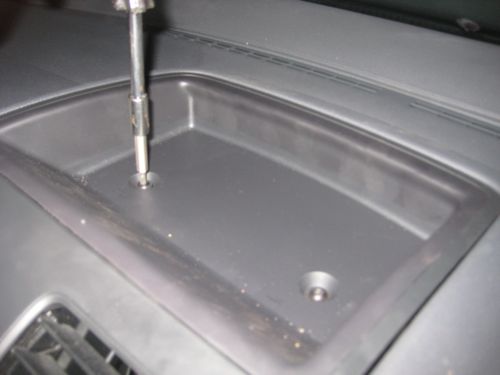
- Gently prize the tray away from the dashboard. I found a couple of flat-head screwdrivers wedged in at each corner seemed to do the trick.
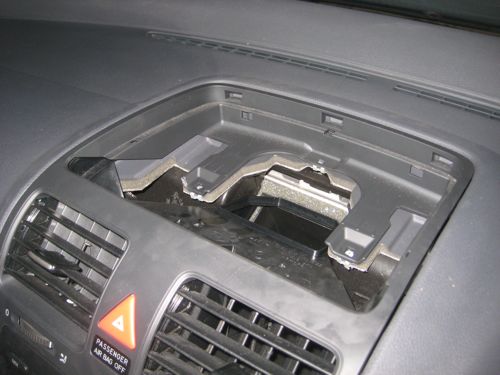
- The top most section of the instrument facia can now be removed. This contains the ventilation grills. Lifting the section from the back, then work your way forward. Again, gentle persuasion with a flat-head screwdriver helped. The section is held firmly at the front with clips which can be released by sliding the panel upwards towards the roof. The section then separates and it can be lifted and placed to one side. Note that you can't remove it completely as a cable prevents you from doing so.
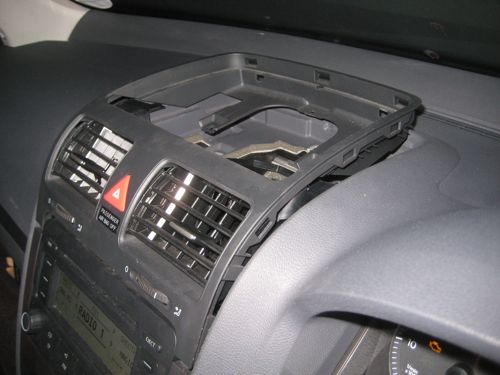
- Two further screws are uncovered. Unscrew these to allow the front facia from around the CD radio head unit to be taken off. Again, working from the top, gently prize the facia forward working from top to bottom down one of the sides.
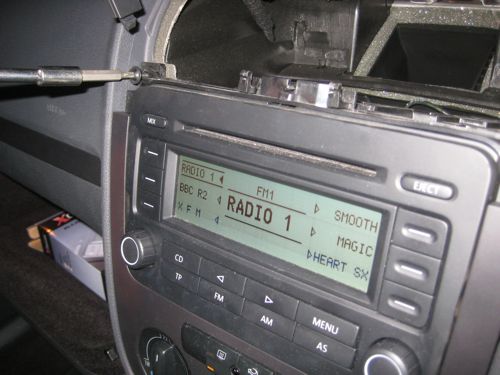
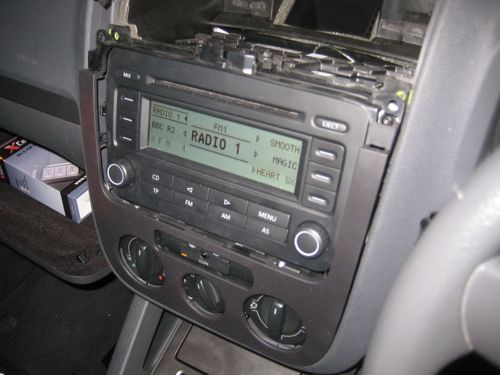
- Four Torx screws hold the CD radio head unit in place. Once again, remove these screws and the CD radio can be pulled forwards.
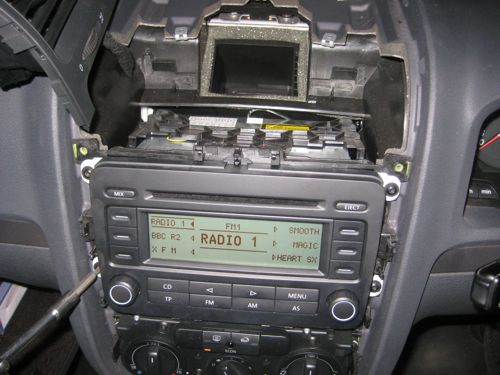
After removing the CD radio head unit, I set about installing the XCarLink adaptor. Read my instructions for fitting the XCarLink adaptor and cables.


Comments
visitor
22 April 2010 - 7:32pm
Permalink
arry west
thanks for the info,picked up my mkv last week and am awaiting my cable now,have been intrigued how the head unit came out.found your blog useful.
Lee
12 September 2011 - 11:59am
Permalink
cd changer
Found this very useful, I want to get my cd working and found there is an ipod socket in the glovebox...so assume the changer was disconnected when the ipod lead was put in.
Would have been nice to see a pic of the sockets on the rear of the radio... so may add some when I get mine out :o)
visitor
27 April 2010 - 7:07pm
Permalink
Zaffar Iqbal
Great little guide. Will same me lots of time trying to figure it out. Thanks.
visitor
2 May 2010 - 3:28pm
Permalink
Iain stewart
Thanks very much but these instructions don't seem to match my dashboard in my 2004 GT TDI Mk 5. I have no
'rubber anti-slip mat or tray on the top of the dashboard and there are not two screws which have Torx screw heads.
I've just spent 45 mins trying to get top of instrument panel away from dash and don't want to force it.
This site seems to represent my Golf's dash more accurately:
http://www.enfigpix.com/tech_vw_mk5_icelink.html
Can't believe we are all spending hours of this rather than just plugging in pods. This is supposed to be the 21C! What are VAG group doing bu not having ipod access?!!!
visitor
3 May 2010 - 9:11pm
Permalink
Iain stewart
Just to add I finally was able to remove the up and bottom part of dash, head unit, cg lighter and everything you need to. VW cert don't make it easy!
Fitted a Connect2 ipod link cable (£33) to cd changer socket. Didn't work at first, so I fiddled to ensure a tighter connection and it worked fine, ipod sounded great, no track access but sound quality good. Then connection failed. Very frustrating. Attempted many times to improve connection by removing and re fitting cable to socket but it now completely fails to recognise ipod in CD changer mode. I reckon Connect2 cable (made in Uk...) is inferior prduct, feels very plastiky, I wd avoid. So a waste of a bank hol monday but still, will try again with another product.
Jonathan
4 May 2010 - 8:15am
Permalink
Jonathan
Hi Iain,
That's very frustrating - I've had plenty of those sorts of experiences too.
Would recommend the XCarLink hardware. Give that a go. Bit more pricey, but solid and reliable.
Jonathan
visitor
8 May 2010 - 11:35am
Permalink
Roger Allison
Very handy - I was trying to figure out if I would need any special tools for this, obviously not! You don't have experience at fitting a bluetooth hands free kit I suppose? Just trying to make sure now that I have the correct adaptor cable for the RCD300 radio. I have the VW iPod interface already fitted from new.
visitor
15 June 2010 - 6:53pm
Permalink
terry arnold
how can i put the radio code in my vw golf radio mk5,has i had to remove the battery to remove the gearbox.help,i have the code but cant work it out how to put the radio code in.
visitor
25 June 2010 - 6:47am
Permalink
Dave George
Perfect... That's saved me £50... Just what I need to remove my Dension Ice-Link kit from my company car before it gets returned next week :-)
visitor
1 July 2010 - 11:30am
Permalink
Anna Keys
Hi,
I got the connects2 Delta 6 Double Din, will this connect to the back of my headunit? I've got a MK5 golf 2007 1.6fsi.
I'd appreciate your help... before i attempt to do it and realise it doesnt connect :(
visitor
15 July 2010 - 2:35pm
Permalink
Paul
Thanks Jonathan, this was of a huge assistance!
visitor
8 August 2010 - 2:15am
Permalink
dale
is it possible to get an auxilery port put into my mk5 golf?
visitor
1 September 2010 - 7:44pm
Permalink
lee schofield
I have the mk5 golf match and would love bluetooth in it without a parrot.I have the
telephone buttone on steering wheel but dont know if i can get anything to make it work.
Any help would be gratefull
visitor
29 April 2011 - 3:40pm
Permalink
John
Great info, I found this really useful. Works a charm for me (I have a very similar setup). I found plastic cycle tyre levers really useful for removing the trim without damaging it, I used "Halfords Glass Fibre Reinforced Bike Tyre Levers".
visitor
29 July 2011 - 2:27pm
Permalink
Thanks
what a full and informative guide it meant I could fit my connects 2 mp3 adapter in less than 20 minutes with no hassle! Wife now very impressed with sounds in her Golf.
Cheers Simon
visitor
26 August 2011 - 2:18pm
Permalink
Timothy
Disc wont eject.Whats da problem and what can be done to sort it.
james
3 October 2011 - 6:48pm
Permalink
CD player
I have same problem. Everything else in stereo unit, including radio and even the disc that has been stuck in CD player for 5 months or so, works. Is there any way of sorting or is a new unit required?
DB
15 October 2011 - 4:07pm
Permalink
RCD 300 Removal
You are right about the top plastic tray, it does require some pulling. Great site. Top stuff!
Nicko
19 November 2011 - 3:04pm
Permalink
Thanks!!
Thanks for the useful info!! Just fitted that Xcar kit into my brother's VW Golf for him, and it was very easy, took me about 35 mins start to finish!! Thanks for posting Jonathan.
nick sampays
26 November 2011 - 4:32pm
Permalink
don't disconnect air bag sensor
Excellent instructions. Only thing I would add is leave air bag sensor connected to top panel as you may need to have this reset by dealer aka Passat.
Aidan
28 November 2011 - 3:15pm
Permalink
only one speaker working
hi i have just purchased a golf mk5 and the is only sound coming from the passenger door speaker. Ive tried the balance but still only coming from the one speaker, any suggestions?
Lee
2 January 2012 - 12:51pm
Permalink
Size of Torx screws?
Does anyone know what size the torx screws are that hold the RCD unit in? I removed mine last year but now I'm selling my GT and need to re-fit the RCD300. Think the screws have rolled out somewhere in the loft lol :P
AC
22 January 2012 - 10:00am
Permalink
Big help
Thanks for the guide Jonathan - it was really useful fitting my XCarLink yesterday.
One word of warning for others - don't disconnect the passenger airbag light from the section containing the vent grilles and then turn on the ignition (as I did). This will leave you with an airbag fault light which you need a diagnostic tool to reset. Safest to disconnect the battery for the duration of the process.
John
15 April 2012 - 10:05pm
Permalink
HELP !!Type of connection from XCARLINK to RCD300
Hi !!!
First of all excellent work with the very useful instructions for removing the RCD300
I´m thinking of buying an xcarlink for my RCD300, but i have a doubt, wich connector ???
FAKRA or mini ISO
Thanks !!!
Jonathan
28 April 2012 - 1:22pm
Permalink
Jonathan
Hi John,
I believe it's mini ISO that you need.
If in doubt, speak to the Xcarlink people. They are very knowledgeable.
Jonathan
visitor
10 July 2012 - 5:33am
Permalink
id need some help my fm is
id need some help my fm is very noisy too much interference ,how do i fix it or ehat do i look for ????????????????anyone ?
ian
5 August 2012 - 10:58am
Permalink
blue tooth phone kit
what is model number blue tooth kit for 2007 vw golf rcd 300 stero?
could a picture of the back rcd 300 stero
D Baker
9 August 2012 - 1:36pm
Permalink
removing radio
great pics. removal easy
Many thanks
Add new comment