
Installing the XCarLink adaptor for iPod, iPhone - VW Golf V (MK 5)
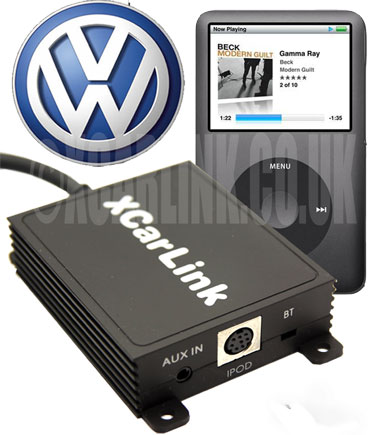
The XCarLink adaptor is simply a box which interfaces between the iPod or iPhone and the CD radio head unit. The adaptor unit about the size of four match boxes and has two cables leading from it. One of the cables connects directly to the iPod or iPhone, the other to the CD changer port on the back of the head unit.
These instructions explain how I fitted the XCarLink adaptor into my VW Golf V (MK 5) TDI SE (2005)
The cable from the adaptor box plugs straight into the available CD changer socket on the back of the head unit. Before connecting, I ran the cable from the bottom of the centre console to behind the CD radio unit. In order to do this, the cigarette lighter and ashtray needs to be removed.
- Remove the gearstick cover. It pops out easily with little force needed.
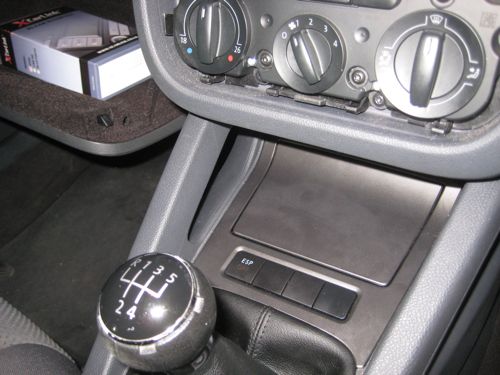
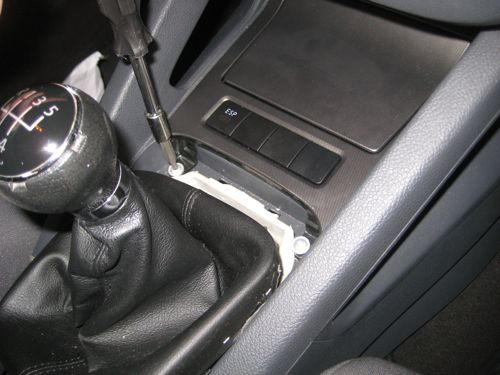
- Beneath the cover reveals two screws. Remove these and the ashtray and cigarette lighter unit can be lifted up and out. You'll need to disconnect the cigarette lighter cable and ESP cable (if fitted.)
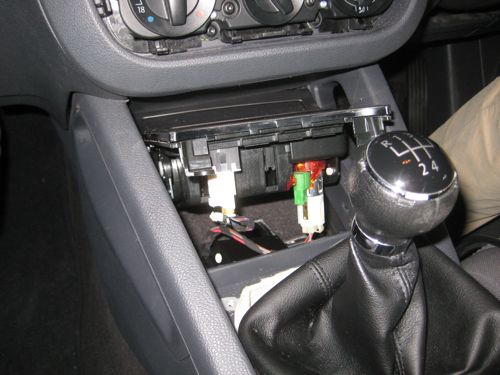
- I identified a suitable spot for locating the XCarLink interface unit beneath the ashtray and cigarette lighter unit.
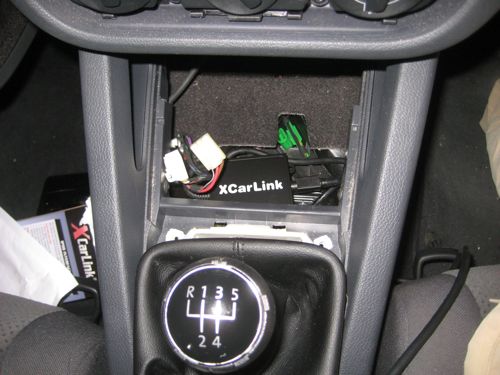
- I routed the cable from the XCarLink interface box to the iPod / iPhone down a gap between the carpet and the centre console.
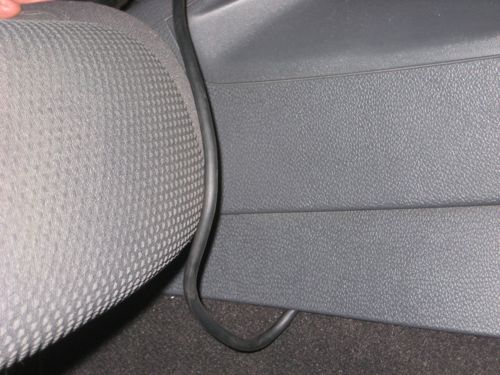
- Once all the cables are in place, switch on the CD radio and test the setup before putting the gearstick cover, centre console and dashboard back together.
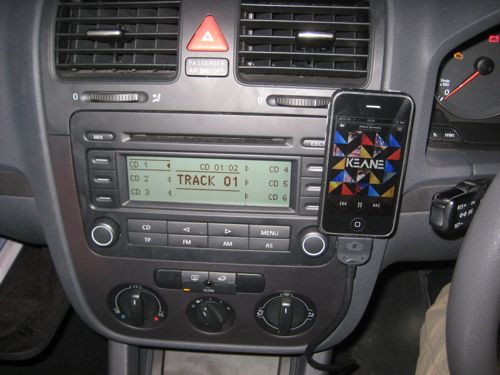
- I use a piece of velco (the soft furry piece attached the iPhone) and the hooks attached the the dashboard. The iPhone isn't very heavy and the velco works well to support the iPhone in an upright position and within easy sight and reach for both the driver and passenger.
This was an easy install and took less than 45 minutes to complete from start to finish.
Good luck and enjoy!
UPDATE
I've checked out new iPhone accessories since posting this blog to find a suitable mounting system for the iPhone. See my later blog entry for more.


Comments
visitor
4 October 2009 - 6:35am
Permalink
R1
Hi
I'm thinking to buy one of these for my Golf. The website states that an existing cd changer can still be used at the same time; could you tell me if this is true/if a cable was supplied which connects both an existing cd changer and the xcarlink unit to the radio?
Many thanks; this guide was helpful.
Jonathan
4 October 2009 - 4:55pm
Permalink
Jonathan
Hello R1
Yes, the XCarLink adaptor has a pass-through connector for connecting to the CD changer. All the cables are supplied, so you simply unplug the CD changer from the back of the head unit, and connect the adaptor to the back of the head unit instead. The CD changer plugs into a connector on the XCarlink adaptor.
The unit is brilliant and would definitely recommend it. Let me know how you get on with it.
Jonathan
visitor
14 October 2009 - 9:42am
Permalink
rob
Hi
Looking at similar myself is that a 2g or 3g iphone does it charge at the time
cheers Rob
Jonathan
18 October 2009 - 6:40pm
Permalink
Jonathan
Hello Rob
Yes this is a 3G iPhone and yes charging is fully supported.
visitor
16 October 2009 - 11:38am
Permalink
thanks for this, very
thanks for this, very useful!
does the info from the ipod appear on the Golf's radio screen? Playlists as well?
Jonathan
18 October 2009 - 7:04pm
Permalink
Jonathan
Hi
No track information or playlist names appear on the screen. Playlists can be accessed through designated numbers, CD1, CD2, CD3 etc. It is one of the weakest features of the unit.
Jonathan
27 February 2010 - 10:56pm
Permalink
Jonathan
No, only shows Playlists as numbers CD1 through to CD5. No info on the screen, sadly.
visitor
1 December 2009 - 6:23pm
Permalink
Simon
thanks for the guide i recently fitted one to my golf mkV and was successful!
i recommend it! only thing is selecting between our cd changer and the ipod input we have to turn the radio on and off each time. maybe im doing it wrong!
visitor
14 December 2009 - 1:53pm
Permalink
Hi, come into this a bit late
Hi,
come into this a bit late but agree that this is very useful! One question - i want to use this with a 3G iPhone as you describe here. Can you still access iPod functions and other iPhone apps such as sat nav thru the phone when connected? i have heard that the xcar link locks the iphone and that you need to go into a "service mode" called "EX1" to get full control via the iPhone...
Cheers
Stu
visitor
23 December 2009 - 4:50pm
Permalink
mark signorelli
Hello Jonathan,
I was admiring your photos of New York City. It's funny, I lived there for several years and never did make it to Wallman rink or the Statue of Liberty; I did take the Staten Island Ferry, which is the cheapskates version of the Circle Line.
The main reason I'm writing is because I am creating a web page with a news section, and would like to use the photograph you took of the news scroll at Times Square. Unfortunately, being an artist, I can't offer you anything in the way of compensation, but would be more than happy to give you a photo credit.
I appreciate your consideration,
Kindest regards,
Mark Signorelli
Jonathan
23 December 2009 - 5:20pm
Permalink
Jonathan
Hi Mark,
I'm very happy for you to use the photograph... I'd welcome the photo credit with link back to this blog please. Where will I find the published web page you are creating?
I loved visiting New York, an amazing city and would love to go back one day...
Best wishes for Christmas and New Year.
Jonathan
visitor
12 January 2010 - 11:29am
Permalink
Henry D
How is the XCarLink box connected to the back of the CD radio head unit, there is no picture/explanation showing how to run the cable from the xcarlink box under the ashtray to the back of the CD radio head unit. Please help!
visitor
21 January 2010 - 9:05pm
Permalink
Niall
Henry D
I'm glad it is not just me who was thinking that.
Jonathon, i don't suppose you fancy taking your car to pieces again to show us how it's done?
visitor
25 January 2010 - 3:30pm
Permalink
kieron g
hi where do you buy this xcar link box from?? i got a golf mark 5 tdi 55plate would it work in that car does any1 know?? also can i change from track to track via the ipod instead of going through the stereo??
visitor
5 February 2010 - 8:14am
Permalink
Evan
Hi Jonathan,
I read your blog before buying this unit and it’s definitely great. I used it with the RCD 300 head unit in a VW Golf although I wasn’t game enough to attempt the installation myself. I had the box mounted just above the foot well so that I could access all the sockets. The cable comes through just under the steering wheel and reaches my iPhone 3G which is mounted with a windscreen mount. It’s the only unit that I could find which also charges the iPhone. Choosing CD1 on my head unit allows full control over the iPod app on the iPhone so that you can make your song choices there whereas CD2 to CD6 choose the first five play lists and only lock the iPod app on the phone.
Thanks for your blog on this, have you tried the Bluetooth add on with this? If so, how well does it work?
Jonathan
27 February 2010 - 11:05pm
Permalink
Jonathan
Hi Evan,
The bluetooth kit is fabulous. I love the fact that all sound is routed through the bluetooth connection which means that sometimes you don't even need to plug in the phone at all even when just listening to music. I wish the microphone had a bluetooth connection though as it needs to be placed nearer to the person speaker.
Definitely get the module though, I'm really pleased with it.
Jonathan
visitor
13 February 2010 - 1:14am
Permalink
rabTT
Hi Jonathon
Great write-up ;) As 'stu' asked, can I use other apps, such as, satnav, on my iPhone 3G using this set-up? Also, are you able to make/receive calls whilst listening to music?
Cheers, Rob
Jonathan
27 February 2010 - 10:59pm
Permalink
Jonathan
Yes you can make/receive calls - when a call comes in, or if you want to make one, the music automatically cuts out whilst the call is live.
Yes, other apps also work and sound is played through the car stereo - it's just perfect. Definitely get the hands-free bluetooth kit too as you get wireless music streaming without any cables.
visitor
3 January 2011 - 5:55am
Permalink
russ
Thanks, Jonathan. Couldnt have installed the xCarLink without your excellent instructions. Got the xcarlink for christmas, and this saved me an unneccesary expense getting it fitted. I found it a fiddly but fairly straightforward task, took me about 45 mins. Most tricky bit is feeding the cable up to the back of the stereo. Took me a few minutes to work out that pressing the CD button twice gets me to the right screen on the stereo, then selecting CD1 lets me control things from the ipod. I wont worry about a bracket to hold the ipod - in my golf i have a simple tray where your ashtray is. I put a soft cloth in there, and the cable reaches nicely so that i can store my ipod in there and reach for it when i like (when I'm not driving along, of course). Thanks again
visitor
3 March 2010 - 10:46pm
Permalink
Sandy
Great stuff Jonathan, thanks for posting all this. I spent a happy afternoon (took me a little longer than it did you!) wrestling with my golf dashboard installing my brand new xcarlink unit and it works like a charm - so much better than the VW lead the dealer was going to put in the glove box. I wouldn't have even attempted it without your post so thanks very much!
Jonathan
4 March 2010 - 12:37pm
Permalink
Jonathan
Hi Sandy,
Glad you got the unit installed. Did you get the Bluetooth adaptor as well.... well worth getting, definitely recommend it.
Jonathan
visitor
21 March 2010 - 12:17pm
Permalink
freddie
Jonathan,
Thanks for the instructions for installing the xcarlink and removal of my car stereo - i wouldnt have considered doing it myself without them!
It did take me a while longer as i fed the cable through the airvent in the centre console box, thus the ipod is not on show. Also i was a bit heavy handed when dismantling the dashboard with the air vent attached, and had to spend a while re-assembling the air vents which was very fiddly. However it works a treat and i hope you are on commision from xcarlink!!!
regards
freddie
Jonathan
21 March 2010 - 11:39pm
Permalink
Jonathan
Hi Freddie,
Thanks for your kind message. Where is the iPod located, I couldn't quite tell from your message?
Well done on fitting the unit, glad my instructions helped.
Jonathan
visitor
2 April 2010 - 10:16am
Permalink
britney
so do you think the xcarl is a good peice of technology. ( oh and sorry i joined a bit late my mate only told me where to go when i mention it.)
Jonathan
2 April 2010 - 10:35pm
Permalink
Jonathan
Yes, very much so. Consider the bluetooth kit as well.
visitor
12 April 2010 - 10:26pm
Permalink
britney
oh ok i will give it a go as well as the xcarl .
visitor
14 April 2010 - 1:21pm
Permalink
David
Hi Jonathan,
Nice write up, I am hoping to fit this in my mk4 Golf.
I am trying to piece together all the info I can find on it, but the replies in this blog fly off in all different directions, so if you and anyone else that has contributed to this could help in answering the below that would be awesome:
1 - how does this unit pick up a power supply? Does it wire straight to the battery, or pick up an internal point in the fusebox or somewhere else?
2 - I have a factory fitted satnav/radio interface but the satnav functionality is now redundant, so is mainly used as a radio. Im struggling to work out if the XCarLink adaptor communicates with the satnav to allow you to use that to control the iPod/iPhone?
3 - With regard to connecting an iPhone and receiving a call, do you need to physically accept the call on the iPhone? Or can you accept the call via a bluetooth headset?
Looks like a great bit of kit, and quite reasonably priced, and would love to purchase one assuming it meets certain criteria, so any help in answering the above is appareciated.
Best,
David
Jonathan
15 April 2010 - 6:59am
Permalink
Jonathan
Hi David,
Thanks for your comment and good luck with the install on your Mk4.
To answer your questions:
1. The unit picks up its power from the CD Changer connection on the back of the head unit. There are only two cables for the XCarLink Unit - one to the head unit, the other to the iPhone / iPod.
2. The XCarLink unit can be controlled from the iPhone / iPod interface or from the head unit which it is connected to. Your SatNav may already be connected to the head unit through the CD changer port. You'll have to remove the unit to find out, or Google the model of the unit to see if there is any information online. You need the CD Changer port available.
3. With the XCarLink connected, the iPhone still works in exactly the same way when handling calls. If you have the bluetooth adaptor connected or connected by wire to the XCarLink, the audio is simply routed through the head unit. You could still accept calls through your Bluetooth headset if you wish. The iPhone has a new menu which is displayed when it detects a range of audio options, i.e. iPhone / Bluetooth Headset / XCarLink
Hope this helps!
Jonathan
visitor
14 April 2010 - 1:21pm
Permalink
home security camera
Digital product like i pod is also helpful in maintaining the digital technology upgarded.By using this technology we also entertain us and others.
visitor
16 April 2010 - 10:12am
Permalink
David
Awesome thanks, I was worried you would need to wire it directly into the fusebox or battery. I have the factory fitted satnav unit in the car, so the standard radio/satnav is all one unit and the cd changer is in the boot.
Assuming I can control the iPod through this headunit, are the menus easy to navigate and will the headunit show track/album/artist names? What is the issue with playlists lsited as CD1, CD2... that is referenced above? It all sounds a little painful.
Ideally I would like the headunit to display the same info as the iPod/iPhone does, which means I can wire it into the glove box or similar. Hence why I asked about the iPhone and calls, because it would be a pain to have to dig your phone out of the glovebox to take a call.
When you mention the mic in your blog, can you elaborate a little on this? Where is the mic located to make calls?
Its amazing how, given this is such a bespoke product, the manufacturers website gives relatively little practical info on how it works in real life....
Again, Jonathan, thanks for your help
Jonathan
18 April 2010 - 10:38pm
Permalink
Jonathan
Hi David,
It's an interesting one that you've already got a CD Changer plugged in. I'm not sure what happens if you want to use the same port for the XCarLink? What you need is a pass-through connector so that you can have both the CD Changer and XCarLink plugged in. However, I'm not entirely sure this is possible, or even how you would access either device. On my Head unit, I press the CD button and it toggles between the CD Changer (which in my case is the XCarLink) and the internal single CD player. Hmmm. Would you disconnect the CD Changer completely since your music is now on your iPhone?
The playlists are a big disappointment. Nothing about the Artist or Track title is displayed on the screen of the head unit. Only the time gets shown, just a standard counter. Accessing the playlists is as bad, all that gets displayed are 6 playlists, listed, CD1 through to CD6. Unless you know the first 6 playlists in your head, you are only able to guess what playlist is being selected from the iPhone.
The mic is included within the Bluetooth kit. It has another, much smaller interface box which plugs into XCarLink. The other cable running from the Bluetooth kit has a microphone on the end - its about 1m in length with a little clip on the end. I'm not sure if this is designed to be clipped on your shirt, which I tend to do, or clipped on the car somewhere close to the drivers head?? Part of the issue for me is that the cable to the mic isn't quite long enough to run through the dash and up the driver side pillar, yet it's long enough to create a bundle of cable in and around the centre console leaving a tangled mess of wire. So, I'm not totally sure on the answer to this one. Anyone else?
David, I totally agree with your sentiments about how little instructions there are. I find the same, constantly. Even on the little iPhone replacement battery kit that I received last week. Very poor for something really quite complex.
Jonathan
visitor
21 April 2010 - 4:29pm
Permalink
David
Hi Jonathan,
Thanks again for your input. Im still trying to get it clear in my head with what I could have to deal with if I were to buy one of these. Again from what Ive tried to piece together, my understanding is you can connect it as a passthrough, so you can keep use of both changer and ipod, but it wouldnt be a big deal if I had to disconnect the changer.
So if my understanding is correct, the interface on the factory fit headunit is poor when trying to control the iPod. Is it just playlists that are a problem? Can you navigate albums or artists via the headunit? Or is this a problem as well?
It sounds like you really need the ipod to hand to be able to select music, and if that the case, im beginning to think that if thats the case, then why bother with the XCarlink (aside from bluetooth phone functionality)? As you can buy a cheap aux cable to run to the back of the headunit for £12 and then a cigarette lead to charge the iphone is £5, and a female cigarette lighter socket to hardwire in to the fusebox is no more than £5, so £22 vs £85 odd seems a bit of a no brainer... The only other added benefit I can see is that the XCarlink would charge the ipod too... so would result in one less cable. Unless Im missing something....
As an aside, Jonathan did you look at any kind of mounting bracket? I have a problem, as the factory satnav might have been good in '03 but doesnt cut the mustard now, and Im thinking of hardwiring in a Garmin/TomTom as well. Having to mount both an ipod and satnav leaves space a little tight, and im not a fan of satnav on the iphone either..
Anyone any thoughts on mounting devices, and additional XCarlink comments always welcome.
visitor
22 April 2010 - 7:42pm
Permalink
Tyrone
Hi Jonathon, i need something better than the current tape connector; do you know if this piece of kit will work with a mk IV golf?
cheers
T
visitor
16 May 2010 - 1:40am
Permalink
Tommy
Hi jonathon. i have a vw caddy 55 plate and was wondering if the xCarlink is compatible? as it sounds like a fantastic bit of kit and well worth it. Also do you know of any signal boosters for vw aerials as mine is in the windowscreen and reception is shocking, many thanks
Jonathan
18 May 2010 - 9:41pm
Permalink
Jonathan
My aerial is on the rear window too, but I find reception excellent. I'm not aware of any boosters, sorry.
What is the CD radio that you have fitted in your VW? Make and model would be helpful. Thanks.
visitor
21 May 2010 - 9:23am
Permalink
Ivan
Great set of instructions Jonathan, thanks for taking the time to post them. After reading your article and even with limitation of the the music playlist user interface, I still think I will buy one.
One question though, when you remove the radio, do you have to disconnect it from the power to be able to plug the xcarlink connector in? I'm slightly worried about this as I don't have the code for my radio.
Cheers
Ivan
visitor
30 May 2010 - 11:12am
Permalink
Andrew
Jonathan,
i apologize for perhaps asking the same questions as others. You are a superstar for running this site!
So I have had this mk5 5 for 3 years and have finally decided to set up the iphone 3gs with it.
The bluetooth adapter. where did you mount the mic? did you run it up to near the visor?
DO you have any photos of this.
Thank you so much in advance this is just the last piece of the puzzle for me ;)
visitor
4 July 2010 - 1:10am
Permalink
Peter
Hi
I have just bought an XCarlink.
Unfortunately I also have a Parrtot CK3000 with a Connects 2 CANBUS controller for bluetooth with steering wheel controls.
An installer has told me that I cant install both as they use the same connection for the CANBUS controller. Do you know if this is the case and if it is possible to workaround?
visitor
26 August 2010 - 3:52pm
Permalink
Roberto
Hello, I have a rcd 300, but has no cd charger! Just turn on xcarlink and works? thanks
visitor
30 August 2010 - 5:01pm
Permalink
Jane
I was really excited when I saw this. Then I read the dreaded sentence: "I ran the cable from the bottom of the centre console to behind the CD radio unit." Without pics on how to do that bit (which seems by far the hardest part) I'm too scared to try!
Also, Jonathan says that "In order to do this, the cigarette lighter and ashtray needs to be removed." but isn't the cable going to be running down behind all the heating controls? wouldn't that panel need to be removed too?
visitor
1 September 2010 - 12:41pm
Permalink
Bob
Would rather have a Parrot CK3200 BlueTooth Car Kit (+ ISO Car Stereo / VW Car Kit Adaptor)
With that you get a full colour screen with track/caller info, a simpler install, stereo mics, track selection buttons to hand, and regular software updates.
Your solution is more expensive, more messy, has less functionality, and is more difficult to install.
visitor
1 March 2011 - 12:13am
Permalink
Garry
Hi,
my mk5 doesnt have a cd changer, will I still be able to install this? is it a standard slot? or does it have to have the cd changer?
thanks
visitor
24 March 2011 - 1:33pm
Permalink
Connecting the unit to the stereo
I have read all the Questions and answers but still cannot see where you have in detail explained how to connect the unit to the stereo. All you talk about is positioning the unit and connecting it to your i-phone etc. So only half a job??
visitor
26 March 2011 - 4:50pm
Permalink
Earthing point
Thanks for this very useful guide. Where did you earth the Xcarlink device?
Thanks
Grahame
visitor
12 June 2011 - 6:17pm
Permalink
Earthing point
Hi,
Where did you earth the cable?
bruce
9 October 2011 - 9:55am
Permalink
Thanks
Thanks for the guide.
I successfully fitted the XCarLink + Bluetooth module yesterday.
Jake Flynn
7 November 2011 - 4:59pm
Permalink
dashboard
hi has any one got a guide on removing the center console and dash for installation on the xcarlink
Russ
3 January 2012 - 7:59pm
Permalink
xcarlink
Hi Jonathan,
I have recently purchased an Xcarlink and Bluetooth module for my mk 5 golf but I'm having a few problems with it.
I have installed it correctly & it works fine with my i phone apart from a few issues I have with it.
Firstly, when the radio is playing & I receive a call I have to press the audio sign on my phone to get it to connect to the bluetooth & the cd button twice on the stereo to get the sound through the stereo. I find this really annoying but also distracting & dangerous while I'm driving & I shouldn't have to only listen to a cd or tunes on my i phone to be able to use it.
Secondly, to hear anybody on the bluetooth I have to turn the volume on the stereo right up to nearkly full volume & then once the call is disconnected the stereo is blaring which is really annoying.
Thirdly, where has everyone fitted the bluetooth module, as the only way out from pressing all these buttons when answering a call is to fit the module somewhere so you can press the button to receive a call but I find that the lead for the mic is too short for the module to fit anywhere neatly & the module is quite an eyesore to have on show. I want something that is discreet & not on show.
Any answers will be much appreciated.
Russ
Jonathan
15 January 2012 - 10:12am
Permalink
Hi Russ,
Hi Russ,
Thanks for your comment. You are quite correct in the frustrations you report. The obvious one is the needing to select the source button on the CD/Radio unit to get the audio from the phone to pass through the speakers. There's little that can be done to fix that unfortunately, and is largely due to their not being a pass-through system for radio.
In terms of answering, I found that sometimes the audio would play through the phone and not the connected XCarLink, but that seemed to be more to do with the iPhone remembering how I last made a call. For example, if the last time I received a call in the car was taken through the iPhone, it would remember that. If I took the call through Xcarlink, it would remember that.
The XCarlink unit itself was placed underneath the ashtray compartment and the bluetooth microphone lead was loose in the centre console. It was messy and not ideal, but as you say, I couldn't find a place for the microphone and button. I rarely used the button however.
Sorry I can't be more help, other than empathise. I think I accepted it as a better solution than none at all.
I really miss not being able to bluetooth my music to the stereo as I did with XCarLink. I think I used the iPhone to stereo function more than anything to get really high quality audio to play through the car speakers.
Best wishes
Jonathan
flackcaptain
7 January 2012 - 10:33am
Permalink
nice one
I was using one of the those rubbish fm transmitter things to play my ipod since buying my Golf a month ago. Beyond useless it was. Your guide to removing the car stereo and install the X-Link is excellent and worked a treat. It took me about 45 minutes from start to finish and I don't think I would've been able to figure it out without it. Thanks alot.
John
7 March 2012 - 3:28pm
Permalink
Earth cable
Hi Jonathan, I have an earlier model of the xcarlink than you (which I bought off ebay). It states it is compatible with rcd300 stereo (vw golf). Although I cannot get mine to work. I'm thinking the issue is that my earth cable is missing from the unit. Could this be the problem as to why it won't charge and isn't recognised by cd changer?
Please help me!!!
Billy
11 March 2012 - 10:31pm
Permalink
Connections
How long is the actual lead coming from the unit to the iphone? Would it be long enough to go onto the air vents above where you have put yours? Knowing this would probably make me buy the product because using my phone as a satnav at times its useful to have it higher up.
Thanks for the guide though looks good and simple to follow.
Jonathan
18 March 2012 - 9:22pm
Permalink
Yes, the cable would be
Yes, the cable would be plenty long enough. It's about 1.2m. I tucked most of it back into the centre console to keep things neat and tidy.
Sam
19 April 2012 - 5:47am
Permalink
Earthing cables
Hi I was just wondering how and where you attached your earthing cables (the 2 wires with the rings on, I case there not called earthing cables)
Jonathan
28 April 2012 - 1:21pm
Permalink
Jonathan
Hi Sam,
I've made the earth connection to a threaded post on the back of the head unit. I used a nut and washer to fix it securely.
Hope that helps.
Jonathan
Camilla
20 April 2012 - 9:52am
Permalink
Mark 5 Golf Match
Hi Jonathon,
I have the Mk5 golf match where a ipod dock already comes in the armrest set up (where the cd changer would normally be).. unfortunatley it has stopped working so I was wondering whether you could plug the xcarlink straight into the wiring block that is already in the armrest? saving me from having to take the headunit out?
thanks,
Camilla
Jonathan
28 April 2012 - 1:19pm
Permalink
Jonathan
Hi Camilla
I'm not sure if the wiring block is the same as the block on the back of the headunit.
I have a Mk5 Golf Match now, and use the iPod dock instead of XCarlink. Clearly yours seems to be broken. I'd try and figure out what's caused it to stop working - could it be a cabling fault, in which case that would spoil your plans to connect XCarlink there.
My belief is that Xcarlink needs to be plugged into the back of the Headunit.
Good luck and let me know how you get on.
Jonathan
Sam
26 April 2012 - 5:45am
Permalink
Earthing point
Just wondering where you earthed the cables too ?
Jonathan
28 April 2012 - 1:20pm
Permalink
Jonathan
Hi,
I've connected the earth cables to a mounting point on the back of the head unit. I used a nut and washer to make the connection secure.
Jonathan
Dan
16 July 2012 - 10:58am
Permalink
Connecting to head unit
Hi Mate,
I installed one of these in my mazda 6, and I've just bought a Golf. Do you need to take out the head unit to connect this to the CD changer port or can you do this without removing the head unit?
Thanks,
Dan
Jonathan
22 September 2012 - 2:11pm
Permalink
Yes you will need to remove
Yes you will need to remove the Head Unit.
Jonathan
James
3 August 2012 - 1:58pm
Permalink
I love the Internet
I love the Internet because of people like you! This guide is awesome. XCarlink is awesome. Thank you.
ronan
25 November 2012 - 2:16pm
Permalink
ipod dock
ive just got an 08 golf tdi, it has an ipod dock in the arm rest, when i press the cd button twice all i get is no cd, took the head unit out, thanks to your instructions, to check if it was properly plugged in, and it was, what could be the issue?
Add new comment